DNS blacklist monitoring

Blacklist monitoring service for your domain and IP

HostTracker's blacklist monitoring service checks your domain and IP address against 80+ DNSBL lists on a schedule and alerts you the day a listing appears, so your IP reputation and email delivery are protected before customers notice. Run a free blacklist check below first.

Free instant check · scanned against 80+ DNS blacklists · no login required

Prefer round-the-clock monitoring?Start free trialView pricing
  • Trusted since 2004
  • 500,000+ websites monitored
  • 300+ checkpoints worldwide

How one blacklist check runs, from the lookup to the alert

80+ blacklists, one checkYour domain is resolved and the addresses behind it are tested against more than eighty DNS blacklists on every run.
The mail path, not just the websiteCheck the first address, every address, or the mail exchangers behind the domain - up to 3 MX hosts with 5 addresses each.
Alerts that carry the way outA new listing names the list and includes its delisting link; a noisy list can be muted per monitor.
How the check works

From domain to listing

Four steps, every run.

Resolve the domainThe check starts from the name and finds the addresses behind it - the website's or the mail servers'.
Ask every listEach address is looked up in 80+ DNS blacklists; a positive answer is a listing.
Weigh the answerLists carry weights; an informational list never marks the monitor down on its own.
Alert with the delisting linkA new listing goes out on each contact's own delay, with the list's removal page attached.
DNS Blacklist Monitoring

Email blacklist monitoring: know before your emails start bouncing

HostTracker checks your domain and IP against dozens of DNS blacklists on an ongoing schedule and alerts you the moment a new listing appears - before it costs you email deliverability or search visibility.

Detection

IP Blacklist Checking

An IP DNS blacklist checker is a tool that scans different DNSBL databases to see if a particular website or IP address is on the list. This is really helpful for website owners, as it lets them know if their site has been blacklisted for spam or other reasons.

Email Security

Role & Impact of DNSBL

DNS blacklists are basically databases that list hosts that have been flagged as sources of spam or other unwanted activity. Servers use these lists to filter out potential spam by checking the IP address of incoming messages.

Causes

Why Sites Get Blacklisted

There are a few reasons why websites or IP addresses might end up on a DNS blacklist. If a mail server is sending emails at a high intensity or using repeating mailing lists, for example, it could trigger inclusion.

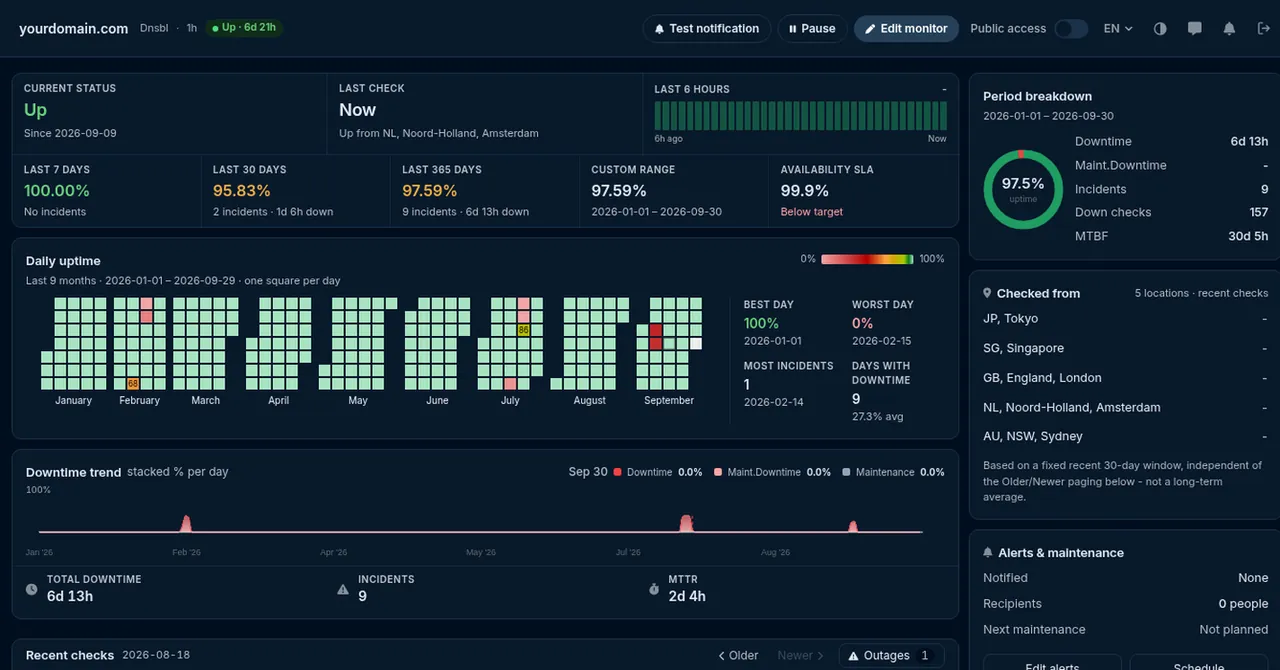
What a blacklist monitor records

Listings as incidents, with the list, the address and when it appeared.

HostTracker blacklist monitor statistics: listings as incidents over time

Listings as incidents

A new listing opens an incident that names the list and the address, and closes when the address is clean again.

History you can send to a provider

Every check kept, so a delisting request starts with the exact date and the exact list.

Every layer of your stack, monitored

Websites, servers, APIs, certificates. One check type per page, the same locations, alerts and reports behind all of them.

"I've worked with this monitoring service for a long time, and my daily routine is no longer a problem. It quietly watches all my sites and lets me respond the moment something goes wrong."
Caleb Levy - Webmaster - CA - Trustpilot

Trusted by teams at

Microsoft Panasonic OTP Bank OneProvider Worldmate
The full guide

Blacklist monitoring, explained

Every chapter opens in place, so the page stays short.

Domain blacklist monitoring

Most blacklist tools ask you for an IP address. That is the wrong unit for a website owner: you know your domain, your hosting provider owns the IP, and the IP can change under you without anyone telling you. HostTracker monitors the domain. On every run it resolves the name first and then tests the addresses that are actually behind it right now, so a move to a new server or a new mail provider is picked up automatically instead of leaving you watching an address you no longer use.

Which addresses get tested is a per-monitor setting. The default checks the first A record - the machine that serves your website. The second mode checks every A record, which is what you want when the domain is spread across several front ends. The third follows the mail path: it looks up your MX hosts and checks the addresses behind them, because those are the addresses a receiving mail server inspects when it decides whether to accept your message. If email deliverability is the reason you are reading this page, that is the mode to pick.

One distinction worth being precise about, because plenty of pages are vague on it. There are two different families of list. IP-based lists (the DNSBLs - Spamhaus, SpamCop, Barracuda, SORBS and dozens more) list the address that sent the mail, and those are what HostTracker's blacklist monitoring queries. Domain-reputation lists (DBL, SURBL, URIBL) list the domain name itself as it appears inside a message body, which is a separate mechanism with separate operators; HostTracker does not query those zones. What "domain blacklist monitoring" means here is therefore precise: you give us a domain, we keep the addresses behind it out of trouble.

The immediate cost of a listing is mail. Messages from a listed address are rejected outright or quietly filed as spam, and because nothing bounces back to you in the second case, the first symptom is usually silence - invoices that were never read, password resets that never arrived. Reputation damage of the other kind, the red browser warning that costs you visitors and search traffic, comes from a different check: malware and phishing monitoring against Google's Web Risk database, which most accounts run alongside this one.

How the blacklist check works

1. Resolve. The check starts from your domain and resolves it to the addresses to be tested - the web A record, all A records, or the MX mail path, depending on the mode you picked above. A bare IP address is accepted too, if that is what you want watched.

2. Query the lists. Each address is queried against dozens of blacklist zones in parallel. A zone answers in the DNS itself, which is why the whole sweep takes seconds rather than minutes, and why running it on a schedule costs nothing to your server.

3. Weigh the answer. Not every list deserves to wake you up. Zones known for false positives, and policy zones that list whole consumer address ranges by design, are carried at weight zero: they appear in the result for information but never flip the monitor to Down. A list that is noisy for your particular address can also be muted for that monitor alone.

4. Alert, with the way out. When a listing that matters appears, the contacts subscribed to that monitor are notified on their own channels - email, SMS, a phone call, Telegram, Slack and the rest - and the alert names the list and carries its delisting link, so the first question after "am I listed?" is already answered. You get the matching all-clear when the listing goes away.

Want to see the result before you set any of this up? The free instant blacklist check runs exactly the same query against your domain right now, with no account and no login - the only difference is that it runs once, when you ask, instead of around the clock. Blacklist monitoring is one of thirteen check types on the same monitor list; the website monitoring service hub has the rest of them.

Key takeaways

Key takeaways

  • A DNSBL (DNS-based blackhole list, also called an RBL or real-time blocklist) check asks a set of anti-spam blacklist zones whether your domain or IP address is listed, and names every zone that answers yes.
  • HostTracker rechecks those zones every 6 hours and alerts when a listing appears or clears; when the check rides on a website monitor, at least two listings are required before it counts as down, so one noisy list does not raise an alarm.
  • The lookups run from HostTracker's own check network rather than the public location fleet, because a blacklist answers the same regardless of where the query comes from.
  • Alerts arrive by email, SMS, voice call, Slack, Microsoft Teams, PagerDuty, Telegram, Discord or a signed webhook.
  • Blacklist monitoring is included from the $14 per month Webmaster plan upward, and in the 30-day trial, which covers 100 monitors with no credit card.

Frequently Asked Questions

A DNS blacklist check, or DNSBL check, tests whether your domain or IP address appears on one of the many databases that mail servers and spam filters consult before accepting incoming email or web traffic. These databases (DNSBLs) list IP addresses and domains that have been flagged as sources of spam, malware distribution, or other abusive activity, and being listed on even one of them can cause legitimate emails from your domain to be silently rejected or dropped into recipients' spam folders. HostTracker's DNSBL check tool queries multiple blacklist databases at once and reports which, if any, currently list your domain or IP. Running this check matters even if you've never knowingly sent spam, because a shared hosting IP, a compromised account, or a misconfigured mail server can get you listed without any deliberate wrongdoing on your part.

Being listed on a DNS blacklist means a blacklist operator has flagged your IP address or domain as a source of spam, malware, phishing, or other unwanted activity, and mail servers or security tools that subscribe to that list may now block or filter traffic associated with it. The most common practical impact is email deliverability: messages sent from a blacklisted IP frequently land in spam folders or get rejected outright, even if the content of the email itself is completely legitimate. Listings can happen for reasons within your control, like a compromised plugin sending spam through your server, or for reasons outside it, like inheriting a "dirty" IP address that a previous tenant on shared hosting used for spam. Whatever the cause, the fix starts with knowing you're listed - which is exactly what a DNSBL check or ongoing DNSBL monitoring is for.

A one-time DNSBL check gives you a snapshot: is your domain or IP listed right now, at this exact moment. Ongoing DNSBL monitoring runs that same check automatically and repeatedly, so you find out the moment a new listing appears rather than discovering it days or weeks later when a customer mentions your emails aren't arriving. This matters because blacklist listings can happen suddenly - a single compromised account sending spam for a few hours can be enough to trigger a listing - and the sooner you know, the sooner you can fix the underlying cause and request delisting. HostTracker's DNSBL monitoring checks your domain and IP against blacklist databases on an ongoing schedule and alerts you through your chosen notification channels as soon as a listing is detected, turning blacklist monitoring from an occasional manual chore into an automatic safeguard running in the background.

Getting removed from a DNS blacklist starts with fixing the underlying cause of the listing - securing a compromised account, cleaning up a mail server that was relaying spam, or resolving whatever abusive activity triggered the flag - since most blacklists will relist you quickly if the problem isn't actually fixed. Once the cause is addressed, most blacklist operators provide a delisting request process, usually a form on the blacklist's own website where you confirm the issue is resolved; processing times vary from immediate to several days depending on the list. Because there are many independent DNSBLs and each has its own removal process, it helps to know exactly which lists you're on rather than guessing - a DNSBL check tells you precisely that. After requesting removal, it's worth re-checking or setting up ongoing DNSBL monitoring to confirm the delisting took effect and to catch any relisting early.

A legitimate website or mail server can end up on a spam blacklist for reasons that have nothing to do with deliberate spamming. Shared hosting is a common cause: if your server shares an IP address with other websites, another tenant's spam activity can get the whole IP blacklisted, dragging your domain down with it. A compromised account or plugin - especially on popular content management systems - can start silently sending spam emails without the site owner noticing until deliverability problems appear. Misconfigured mail servers, open relays, or mailing lists sending at unusually high volume can also trigger automated blacklist flags even without malicious intent. Because the cause is often invisible from the inside, regular DNSBL checks or ongoing monitoring are the most reliable way to catch a listing early, before it does lasting damage to email deliverability or search visibility.

Yes. HostTracker's permanent free plan monitors two sites at no cost, and DNSBL monitoring is one of the 13 check types available across the product, alongside uptime, SSL, domain, and other checks, so you can add blacklist monitoring to your free monitors without upgrading. For more sites or more frequent checking, paid plans start at around $5 a month with check intervals as fast as 1 minute, and a 30-day full-feature trial with no credit card required lets you test the full range of monitoring types, including DNSBL, before committing to a paid plan. Given how easily a shared hosting IP or a compromised account can trigger a blacklist listing, having DNSBL monitoring running continuously - even on the free tier - is a low-cost way to protect email deliverability without waiting for customers to report missing messages.

30-day free trial - no credit card

Know the moment your domain gets blacklisted

Start a free trial and get alerted if your domain or mail server lands on a DNS blacklist.

30-day free trial - 100 monitors - no credit card
  • Trusted since 2004
  • 500,000+ websites monitored
  • 300+ checkpoints worldwide