Free status page tool

A public status page for your website: live uptime, incidents and updates

Give your users one uptime status page to check whether you're up: real, live-computed uptime for every service you monitor, a clear incident timeline when something breaks, and automatic email or RSS updates for anyone who wants to follow along.

  • Trusted since 2004
  • 500,000+ websites monitored
  • 300+ checkpoints worldwide

How a status page stays true, from the check to the subscriber

Built on the monitors you already runEvery component is one of your existing checks. Status is computed live, and no data is never shown as down.
Incidents you declare, updates they followInvestigating, identified, monitoring, resolved - with a running timeline your subscribers get by e-mail or RSS.
Free on every planLogo, accent colour, announcement banner and an optional password, published in minutes on status.host-tracker.com.
What you get

Everything a hosted status page needs, built on monitors you already run

Turn the checks HostTracker is already running into a branded page your customers can check themselves, instead of emailing you to ask "is it down?"

Live status

Live Status, No Delay

Every component shows real, live-computed status, not a badge someone forgot to update. HostTracker tells "no data yet" apart from "confirmed down," so a quiet monitor is never miscounted as an outage.

Uptime history

24h / 7d / 30d Uptime & History

A 90-day heatmap with hover popovers and a response-time chart give visitors the history behind today's status, not just a single up/down badge.

Components

Components, Grouped Your Way

Add any of your existing monitored checks as a component, reorder them, and group related ones under a shared name - API, Website, Checkout - however your users think about your product.

Incidents

Real Incidents, Not Just Uptime Math

Declare an incident - Investigating → Identified → Monitoring → Resolved - tag the affected components, and post a running update timeline, kept separate from the auto-derived downtime the heatmap already shows.

Subscribers

Subscribers Notified Automatically

Visitors subscribe by email with double opt-in, get a message on every incident update, and can unsubscribe from the link in any email - or skip email and just follow the RSS feed, no mailing list to maintain by hand.

Branding

Your Logo, Your Colors, Your Banner

Add your logo, an accent color and an announcement banner, and password-protect the whole page if it's private.

Status page example: HostTracker's own, built the same way

The same product, watching the same service you are reading about.

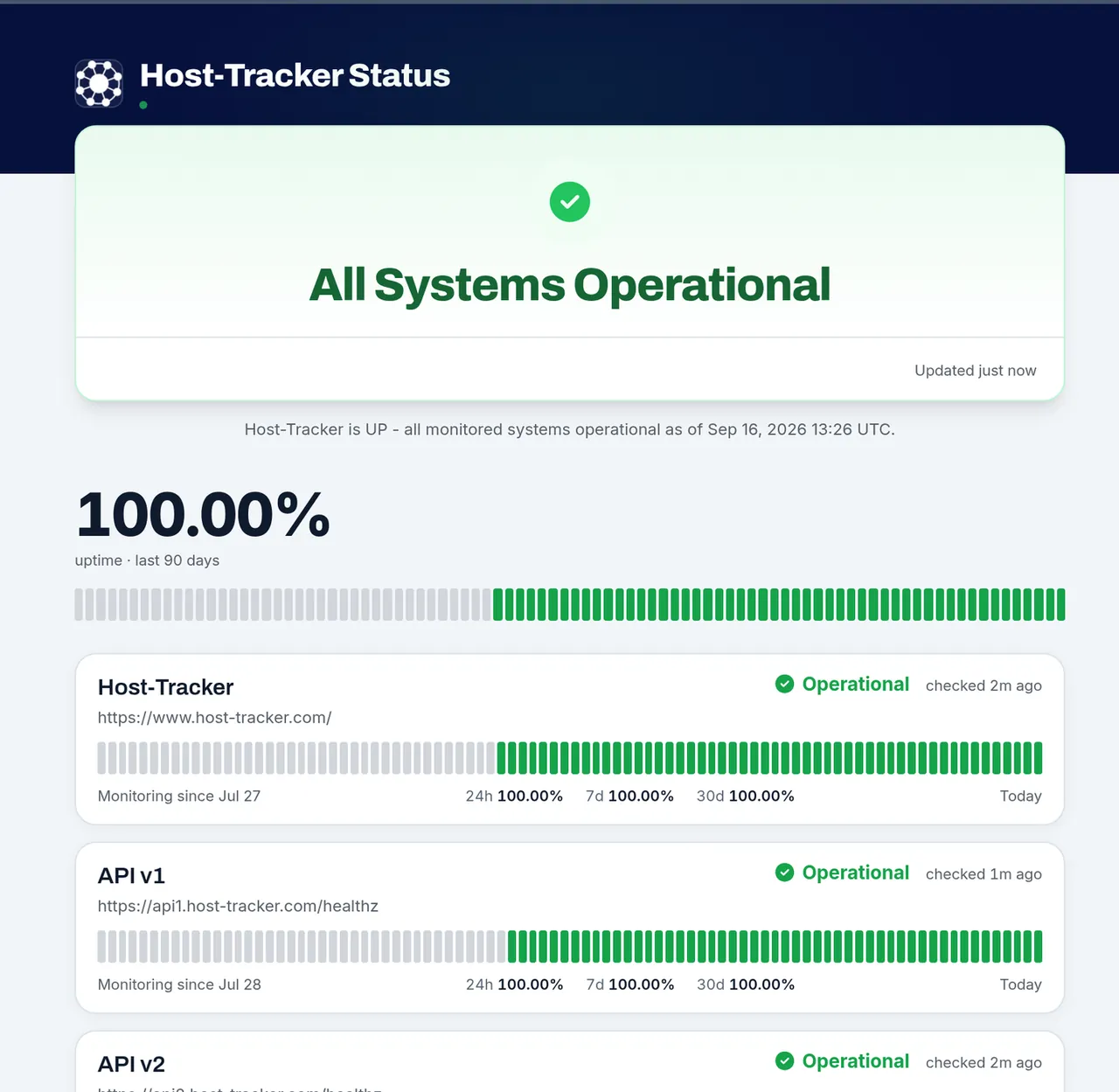
HostTracker's own public status page: all systems operational, components with 90-day uptime

Components with live status

Each row is a monitor: its state now, a 90-day heatmap and its uptime for 24 hours, 7 and 30 days.

Incidents on top, downtime underneath

Declared incidents with their update timeline sit above the automatically derived downtime, kept apart on purpose.

View HostTracker's live status page ↗
Set-up

How to create a public status page in five steps

Most pages are live within minutes. Only the name and the address are required; everything else can change later.

Monitor what your users depend onAdd a check for each service people touch: website, API, login, checkout. Each monitor becomes one row.
Create the page and pick its monitorsOpen Status Pages, choose the monitors to publish, rename them in your customers' words and group related rows.
Choose the name and the addressPick a page name and an address on status.host-tracker.com. The address is fixed once the page exists, so choose one you can keep.
Make it look like yoursAdd your logo, favicon and accent color, pick a light or dark theme, and check the live preview.
Publish and link to itThe page is public as soon as it exists. Link it from your footer, help center and error pages.

Every layer of your stack, monitored

Websites, servers, APIs, certificates. One check type per page, the same locations, alerts and reports behind all of them.

"I've worked with this monitoring service for a long time, and my daily routine is no longer a problem. It quietly watches all my sites and lets me respond the moment something goes wrong."
Caleb Levy - Webmaster - CA - Trustpilot

Trusted by teams at

Microsoft Panasonic OTP Bank OneProvider Worldmate
The full guide

Status pages, explained

Every chapter opens in place, so the page stays short.

What a public status page is for

A public status page shows, on a site hosted apart from your own, whether each part of your service works right now and what you are doing about anything that doesn't. It is where people look first when something seems wrong, instead of your support inbox.

During an outage, every customer who can't tell whether the problem is theirs or yours opens a ticket. A page that answers "is it down, and since when?" turns those questions into one link, and an incident already posted tells visitors you are on it. Over time its history becomes the record a prospective customer checks before signing up.

For a product-neutral explanation, read what a status page is and what belongs on one.

What to put on your status page

A useful page answers three questions fast: what is affected, how bad it is, and when visitors will hear more.

ElementHow HostTracker fills it
ComponentsOne row per monitor you choose, with live status, under group names you set
Overall statusWorked out from every row and open incident: All Systems Operational, Degraded Performance, Partial Outage, Major Outage or Under Maintenance
IncidentsPosts you write, with a status, an impact level, the affected rows and a timeline of updates
MaintenanceScheduled windows, shown before they start
HistoryA 90-day uptime bar per row, uptime percentages, a response-time chart and past incidents

Name components the way customers think: "Checkout" means something to a visitor, "web-03" doesn't. A service you rely on but don't monitor, such as a payment provider, can be a third-party row whose status you set by hand.

Writing incident updates people trust

Post as soon as a problem is confirmed, even if all you can say is that you are looking into it. Then move the incident through four stages:

  1. Investigating. What users see, in their terms, and which components are affected.
  2. Identified. The cause, as far as you can share it, and what you are doing.
  3. Monitoring. A fix is in place and you are watching it.
  4. Resolved. It is over, with when it started and ended.

Promise a time for the next update and keep it, even when nothing has changed. Each update lands on the incident's timeline and goes to your subscribers. Repeat announcements can be saved as templates, and a resolved incident can get a postmortem on its own page.

Planned maintenance without false alarms

Schedule a maintenance window with a start, an end and the components it covers, and visitors see it as upcoming before the work begins and as in progress while it runs. Failures inside the window are marked as maintenance and not counted against the uptime on the page, so a planned migration doesn't look like an outage in your 90-day history.

The header shows Under Maintenance only when nothing else needs reporting: an open incident or a failing check always outranks it, so a window never hides an outage. Maintenance windows you already set for your monitors can appear on the page automatically through their "Show on status page" switch.

Hosted vs self-hosted status page software

The choice comes down to what you want to own.

QuestionHosted status pageSelf-hosted status page
Who keeps it runningThe providerYou: updates, backups, security patches
How status changesUsually from the provider's monitoring, automaticallyFrom scripts or a tool you connect, or by hand
Survives your outageYes, if the provider is independent of your hostingOnly if it shares nothing with what failed: network, DNS, cloud account
ControlWithin the provider's optionsFull control of code, data and design
CostA subscription or a free tierNo license, but server time and staff time

Both share one rule: a status page that goes down with your product is worse than none. That is the main reason most teams choose a hosted status page. Self-hosting makes sense when the page must live inside a private network, keep every byte on your own servers, or run code you want to change. For a public page whose job is to stay reachable while your systems are not, a page run by an independent monitoring service is usually simpler.

Status that comes from your monitors, not a separate tool

Many teams run monitoring that alerts them plus status page software someone updates by hand. In HostTracker it is one system. Each component is a monitor you already run, so the page changes on the same confirmed results that send your alerts, and nobody has to flip a switch at 3 a.m.

  • No data is not "up". A monitor that hasn't reported for a while shows as Not confirmed rather than green.
  • Paused monitors never count. They show as paused, or hidden, and stay out of the overall status.
  • New monitors can join on their own when automatic adding is on.

Keeping people informed: email, feeds, chat and embeds

  • Email. Visitors subscribe with a confirmation code (double opt-in) and hear when an incident is posted, updated or resolved.
  • RSS and Atom feeds for feed readers.
  • Slack, Microsoft Teams and webhooks, for every announcement or only those naming one component.
  • Badge and status card. A live badge for a README, and an iframe card for your own site that refreshes every 60 seconds.
  • status.json, a machine-readable summary for dashboards and bots.

Times are shown in each visitor's own time zone. Every status-page operation is also in the REST API v2, the command-line client and the MCP server, so a script or an AI assistant can post an incident for you.

What to look for in status page software

Choosing your first page, or a status page alternative to a tool you have outgrown? Ask:

  1. Does status update on its own? A page that waits for a human is wrong in the first minutes of an outage, exactly when people look.
  2. Is it hosted apart from your product? It has to stay up when your servers or DNS don't.
  3. Can you write real incidents and schedule maintenance? Automatic up and down is only half the story.
  4. How do people follow updates? Email with double opt-in, feeds, chat channels, embeds.
  5. Is the history measured, not typed in?
  6. Is it another subscription? In HostTracker the status page comes with the monitoring you already run, on every plan.

Key takeaways

  • A public status page answers "is it down?" before customers ask support.
  • Publish customer-facing components, update incidents on schedule, and announce maintenance ahead.
  • A hosted status page stays reachable when your own systems fail.
  • In HostTracker every component is a monitor you already run, so status changes automatically.

Frequently Asked Questions

A public status page is a web page that shows whether each part of your service is working right now, with current incidents, planned maintenance and recent uptime. Customers check it before contacting support, so it cuts tickets during an outage and shows you are already on the problem.

Yes. HostTracker's permanent free plan covers monitoring two sites, and any monitor you're already running can become a status page component at no extra cost - there's no separate "status page" subscription to buy. A 30-day full-feature trial also unlocks every check type and up to 100 monitors if you want to test a larger setup first, with no credit card required. Paid plans, needed once you outgrow the free monitor limit, start at around $5 a month.

Sign up for a free HostTracker account, add a check for each service you want visitors to see - your website, your API, checkout, whatever matters to your users - then open Status Pages from your dashboard, pick those monitors as components, set a title and accent color, and publish. Your page goes live immediately at its own status.host-tracker.com URL, no separate hosting or DNS work required.

A hosted status page runs on the provider's infrastructure, so it stays reachable when your own servers or DNS fail, and there is nothing to patch. A self-hosted page gives you full control of code and data, but you run it, feed it status yourself, and must keep it apart from the product it reports on.

Not with HostTracker. Every component on your status page is one of the monitors you already run, so its status changes automatically from the same confirmed checks that trigger your alerts, with no second tool to connect.

Yes. Schedule a window with a start, an end and the affected components, and visitors see it before the work begins. Failures inside the window are shown as maintenance and not counted against your uptime, and maintenance windows you already set for your monitors can appear on the page automatically.

Yes. Anyone can subscribe by email with a double opt-in, and they'll get a message whenever you post or update a real incident. They can unsubscribe at any time from the link in every email, or skip email entirely and follow your page's RSS feed instead.

You set the name, logo (plus one for the dark theme), favicon, accent and header colors, light or dark theme, layout density, logo position, grouping, and which sections visitors see. A small "Powered by HostTracker" credit stays in the footer.

It's live-computed from HostTracker's own checks against your monitored URL, not a manually set badge. The page shows current up/down status, a staleness indicator if a check hasn't reported recently, 24-hour/7-day/30-day uptime percentages, a 90-day heatmap with hover detail, and a response-time chart - and it correctly distinguishes "no data yet" from "confirmed down" rather than treating both the same.

You declare a real incident - Investigating, then Identified, Monitoring, and finally Resolved - tag which components are affected, and post updates as you learn more. Subscribers are notified on every update, and the incident gets its own page with a full timeline, distinct from the automatically derived downtime the heatmap already shows on its own.

Every page can optionally be password-protected end to end, so only visitors who know the password can view it.

Yes. Status pages are part of HostTracker's REST API v2, so you can create pages, set components, post incidents and updates, and manage subscribers with a scoped token, or do the same from the CLI, the SDKs or the MCP server.

Free - no credit card

Give your users a place to check status themselves

Create a free HostTracker account and publish your status page today - no credit card required.

30-day free trial - 100 monitors - no credit card
  • Trusted since 2004
  • 500,000+ websites monitored
  • 300+ checkpoints worldwide