SSL Certificate Monitoring

SSL certificate monitoring: expiry alerts for certificates and domains

HostTracker's SSL certificate expiration monitoring checks your SSL/TLS certificates for upcoming expiry, chain errors, revocation, and weak security protocols - and alerts you before a browser ever blocks your site. Domain expiration tracking is included at no extra cost.

Free instant check · tested live from 300+ worldwide locations · no login required

Prefer round-the-clock monitoring?Start free trialView pricing
  • Trusted since 2004
  • 500,000+ websites monitored
  • 300+ checkpoints worldwide

How one certificate check runs, from the handshake to the alert

Expiry, chain, revocation, protocolEvery run checks how long the certificate has left, that the chain validates, that it is not revoked and that the protocol is not outdated.
30, 7 and 1 day beforeThree notices before a certificate lapses, on the channels each contact chose, so a renewal never slips past a weekend.
The domain, tooRegistration expiry is read live over RDAP and watched beside the certificate, at no extra cost.
SSL Certificate Monitoring

Never lose an SSL certificate to a missed renewal

HostTracker checks your SSL/TLS certificates for upcoming expiry, chain errors, revocation, and weak or outdated security protocols, and sends automatic alerts and summary reports well before a browser starts blocking your site.

SSL

Certificate Security Monitoring

HostTracker's SSL monitoring service keeps websites secure and running smoothly. It checks that your SSL/TLS certificates are up to date and sends you an alert if they are about to expire. SSL certificates protect user data and maintain trust by encrypting information between the server and users. Monitoring your SSL helps keep your website secure and up to date with the latest security standards. This avoids penalties from search engines like Google.

Detection

Expiry Alerts & Issue Detection

HostTracker's SSL monitoring service keeps websites secure. It sends you a notice before your SSL certificate expires. The service also checks for issues with the SSL certificate and sends instant alerts. This monitoring helps website owners fix problems quickly, keeping users trust and protecting data.

Trust

Stronger Security & Trust

SSL monitoring from HostTracker improves security and user trust. By ensuring SSL certificates are always valid, websites can protect user data from potential breaches and avoid security warnings from browsers. Timely alerts and detailed reports help you manage your website better. SSL monitoring is important for keeping websites secure and performing well.

Renewal

Timely Renewal Tracking

HostTracker monitors domain names to prevent loss due to missed renewal deadlines. It tracks registrations and sends timely notifications about upcoming expiration dates. These alerts are sent at intervals to ensure domain owners have time to renew. This service maintains an online presence and avoids the costs and inconvenience of domain expiry.

Alerts

Alerts & Reports

The HostTracker domain monitoring service includes features for tracking and notifications. Users can set up alerts to be sent to several contacts by email, text or via apps like Telegram and Discord. The service also provides reports on domain registrations, including renewal dates and changes in status. This helps prevent domain lapses and ensures businesses and individuals can stay online.

Protection

Prevent Expiration Risk

HostTracker's domain monitoring service protects valuable domain names from expiring accidentally. Timely alerts help domain owners avoid risks and costs associated with reclaiming expired domains. The service also lets you manage multiple domains with detailed reports and customized alerts. This keeps businesses online and protects their brand.

What one monitor watches

Six things that each take a site down on their own, checked together.

Days to expiry
Chain validity
Revocation
Protocol version
Weak ciphers
Domain registration

What an SSL monitor shows

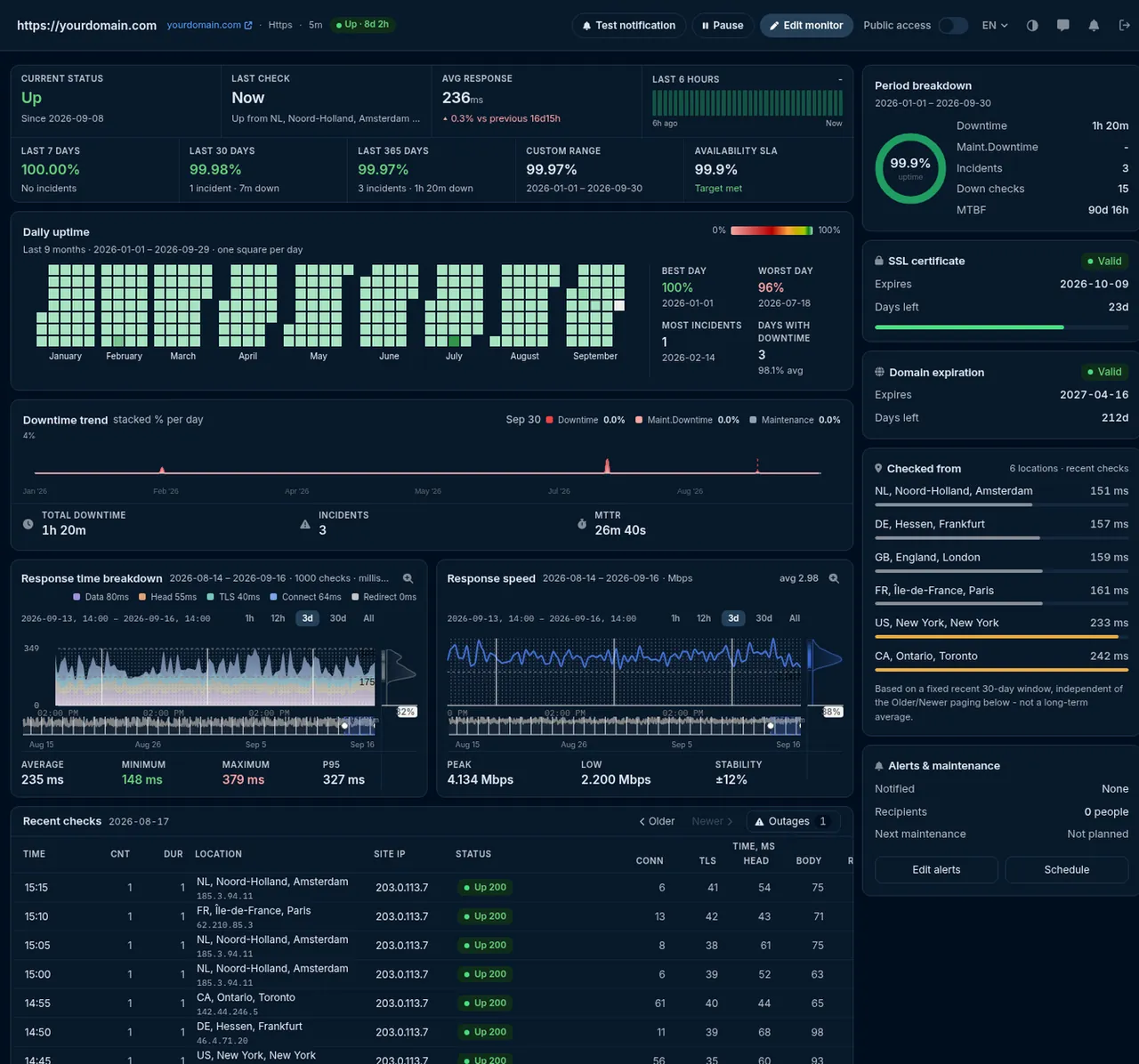
The certificate and the registration on the monitor's own page, with days left and the issuer.

HostTracker monitor statistics with the SSL certificate and domain expiration cards

The certificate card

Valid or not, expiry date, days left, issuer and the exact name the certificate was issued for.

The domain card

Registration expiry and days left, read from the registry rather than a cached whois copy.

Every layer of your stack, monitored

Websites, servers, APIs, certificates. One check type per page, the same locations, alerts and reports behind all of them.

"I've worked with this monitoring service for a long time, and my daily routine is no longer a problem. It quietly watches all my sites and lets me respond the moment something goes wrong."
Caleb Levy - Webmaster - CA - Trustpilot

Trusted by teams at

Microsoft Panasonic OTP Bank OneProvider Worldmate
The full guide

SSL and domain monitoring, explained

Every chapter opens in place, so the page stays short.

Domain expiration monitoring

An expired SSL certificate isn't the only deadline that can take a site offline - HostTracker's domain expiration checker watches your registration status alongside your certificates, at no extra cost.

What SSL monitoring checks on every run

An SSL certificate expiry monitor is often sold as a calendar reminder, and expiry is genuinely the most common way certificates break. It is not the only way. Every HostTracker run opens a real TLS connection and evaluates the certificate the server actually served - which catches the failures that arrive without any date changing at all.

What is verifiedWhat a failure looks like to your visitors
Validity windowThe certificate is inside its not-before / not-after dates. Past the end, every browser blocks the page with a full-screen interstitial.
Chain of trustThe certificate chains to a trusted root. A missing intermediate is the classic "works in my browser, fails on every phone and every API client" bug - your laptop cached the intermediate, nobody else's did.
Hostname coverageThe name you are checking is actually covered by the certificate. A mismatch reads to a browser as a possible interception attempt, not a typo.
Revocation statusThe certificate has not been revoked, checked against the issuing authority's OCSP or CRL service. If that responder is unreachable the result is flagged rather than failed, so a third party's outage cannot manufacture a false alarm on your site.
What it recordsExpiry and not-before dates, issuer, serial number, the subject alternative names, and the TLS protocol version and cipher that were negotiated - so a result tells you what changed, not just that something did.

Under the hood a certificate monitor is a TLS connection to a host and a port. The port defaults to 443, and you can name a different one - example.com:8443 - so an API gateway, an alternate HTTPS port or a service on an implicit-TLS port is watched exactly the same way. The hostname is sent via SNI, so a server hosting several certificates on one IP address returns the right one.

Why an expired certificate is worse than a short outage

When a server goes down, a visitor sees a browser error and usually tries again later. When a certificate expires, the server is still perfectly healthy - it answers every request - and the browser refuses to show what it sent. The difference matters in four ways that are easy to underestimate until it happens.

  • The warning is designed to be frightening. A full-page interstitial about an insecure connection is the same screen a browser shows for an interception attack. Visitors do not read it as "their certificate lapsed"; they read it as "this site is not safe".
  • On an HSTS-enabled site there is no way through. If you have ever sent a Strict-Transport-Security header - and you should have - browsers remove the "proceed anyway" option entirely. Every visitor is hard-blocked until the certificate is replaced.
  • Machines fail harder than people. Your mobile app, your payment webhooks, your partners' integrations and every API client validate the certificate too, and none of them have a button to click past it. An expiry is a full integration outage, not just a website one.
  • Your own monitoring can look green. A check configured to ignore certificate problems still reports HTTP 200 from a server whose certificate expired an hour ago. The application never noticed. That is precisely the gap a certificate monitor exists to close.

The same asymmetry applies to a lapsed domain, only slower and less reversible: a certificate can be reissued in minutes, while a domain that leaves the redemption period can be registered by anyone.

Two ways to turn SSL monitoring on

Certificate watching comes in two shapes, and most accounts want the first one.

Attached to an existing HTTPS monitorA standalone certificate monitor
How you turn it onA checkbox on a monitor you already haveAdd a monitor and pick Certificate expiration as the type
Extra requests to your serverNone - that monitor already performs a TLS handshake on every run, so the certificate is read from the connection it was making anywayOne TLS connection per run, on its own schedule
Uses one of your monitor slotsNoYes
Best forAny site whose uptime you already monitor - which is the normal caseAn endpoint you do not monitor for uptime: a mail server, an internal gateway, an alternate port, a certificate on a host that serves no web pages
CadenceEvaluated periodically from the observations your HTTPS monitor is already collectingA fixed six-hour cadence

A certificate does not change between one minute and the next, so neither shape checks more often than it usefully can. Six hours means the worst case between a certificate breaking and HostTracker noticing is a few hours, on something that normally gives you 30 days of warning.

When you'll hear about it: 30, 7 and 1 day

HostTracker sends reminder notices at 30 days, 7 days and 1 day before an expiration date - for SSL/TLS certificates and for domain registrations alike. Three rungs rather than one, because each catches a different kind of miss: 30 days is enough lead time to raise a purchase order or repair a broken renewal job, 7 days catches the ticket nobody picked up, and 1 day is the last call before browsers start warning your visitors.

A reminder is not an outage alert, and HostTracker keeps the two separate. If the certificate is actually invalid right now - expired, revoked, chained to an untrusted root, or issued for a different hostname - that is a failed check, and it escalates through your normal down-alert contacts on the delay each of them chose: immediately, or after 3, 5, 15, 30 or 60 minutes, or 3, 6, 12 or 24 hours.

Alerts go out over the nine channels HostTracker supports - email, SMS, voice call, webhook, Slack, web push and the messenger apps Telegram, Discord and Viber. Certificate renewals and domain renewals are usually owned by different people, so put both on the contact list: the reminder that reaches only the inbox of whoever set the monitor up is the reminder that gets missed.

Certificate expiration monitoring: the expiry tracker

The ladder above is what an SSL certificate expiry tracker looks like in practice. Every six hours HostTracker re-reads the certificate your server actually served and recomputes the days remaining on it; three of those numbers are wired to a reminder.

Days before expiryWhat the alert saysWhere it goes
30 daysFirst reminder. It names the monitor, the host and port, the exact expiry date and the issuing authority - enough to tell an automated renewal that quietly stopped from a certificate somebody buys by hand.Every contact subscribed to that monitor, on its own channel - email, SMS, voice call, Slack, webhook, web push, Telegram, Discord or Viber.
7 daysSecond reminder, a week out. The same detail, but a renewal that has not happened by now is late rather than upcoming, and it is worth checking who owns it.The same contacts and channels, deduplicated to at most one notice per day, so a rung never arrives twice.
1 dayLast reminder, the day before browsers begin warning your visitors. If the certificate then actually lapses, the next check fails and the monitor turns Down.The same contacts and channels - and, once it lapses, a Down alert on the escalation delay each contact chose.

The three rungs are fixed at 30, 7 and 1 day, and the same ladder covers domain registrations as well as certificates. A reminder is informational and never marks a monitor Down on its own; a certificate that is actually invalid - expired, revoked, issued for a different hostname, or chained to an untrusted root - is a failed check and escalates like any other outage.

Not monitoring yet? The free instant SSL check reads the same certificate and reports the same expiry date, issuer, chain and negotiated TLS version - once, right now, with no account. The expiry tracker is that check on a six-hour loop, with the three reminders attached.

Stricter TLS rules on an HTTPS monitor

The certificate monitor above answers "is this certificate valid". A separate set of switches on an HTTPS availability monitor answers a harder question - "is this connection up to our standard" - and each is opt-in, because turning them all on for every customer would fail a great many sites that are working exactly as their owners intend.

  • Require a valid certificate chain. Off by default, so a self-signed certificate on an internal host does not fail its uptime check. Turn it on for anything public.
  • Require a strong TLS protocol. Fails the check when the server negotiates anything below TLS 1.2 - the useful switch after a hardening project, so a rolled-back configuration cannot quietly reintroduce an obsolete protocol.
  • Block weak ciphers. Fails the check when the negotiated cipher is weaker than 128-bit.
  • Check certificate revocation. Adds an OCSP/CRL lookup to the availability check itself.

A standalone certificate-expiration monitor already applies chain validation and revocation checking on its own, without any of these switches - they exist so that your uptime check can be made as strict as your security posture requires, independently of what the certificate monitor reports.

How certificate renewals fail quietly

Automatic renewal was supposed to end expiry incidents, and mostly it has. What it changed is the shape of the remaining ones: instead of a human forgetting a date, a piece of automation stops working and nobody notices, because working automation is silent and broken automation is silent in exactly the same way. Certificate lifetimes keep getting shorter across the industry - the widely-used free authorities issue 90-day certificates, and the maximum lifetime browsers accept is being reduced in stages - which means renewal now happens many times a year, and any of those renewals can be the one that fails.

The failures we see reported look like this:

  • The renewal cron job died months ago. The certificate it last renewed was valid for 90 days, so the failure only became visible on day 91.
  • Renewal succeeded, but nothing reloaded. The new certificate sits on disk while the web server, the load balancer or the container keeps serving the old one from memory. Every renewal log says success.
  • One node out of several was missed. Behind a load balancer, most requests get the new certificate and a fraction get the expired one - which is why an intermittent, "it works for me" certificate error is almost always a fleet-consistency problem.
  • The edge is fine, the origin is not. Your CDN presents its own valid certificate while the origin's expired underneath it. Anything that talks to the origin directly breaks.
  • The validation method stopped working. A DNS record was tidied up, an /.well-known/ path started redirecting, a firewall rule changed - and the renewal that depends on it silently stopped passing.
  • The wildcard did not cover the new subdomain. A wildcard certificate covers one level, so a host added under a deeper label is not covered by it at all.

Every one of those is invisible from inside your own deployment pipeline and obvious from outside, which is the whole argument for an external watcher. A monitor that connects the way a stranger's browser does sees the certificate you are actually serving - not the one your automation believes it installed.

How the domain expiration check works

The domain side asks the registry rather than the server. HostTracker looks the domain up over RDAP - the modern, structured successor to WHOIS - resolving which registry answers for your TLD from IANA's own published directory, and falls back to a classic WHOIS query on port 43 for TLDs that do not publish an RDAP service yet. The lookup runs on a fixed six-hour cadence, and the check reports:

  • the expiration date the registry holds - the authoritative one, not the one in your billing system;
  • the registry status codes on the domain, where RDAP provides them - including whether a transfer lock is in place;
  • a separate "expiration date changed" notice whenever the registry's date differs from the previous check - which is how you confirm a renewal actually landed, and how you find out about one you did not authorise.

That last one is quietly the most useful signal on the page. A renewal you paid for that never reached the registry looks identical to a healthy domain right up until the 30-day reminder fires. Watching the date itself change turns the renewal from something you hope happened into something you can see.

Want the full registry record - registrar, nameservers, creation date - right now rather than as a monitor? Run the free WHOIS and domain expiry lookup; no login required. The recurring monitor deliberately reports less, because expiry and status are what change.

Setting up certificate and domain monitoring

  1. Look the domain up first with the free instant check so you know what today's expiry dates are before you automate anything.
  2. If you already monitor the site's uptime, open that monitor and switch on certificate watching and domain-expiration watching. No new monitor, no extra request.
  3. For anything you do not monitor for uptime - a mail host, an internal gateway, an alternate port - add a standalone Certificate expiration monitor and give it host:port. Port 443 is assumed when you leave the port off.
  4. Add a Domain expiration monitor for each registrable domain you own, including the defensive registrations and the redirect domains. Those are exactly the ones that lapse, because nobody is watching a domain that has no site on it.
  5. Put more than one person on the contact list. Certificates and domains are usually owned by different teams, and the reminder that only reaches the person who set the monitor up is the one that goes unread when they change jobs.
  6. Note the reminder ladder - 30, 7 and 1 day - and make sure your renewal process fits inside 30 days. If a purchase order takes six weeks, the ladder is not your constraint; the process is.

SSL monitoring vs a one-off SSL checker

Free SSL checker tools - including HostTracker's own - are genuinely useful and answer a different question. A checker tells you the state of a certificate at the moment you asked. Monitoring tells you when that state changes while you are not looking, which is the only time it matters.

One-off SSL checkerSSL certificate monitoring
Runs whenYou remember to open itEvery six hours, indefinitely
Tells you about an expiry in 30 daysOnly if you happen to check that dayYes - at 30, 7 and 1 day
Notices a chain break introduced by a deployNoYes - within one check cycle
Notices a renewal that never reached the registryNoYes - the expiry-date-changed notice
Reaches the right personWhoever ran itEvery contact you configured, on nine channels
Covers many domains at onceOne at a timeOne monitor per domain, alerting into the same contacts

Certificates sit alongside the other things about a domain that can go wrong without anyone touching your server. Once the expiry side is watched, the usual next two are malware and phishing flags and DNS blacklist listings - both of them silent reputation failures that leave the site up and the traffic gone.

Limits worth knowing

  • No STARTTLS. The check connects and starts the TLS handshake immediately, so it works on any port that speaks TLS directly. Protocols that begin in plaintext and upgrade mid-session - SMTP on 587, IMAP on 143, explicit-TLS FTP - need a negotiation the check does not perform. Point it at the implicit-TLS port instead.
  • The reminder days are fixed at 30, 7 and 1. They are not currently a per-monitor setting.
  • An unreachable revocation responder is reported, not failed. That is deliberate - a certificate authority's OCSP outage is not your site's outage - but it does mean revocation coverage depends on a third party being up.
  • Certificate Transparency logs are not monitored. HostTracker tells you about the certificate being served; it does not watch public CT logs for certificates issued for your domain by someone else.
  • Client certificates are not exercised. The check validates the certificate the server presents, not a mutual-TLS handshake.
  • Domain coverage follows the registries. RDAP is used where the TLD publishes it and classic WHOIS where it does not; a small number of obscure TLDs publish neither well, and the check reports a lookup failure rather than pretending to know a date.

Key takeaways

Key takeaways

  • A certificate monitor connects to your endpoint, reads the TLS (Transport Layer Security) certificate it serves, and reports the expiry date, the issuing chain, the revocation status and the protocol and cipher in use.
  • Warnings are sent 30 days, 7 days and 1 day before the certificate expires; on an Http or Port monitor you can set your own days-before-expiry thresholds instead.
  • Domain registration is watched separately over RDAP (Registration Data Access Protocol) and whois, and alerts before the registration lapses.
  • Both checks run on a fixed 6-hour cadence and reach you by email, SMS, voice call, Slack, Microsoft Teams, PagerDuty, Telegram, Discord or a signed webhook.
  • The $14 per month Webmaster plan is the first that includes certificate, domain and blacklist checks; the 30-day trial covers 100 monitors with no credit card.

Frequently Asked Questions

SSL certificate expiration monitoring is an automated check that tracks the validity dates of your website's SSL/TLS certificates and warns you before they lapse. It matters because an expired certificate doesn't take your server offline - it makes web browsers block the page outright with a security warning, which drives visitors away and looks identical to a real outage to anyone who doesn't dig into the cause. Certificates can also fail for reasons besides expiry, including chain errors, revocation, and outdated or weak security protocols that browsers no longer trust. HostTracker re-checks your certificates automatically every six hours and sends reminder notices 30 days, 7 days and 1 day before the expiration date, so renewal happens on your schedule rather than in a panic after customers start seeing warnings. Because certificates are easy to forget once installed, ongoing monitoring is far more reliable than depending on someone remembering a renewal date manually.

A domain expiration checker tracks your domain's registration status and renewal date, then sends you a notification with enough lead time to renew before the registration lapses. This matters because once a domain expires, the consequences can range from your site going fully offline to the domain becoming available for anyone else to register, including opportunistic buyers hoping to resell it back to you at a markup. Missed renewals usually happen for mundane reasons - an outdated billing email, an auto-renew payment that silently failed, or simply losing track of the date - not carelessness. HostTracker's domain monitoring checks registration status directly and alerts you through your chosen contacts as the expiration date approaches, independent of whatever reminder emails your registrar does or doesn't send. Since a lapsed domain can undo years of SEO value in a single missed renewal, an independent watcher on the registration date is a low-effort safeguard.

Yes. Every run performs a real TLS handshake, so beyond the expiration date it also verifies that the certificate chains to a trusted root (a missing intermediate is the single most common cause of a certificate that works in your browser and fails everywhere else), that the hostname you are checking is actually covered by the certificate's subject alternative names, and that the certificate has not been revoked - revocation is checked against the issuing authority's OCSP or CRL service. Any of those problems produces the same browser security warning as an outright expired certificate, even while the expiration date is still comfortably in the future, so checking only the expiry date would miss real, user-facing issues. The negotiated TLS protocol version, cipher, issuer, serial number and full SAN list are recorded with every result too, and if you want a weak protocol or a weak cipher to actually FAIL the check rather than just be reported, those are opt-in strictness switches on an HTTPS monitor. This gives a more complete picture of certificate health than a one-time SSL checker tool, since your configuration can change without the expiration date changing at all.

HostTracker sends reminder notices at three points: 30 days, 7 days and 1 day before the expiration date, for SSL/TLS certificates and domain registrations alike. The three-step ladder is deliberate rather than a single warning - 30 days is enough lead time to raise a purchase order or fix a broken renewal job, 7 days is the reminder that catches the ticket nobody picked up, and 1 day is the last call before browsers start showing your visitors a security warning. Those reminders are separate from a real failure: if the certificate is already invalid - expired, revoked, served with a broken chain, or issued for a different hostname - that is not a reminder but a failed check, and it alerts through your normal down-alert contacts immediately. That combination means you get a calm heads-up while there is still time to act, and an urgent alert only when something is actually wrong right now.

HostTracker's permanent free plan monitors two sites with checks every 30 minutes at no cost, and a 30-day full-feature trial unlocks every check type, including domain and SSL monitoring, on up to 100 monitors with 1-minute checks and no credit card required. This means you can evaluate certificate and domain expiration monitoring on your real domains before deciding whether to continue on a paid plan. If you decide to keep using it long-term with more frequent checks or more monitored domains, paid plans start at around $5 a month. Because certificate and domain problems are infrequent but high-impact when they happen, even the free tier's lighter check frequency is often enough to catch an expiration date well before it becomes urgent - it's the kind of monitoring that's cheap to run and expensive to skip.

Yes. A certificate-expiration monitor's target normalises to a host and a port, and the port defaults to 443 only when you don't name one - write it as example.com:8443 and the check connects there instead. The check opens a TCP connection to that host and port and performs a TLS handshake immediately, sending the hostname via SNI so a server hosting several certificates on one address returns the right one. That means any service that speaks TLS directly on connect can be watched this way, not just web servers: an alternate HTTPS port, an API gateway, or a mail service on an implicit-TLS port. The one shape it does not handle is STARTTLS - protocols that begin in plaintext and upgrade mid-session, such as SMTP on port 587 or IMAP on 143, need a protocol-level negotiation the certificate check does not perform, so point it at the implicit-TLS port instead.

No, and in the most common setup it does not even cost an extra request. Certificate watching can be switched on as part of an existing HTTPS monitor rather than added as a separate check: that monitor already performs a TLS handshake every time it runs, so the certificate's issuer, validity dates and any handshake problem are read from the connection it was making anyway. Turning the option on simply starts evaluating and reporting what was already on the wire. The alternative - a standalone certificate-expiration monitor - is the right choice when the endpoint you want to watch isn't the one you monitor for uptime, such as a mail server, an internal API gateway or an alternate port. Either way, certificate and domain expiration monitoring are part of the standard check set, and the 30-day trial covers both on up to 100 monitors with no credit card.

Once a problem is detected - whether it's an approaching expiration date, a certificate chain error, or a domain nearing its renewal deadline - HostTracker sends an alert through whichever of its 9 notification channels you've configured, including email, SMS, voice call, webhooks, Slack, and messenger apps like Telegram, Discord and Viber. You can set up multiple contacts and channels, so both the person responsible for domain management and the person responsible for infrastructure get notified rather than a single inbox that might get missed. Alerts include the specific issue detected, so you know immediately whether you're dealing with an expiring certificate, a configuration issue, or a lapsing registration rather than a generic "problem" message. Because these checks run automatically at the interval you set, you find out about the issue on HostTracker's schedule, not the day a customer reports a broken padlock icon.

30-day free trial - no credit card

Never miss a certificate or domain renewal

Start a free trial and get advance alerts before your SSL certificate or domain name expires.

30-day free trial - 100 monitors - no credit card
  • Trusted since 2004
  • 500,000+ websites monitored
  • 300+ checkpoints worldwide

Part of HostTracker's website monitoring software.