
Found for you
The providers your pages load, suggested
We read what your browser monitors load and suggest the providers behind them. A browser sees front-end services such as CDNs and payments; back-end APIs you pick by hand.
Vendor outage alerts
HostTracker reads the public status pages of 57 providers and sends one alert per incident, only for the parts you use, with a line on whether your own monitors were hit.
30-day trial with unlimited providers · no credit card · email, SMS, Slack, Teams and more
How a provider incident becomes one alert, with your monitors beside it
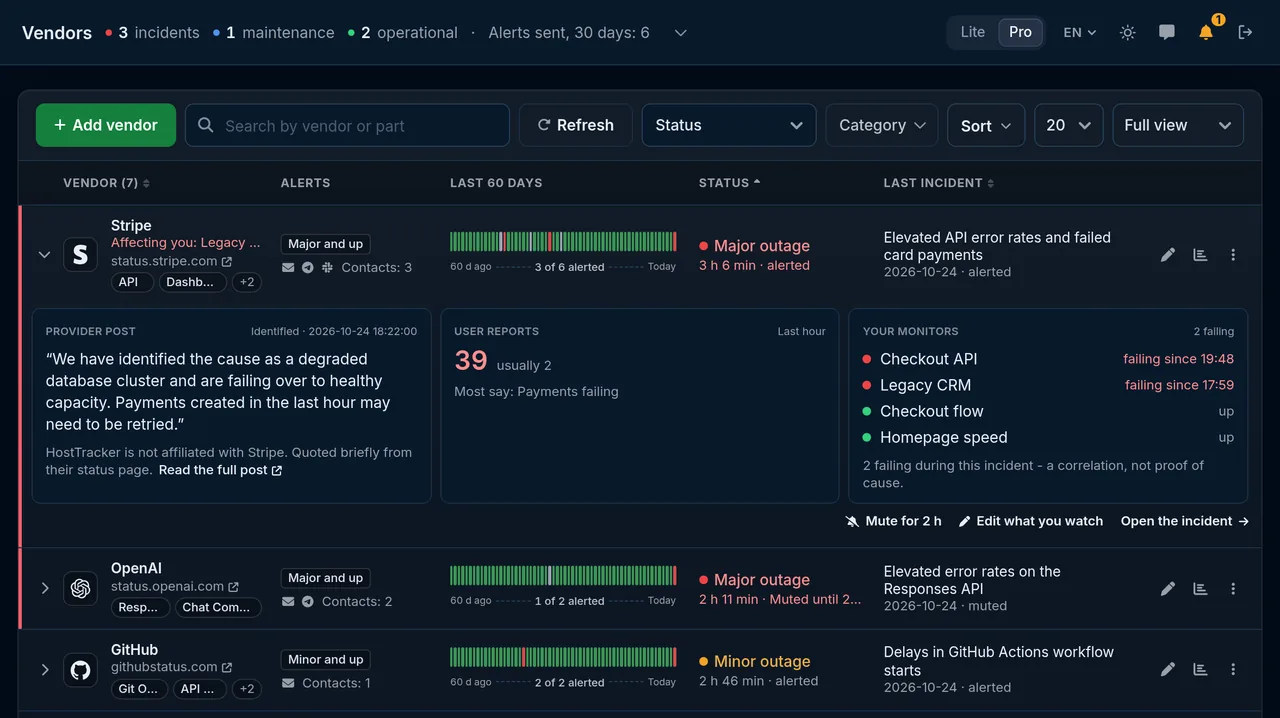
A provider's status page says what the provider says. Vendor Watch adds what only the monitoring account behind it knows: which providers your pages load, and whether your monitors were hit.
We read what your browser monitors load and suggest the providers behind them. A browser sees front-end services such as CDNs and payments; back-end APIs you pick by hand.
Watch the API, not the playground, and set the minimum impact. Before you save, the picker shows how many alerts the last 60 days would have sent.
An impact line from the monitors linked to the watch, and a switch that holds the alert until one of them fails. It states a correlation, never a cause.
Pick a provider and the parts of it you use. Linked names have their own is-it-down page with live checks and recent incidents.
HostTracker is not affiliated with the providers listed. Their incident text is quoted briefly, with a link to the full post.
Alerts go to the contacts already in your account, so a provider incident reaches the people and tools that handle your own alerts.
The incident and the recovery, with the provider's post linked.
A short text for whoever is on call.
Posted to the channel of your Slack contact.
Posted to the channel of your Teams contact.
To a chat or a group.
Triggered on the incident, resolved on recovery.
Created on the incident, closed on recovery.
Your own endpoint, as JSON, XML or form data.
Voice calls are not used for vendor incidents; they stay for the alerts of your own monitors.
Its status, the last 60 days and the latest incident, with the provider's post and your monitors one click away.
A strip per provider: clear days, incidents that alerted you and the ones your settings filtered out. Click a day to open its incident.
The monitors linked to the watch, failing or up, while the incident is open, next to the provider's own words.
Mute it for 2 hours without turning the watch off. The next incident alerts as usual.
Vendor Watch is part of the plan you already have; there is no separate add-on.
The limit applies when you add a watch; a downgrade never deletes one you already have. The 30-day trial needs no credit card. Prices, annual billing and the larger Enterprise sizes are on the pricing page.
StatusGator and IsDown also aggregate provider status pages, and they cover more consumer services than we do. What HostTracker adds is the account of monitors your alerts are set against.
Websites, servers, APIs, certificates. One check type per page, the same locations, alerts and reports behind all of them.
Trusted by teams at





A status page aggregator reads the public status pages of many providers and relays their incidents in one place, so you do not check each page by hand. HostTracker's Vendor Watch does this for 57 providers: you pick the provider and the parts you use, and each incident reaches you once, by email, SMS, Slack, Microsoft Teams, Telegram, PagerDuty, Opsgenie or webhook, with one more message when it is resolved.
Add the provider to Vendor Watch, choose the parts you rely on (the API rather than the website, for example) and the minimum impact, then pick the contacts to tell. When the provider posts an incident that matches, you get one alert, and one more when it is resolved. For a service without a public status page, or to see what your own users get, add a monitor of your own on the endpoint or the page.
Create a Slack contact in your account and choose it as one of the contacts of a vendor watch. HostTracker posts the provider's incident to Slack once and posts again when it is resolved. Microsoft Teams, Telegram, PagerDuty, Opsgenie and webhook contacts work the same way, and so do email and SMS. Voice calls are not used for vendor incidents.
Use two layers. Vendor Watch relays what the provider declares on its status page for the parts you use, such as an API. Your own monitors then show what your users get: an HTTP or API monitor on the endpoint you call, or a browser check of the page that depends on the provider. Vendor Watch links the two. An alert can say 'Affecting you: Checkout failing since 14:03' or 'No impact on your monitors so far', which states what your monitors saw during the incident, not that the provider caused it.
No. Vendor Watch relays what the provider publishes on its public status page; it does not detect an incident earlier. HostTracker reads each provider's status feed every 5 minutes, so an alert can trail the provider's own post by a few minutes. What it adds is context: whether your own monitors were hit during the incident.
StatusGator and IsDown also aggregate provider status pages, and they cover more consumer services than our catalog. What HostTracker adds is the monitoring account behind the aggregator: your own monitors from 300+ checkpoints, a 'did it hit you?' verdict on each alert, and status pages whose third-party rows can follow a provider. If all you need is a long list of services to follow, start with them; if you want vendor incidents next to your own uptime, that is where HostTracker fits.
Each provider's public status feed is read every 5 minutes. You get one message when an incident matches your watch and one when it is resolved, not one per update. You can mute a single incident for 2 hours without turning the watch off, and the picker shows how many alerts the last 60 days would have sent with your settings before you save.
The Free plan includes 1 provider, Personal 2, Solo 3, Webmaster 10 and Business 25. Enterprise has no limit, and neither does the 30-day trial, which needs no credit card. The limit applies when you add a watch; a downgrade never deletes one you already have.
Pick your providers and the parts you use, choose who to tell, and get one alert per incident, with a line on whether your own monitors were hit.
Part of HostTracker's website monitoring software.