
Robots meta tag
The <meta name="robots"> tag in the page head. A noindex or nofollow that appears - or disappears - between two checks is reported with the value before and after.
SEO monitoring
HostTracker's SEO monitoring tool reads the robots meta tag, the X-Robots-Tag header and the canonical tag on every check of your website monitors and sends an SEO alert the day one of them changes - because a noindex tag or a wrong canonical does not break your site, it quietly removes pages from search.
Free noindex check · reads the page as served · no login required
How an indexability change is caught, from the check to the notice
Indexability is an option on an HTTP monitor, next to certificate and domain expiration. It adds no extra request to your site - it reads the response the uptime check already fetched.
The <meta name="robots"> tag in the page head. A noindex or nofollow that appears - or disappears - between two checks is reported with the value before and after.
The same directives sent as a response header, usually by a CDN, proxy or server rule. Viewing the page source never shows it, which is exactly why it is worth watching.
The rel="canonical" link, resolved to a full URL. A canonical that starts pointing at another page, another host or a staging domain is the change you hear about.
None of these show up in an uptime check, a browser or a status code. Each one returns 200 and looks normal to every visitor, and the first sign is usually a traffic graph a week later.
A "discourage search engines" option, an environment flag or a header rule that belonged to staging goes out with a release. Every page now carries noindex. With Indexability on, the first check after the deploy sees the new directive and the notice names the page and the value it changed to. Check a page now with the free noindex checker.
A base URL setting travels with a database copy or a config file, and every canonical now names staging.example.com. Search engines are asked to fold your live pages into a host they cannot index. Indexability reports the canonical moving to another host on the next check. Confirm a single page with the free canonical checker.
A staging robots.txt with Disallow: / replaces the production file, and crawlers stop fetching the site. This one lives outside the page, so the Indexability option does not see it: the free robots.txt tester checks a URL against the rules for all crawlers, and the scheduled crawl cross-checks every page against robots.txt on each run.
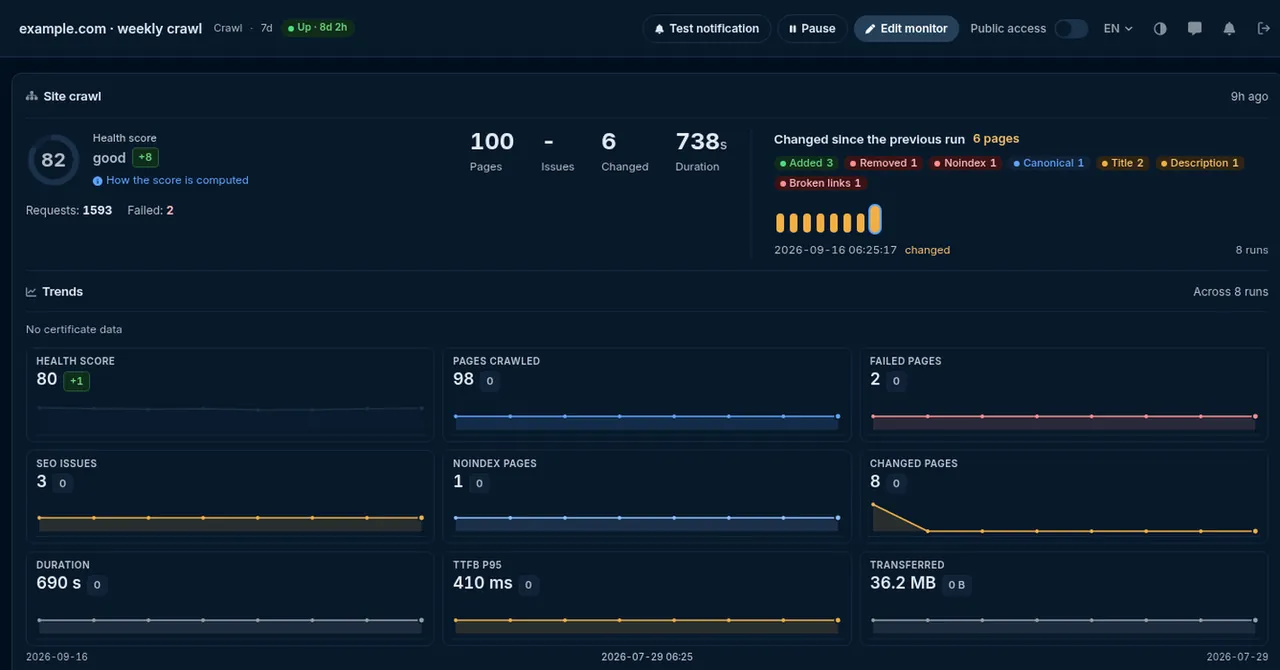
A health score, the issues behind it and every page that changed since the last run.
One number per run, the band it sits in, and the noindex, canonical, duplicate and broken-link issues that move it.
Pages added, removed, newly noindexed or re-canonicalised since the previous crawl, page by page.
Websites, servers, APIs, certificates. One check type per page, the same locations, alerts and reports behind all of them.
Trusted by teams at





Every chapter opens in place, so the page stays short.
The two work at different depths. Indexability watches the few pages that matter most - the home page, pricing, the top landing pages - on every uptime check. The scheduled crawl walks the whole site on a slower schedule and finds the template-level problems no single page reveals.
| Indexability on an HTTP monitor | Scheduled crawl monitor (beta) | |
|---|---|---|
| What it covers | Each page you monitor | A whole site, walked from a start URL |
| How often | Every check, at the monitor's own interval | Weekly by default |
| Robots meta tag and X-Robots-Tag | Yes | Yes, per crawled page |
| Canonical tag | Yes | Yes, per crawled page |
| robots.txt rules | No | Yes - pages disallowed yet linked, missing robots.txt |
| Sitemap | No | Yes - noindex pages listed in it, listed pages never reached, missing sitemap |
| Broken links, titles, duplicates | No | Yes, compared with the previous run |
| Health score | No | 0 to 100, with the issues behind it |
| How you hear about it | A change notice to the Up alert contacts | A weekly site-health digest, plus optional notices when many pages change or the score drops |
| Availability | Solo, Business and Enterprise plans | Beta, enabled on request |
Scheduled crawl is in beta - ask support. Write to [email protected] with the site you want crawled and we will enable it on your account. Until then, the free website crawler runs the same walk once, with no login.
Each check records the page's robots directives and canonical as a baseline. The next check compares what it reads against that baseline, and only a difference produces a notice. The first check after you turn the option on therefore sends nothing - it has nothing to compare with. When you want the current state straight away, run the noindex checker against the same URL.
A check that cannot be read as a web page is left out of the comparison. A PDF, a JSON response, a truncated body or an error status keeps the previous baseline and sends no indexability notice, so a short outage never turns into a pair of false "changed" and "changed back" messages. The outage itself still alerts through the monitor's normal Down path.
The notice shows the page, which signal moved and its value before and after. It goes to the contacts subscribed to the monitor's Up alerts, the same path certificate and domain expiration notices use, and it is never delivered as a voice call. Nobody is paged for a page that is still serving visitors.
Two things, at two different depths. The Indexability option on an HTTP monitor watches the pages you already monitor: on every check it reads the robots meta tag, the X-Robots-Tag response header and the canonical tag from the response the check fetched, and sends a notice when one of them changes. The scheduled crawl monitor, which is in beta, walks a whole site from a start URL on a schedule, compares each run with the previous one, scores the site's health and cross-checks the pages against robots.txt and the sitemap.
No. An indexability change is informational. The notice goes to the contacts subscribed to the monitor's Up alerts, is never sent as a voice call, and never marks the monitor as down. The page is still serving visitors when it turns noindex, so treating it as an outage would train people to ignore the alert. You read it during the working day and fix the release that caused it.
Because a notice reports a change, and the first check has nothing to compare with. The first run records what the page looks like - its robots directives and its canonical - as a baseline, and sends nothing. From the second check on, any difference from that baseline produces a notice that shows the value before and after. To see the current state straight away, run the free noindex checker or canonical checker against the same URL.
Not today. It reads what the monitored page itself says: the robots meta tag, the X-Robots-Tag header and the canonical tag. Robots.txt rules and sitemap membership are checked by the scheduled crawl monitor, which cross-checks every crawled page against both on each run, and by the free robots.txt tester for a single URL. If you only need to know that robots.txt is reachable, an ordinary HTTP monitor pointed at the robots.txt URL covers that.
A check that cannot be read as a web page leaves the baseline alone and sends no indexability notice. That covers non-HTML responses such as PDFs or JSON, truncated bodies and error status codes. An error status is still an outage for the monitor itself, so it alerts through the normal Down path. Once the page answers with HTML again, the comparison resumes against the last good baseline, so a brief error never produces a pair of false change notices.
No. The checkers and the monitor read the HTML and headers exactly as the server returns them, which is also what a search engine sees on its first fetch. If your robots tag or canonical is injected by client-side JavaScript, it will not appear in the result. That is worth knowing on its own: a directive that only exists after rendering is one the crawler may or may not honour.
A one-off crawl tells you what the site looks like today. The scheduled crawl runs the same walk every week by default, keeps every run, and reports what changed since the last one - pages that became noindex, canonicals that moved, links that broke - together with a health score from 0 to 100 and the issues behind it. Each run fetches up to 500 pages from one location, waiting between requests so it stays polite to your server, and the results arrive as a weekly site-health digest.
For a one-off answer, run the free noindex checker: it fetches the page the way Googlebot does and reports the robots meta tag, the X-Robots-Tag header and the canonical it found, so you see immediately whether the page is allowed into the index. Whether Google has actually indexed it is confirmed in Search Console's URL inspection. To make sure it stays indexable, turn on the Indexability option on the page's HTTP monitor and you will hear the day a noindex or a canonical change ships.
The Indexability option on HTTP monitors is included on the Solo, Business and Enterprise plans. It is not part of the free trial or the Webmaster plan. The scheduled crawl monitor is in beta and enabled on request: write to [email protected] with the site you want crawled. The three checkers - noindex, robots.txt and canonical - are free and need no account.
On Solo, Business and Enterprise plans, turn on Indexability for the pages that carry your traffic and let every check read what they tell search engines. Scheduled crawl is in beta - ask support.
Part of HostTracker's website monitoring software.