Free status page tool

A Free Status Page for Your Website — Live Uptime, Incidents & Updates

Give your users one place to check whether you're up: real, live-computed uptime for every service you monitor, a clear incident timeline when something breaks, and automatic email or RSS updates for anyone who wants to follow along.

No credit card required · publish in minutes on your own status.host-tracker.com page
Already have a HostTracker account? Sign in to build yours · View Pricing
status.host-tracker.com/status/yourcompany
All Systems Operational
Website100% · 30d
API99.98% · 30d
Checkout99.95% · 30d
Updated live · subscribers notified automatically
What you get

Everything a status page needs, built on monitors you already run

Turn the checks HostTracker is already running into a branded page your customers can check themselves, instead of emailing you to ask "is it down?"

Live status

Live Status, No Delay

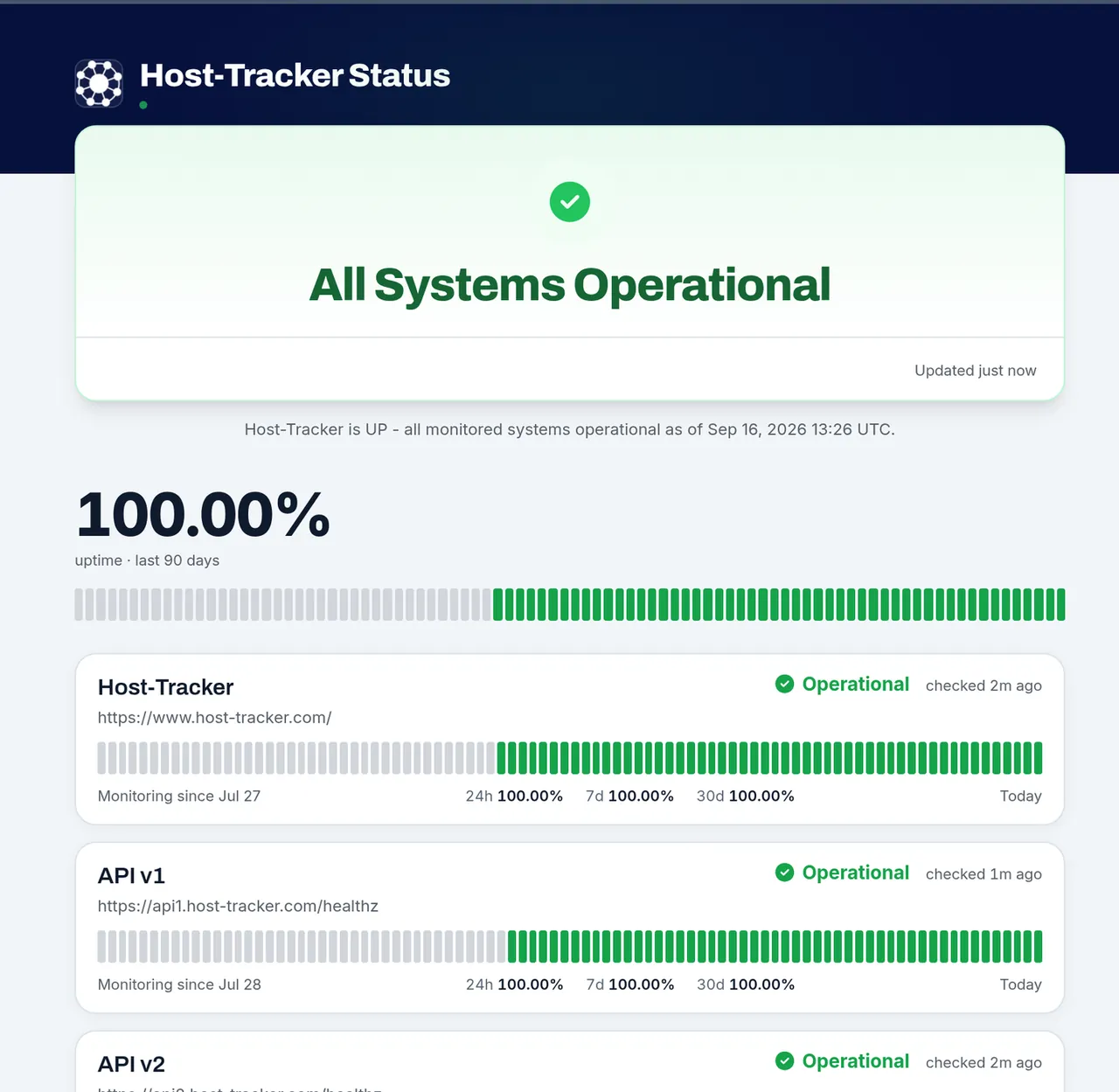
Every component shows real, live-computed status, not a badge someone forgot to update. HostTracker tells "no data yet" apart from "confirmed down," so a quiet monitor is never miscounted as an outage.

Uptime history

24h / 7d / 30d Uptime & History

A 90-day heatmap with hover popovers and a response-time chart give visitors the history behind today's status, not just a single up/down badge.

Components

Components, Grouped Your Way

Add any of your existing monitored checks as a component, reorder them, and group related ones under a shared name - API, Website, Checkout - however your users think about your product.

Incidents

Real Incidents, Not Just Uptime Math

Declare an incident - Investigating → Identified → Monitoring → Resolved - tag the affected components, and post a running update timeline, kept separate from the auto-derived downtime the heatmap already shows.

Subscribers

Subscribers Notified Automatically

Visitors subscribe by email with double opt-in, get a message on every incident update, and can unsubscribe in one click - or skip email and just follow the RSS feed, no mailing list to maintain by hand.

Branding

Your Branding, Optionally Your Domain

Add your logo, an accent color and an announcement banner, and password-protect the whole page if it's private. On Enterprise, publish it under your own domain instead of ours.

Already monitoring your site with HostTracker?
Turn any of your existing monitors into a public status page in a couple of clicks - no new setup required.
Start Free Trial →
See it live

This is HostTracker's own status page

We run our public status page on the exact same feature described above - components, live uptime, incident history and subscriber updates - published at our own status.host-tracker.com subdomain, no special-casing.

Frequently Asked Questions

Yes. HostTracker's permanent free plan covers monitoring two sites, and any monitor you're already running can become a status page component at no extra cost - there's no separate "status page" subscription to buy. A 30-day full-feature trial also unlocks every check type and up to 100 monitors if you want to test a larger setup first, with no credit card required. Paid plans, needed once you outgrow the free monitor limit, start at around $5 a month.

Sign up for a free HostTracker account, add a check for each service you want visitors to see - your website, your API, checkout, whatever matters to your users - then open Status Pages from your dashboard, pick those monitors as components, set a title and accent color, and publish. Your page goes live immediately at its own status.host-tracker.com URL, no separate hosting or DNS work required.

Yes. Anyone can subscribe by email with a double opt-in, and they'll get a message whenever you post or update a real incident. They can unsubscribe with one click at any time, or skip email entirely and follow your page's RSS feed instead.

It's live-computed from HostTracker's own checks against your monitored URL, not a manually set badge. The page shows current up/down status, a staleness indicator if a check hasn't reported recently, 24-hour/7-day/30-day uptime percentages, a 90-day heatmap with hover detail, and a response-time chart - and it correctly distinguishes "no data yet" from "confirmed down" rather than treating both the same.

You declare a real incident - Investigating, then Identified, Monitoring, and finally Resolved - tag which components are affected, and post updates as you learn more. Subscribers are notified on every update, and the incident gets its own page with a full timeline, distinct from the automatically derived downtime the heatmap already shows on its own.

Every page can optionally be password-protected end to end, so only visitors who know the password can view it. A custom domain - publishing under status.yourcompany.com instead of our subdomain - is available as an Enterprise-tier option on top of the free status.host-tracker.com hosting every plan already gets.

Free trial available now

Give your users a place to check status themselves

Create a free HostTracker account and publish your status page today - no credit card required.