
How to Set Up API Monitoring in HostTracker
An API check requests an endpoint the same way an HTTP check does, then goes one step further: it parses the response body as JSON, XML or plain text and validates a specific value inside it, rather than only the status code. Use it for a REST or SOAP endpoint whose data you want to assert on, e.g. a status field, a stock count or a price. If you only need to confirm a URL loads and returns an acceptable status, an HTTP check is the simpler choice.
Main Settings
No screenshot exists for this section for the API type, but it uses the same shared controls as every other check type. Monitoring enabled is the master on/off switch. Interval schedule (1 minute to 24 hours, slider or dropdown) or a Cron schedule builder (every N minutes/hours, daily, weekly, monthly, or a custom expression, paid plan only) controls how often the check runs. Timeout is 1 to 100 seconds; DNS resolution time isn't counted. Tags are comma-separated labels for grouping and filtering. Full Log saves every result instead of grouping identical consecutive ones, and Open Stats publishes the task's statistics and log on a public link. Unlike HTTP, the API form has no DNSBL toggle (DNSBL only persists for Http/Ping/Port); it does carry the same Domain Expiration, Certificate Expiration and Web Risk cards, each running every 12 hours - expiry reminders follow your Up subscriptions below, a bad result follows Down/Repeat.
Request Configuration
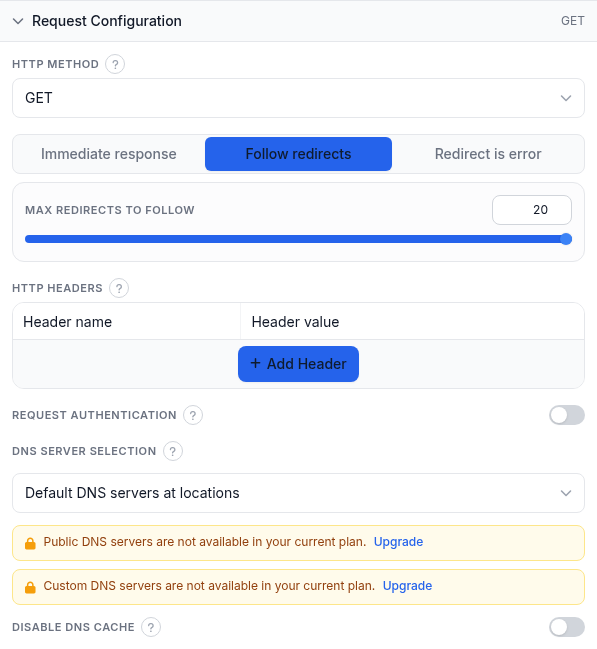
- HTTP Method - GET, HEAD, POST, PUT, DELETE or PATCH. GET (default) is required to read and analyze a response body; HEAD fetches only headers.
- Request body (POST/PUT/PATCH only) - Raw body sends exactly what you type (add your own Content-Type header to describe json/xml/plaintext); POST parameters accepts one
KEY=VALUEper line and is sent as a form-urlencoded body. - Redirect behavior - Immediate response judges the first response as-is; Follow redirects (default) follows the chain, with a Max redirects to follow slider (1-20); Redirect is error fails on any redirect (unavailable under assertion mode).
- HTTP Headers - custom name/value pairs, with datalist suggestions for common API header names and values (Content-Type, Authorization, X-API-Key, Bearer/Basic prefixes and more). Left empty, the probe sends default headers (User-Agent, Accept, Accept-Language, a Referer).
- Request authentication - reveals username/password for the server's own HTTP challenge auth (Basic, Digest, NTLM, Kerberos, Negotiate). For a bearer token or API key, add an Authorization header above instead.
- DNS Server Selection - Default DNS servers at locations; Public DNS servers of location's country; or Manually defined DNS servers (your own resolver IPs). The last two need a paid plan.
- Disable DNS cache - forces a fresh DNS lookup every check instead of reusing the agent's cache.
Response Validation
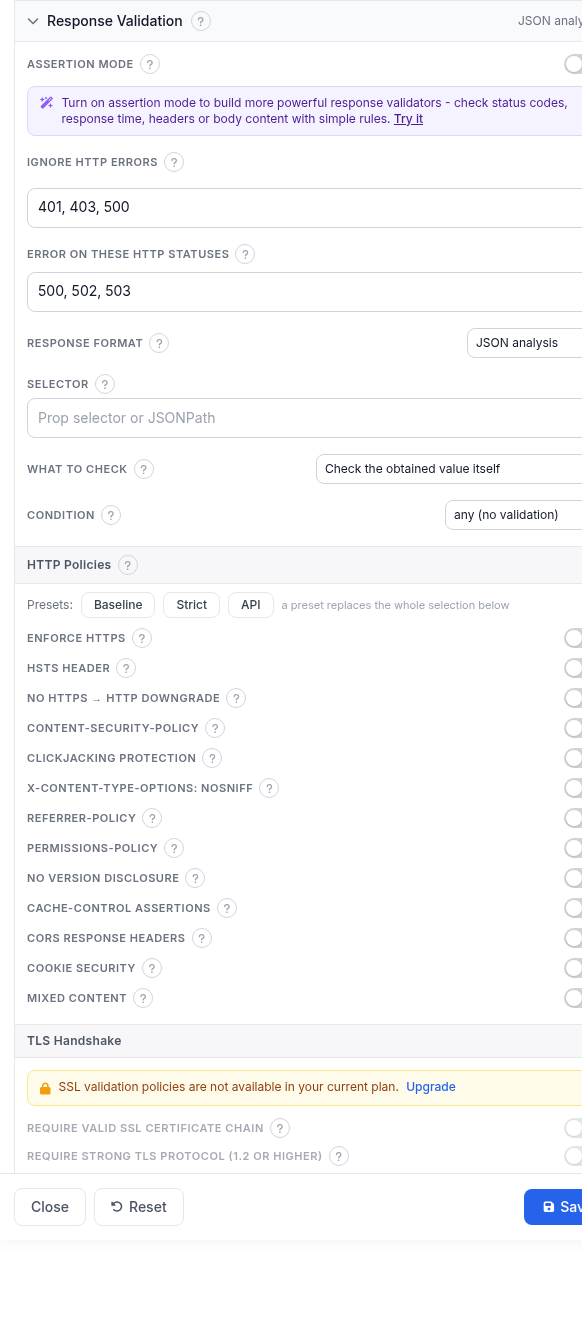
By default a check succeeds when DNS resolves, the connection and TLS handshake (for https) complete, the server returns an HTTP Ok status, and the response parses as the selected format below.
- Assertion mode - the screenshot shows it off, with a banner inviting you to turn it on for status-code, response-time, header or body-content rules. API and HTTP are the only two check types with a working assertion editor; see the assertion-mode deep dive for the full rule language. While it's off, the classic fields below drive the verdict.
- Ignore HTTP Errors - status codes that should NOT fail the check, e.g.
401, 403, 500; empty means every code 400+ is an error. - Error on these HTTP statuses - the reverse: codes that should fail the check even if they normally wouldn't.
- Response format - how the body is parsed before the selector runs: JSON analysis (JSONPath or property selector, shown selected in the screenshot), XML analysis (XPath query), or String analysis (regex with capture). GET is required to read a body.
- Selector - picks a value out of the parsed response; leave empty to use the whole response as the value.
- What to check - by default the condition below judges the selected value itself (Check the obtained value itself); switch to Check the value change between checks, or a per-second/per-minute rate of change, to judge how much the value moved instead.
- Condition - compares the value:
any (no validation)(default, shown in the screenshot),equal to,not equal to,in set of,out of set,less than,less or equal,greater than,greater or equal,in range,out of range,absent in content, orjson null. Every condition except the last two needs a comparison value entered below it. - HTTP Policies - the same opt-in header/cookie/content checks as the HTTP check type: Enforce HTTPS, HSTS header, no https-to-http downgrade, CSP, clickjacking protection, X-Content-Type-Options, Referrer-Policy, Permissions-Policy, no version disclosure, Cache-Control assertions, CORS response headers, cookie security and mixed content. Presets Baseline, Strict and API replace the whole selection; a violation concludes the check as Down like any other failure.
- TLS Handshake - four strictness toggles (paid plan): require a valid SSL certificate chain, require TLS 1.2 or higher, block weak (128-bit or lower) ciphers, and check certificate revocation.
- Expected IPs validation - confirms DNS resolves your host to one of the IPs you list on every check, catching hijacking or a stale record even while some server still answers.
- Max response size - stops reading the body past this size, so the parser and selector only see the downloaded part. Default 1 MB, maximum 10 MB; 0 reads no body.
A note on the screenshots above: they were captured on an account whose package doesn't include the API check type, so the type-selection field there read "not in your package". That is an artifact of the test account, not something you will see - every field and default described here is otherwise exactly what the form shows.
Alert Subscriptions
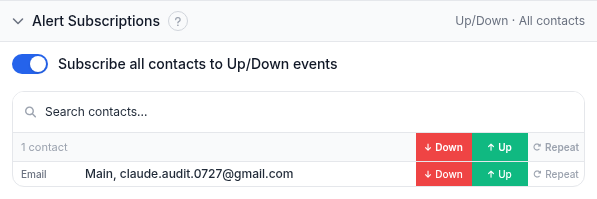
Shared by every check type. Down = the endpoint failed the check, Up = it recovered, Repeat = reminders while it stays down. Subscribe all contacts to Up/Down events is a shortcut; the table gives per-contact control, individually or via reusable contact-group presets. A task with no alert subscriptions still runs and logs results - it just never notifies anyone.
Report Subscriptions
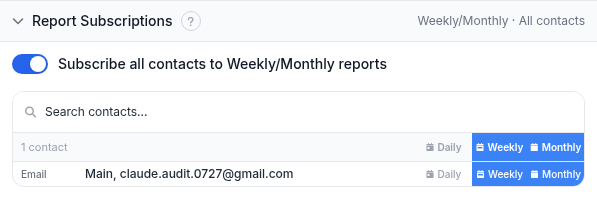
Periodic uptime reports, email only. Choose Daily, Weekly or Monthly per contact; Monthly also bundles in Quarterly and Yearly summaries. The subscribe-all switch works the same as in Alert Subscriptions.
Monitoring Locations
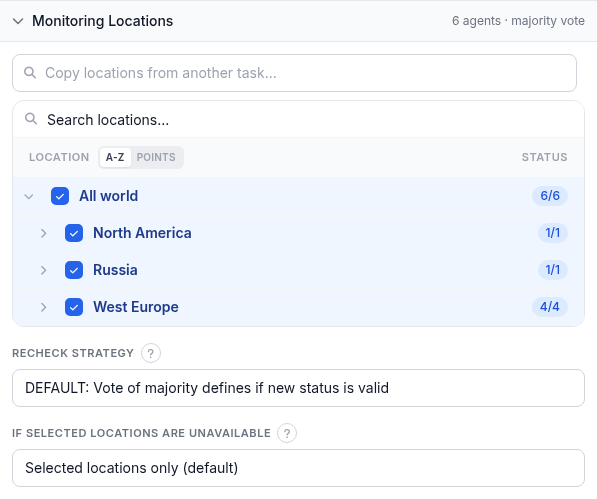
- Location picker - search or browse the region/country tree and tick locations to check from; each row shows agents available versus agents selected. "Copy locations from another task" reuses an existing set.
- Recheck strategy - on a state transition (e.g. Up to Down), several locations re-verify it before the new state is accepted, guarding against a false positive from one region. Options: default majority vote; a specified number of locations confirming Down (adds a 1-7 slider); no recheck; full agreement of every recheck location; or full agreement for Down, majority vote for Up.
- If selected locations are unavailable - Selected locations only (default) waits rather than risk a false alert; Closest locations uses the nearest available location; Any location falls back worldwide.
Worked example
Monitoring a JSON status endpoint: API check, 5-minute interval, 40s timeout, GET, Follow redirects (max 20). Response format JSON analysis, Selector $.status, What to check "the obtained value itself", Condition "equal to" with comparison value ok. Ignore HTTP Errors left empty. Monitoring Locations left at All world with the default recheck strategy. The on-call team's email subscribed to Down, Up and Repeat, and to Weekly reports.
Troubleshooting
- The check always passes even though the endpoint is clearly broken - Condition defaults to
any (no validation), which only judges parsing and transport, not the value itself. Pick a real condition and comparison value once you know what a healthy response looks like. - Selector returns nothing - confirm Response format matches what the endpoint returns (JSON vs XML vs plain text); a JSONPath selector against an XML body never matches. Leave Selector empty first to confirm the whole response comes through, then narrow it down.
- A numeric Condition (greater than, in range, etc.) errors out - it needs the selected value to convert to a number. A selector pointing at a string, or a change-mode calculation with no previous check yet, gives it nothing to compare.
- Went Down right after enabling HTTP Policies (especially Strict) - Strict expects headers many APIs haven't configured. Fix the headers, drop to Baseline, or run the policies as a separate task first.
- The selector stops finding a value on a large response - Max response size cuts the body off, so nothing past the cutoff reaches the parser or the selector. Raise it.
Related
- API monitoring and validation - the product page for this check type.
- Free instant HTTP/API check - run a one-off check with no account needed.
- Assertion-mode response validation rules - the full rule language behind Response Validation.
- HostTracker API - automate monitor management from your own code.
- API v2 documentation - the full reference for the API used to build integrations.
- 429 Too Many Requests - the status an API returns when the caller is rate limited, and what to do about it.
- All monitoring guides - the setup guide for every other check type.