
A Statuspage alternative: hosted status pages on your own domain, on every plan.
Atlassian Statuspage is a dedicated status page product with a Free plan and paid plans from $29 to $1,499 a month. HostTracker is monitoring first: each component on your public status page is a monitor you already run, the page can live on your own subdomain, and it is included in every plan, the Free plan too.
Key takeaways
- Switch if you want the status page and the monitoring in one account: each component on a HostTracker status page is a monitor you already run, while Atlassian's Statuspage pricing page lists incidents, components, maintenance, incident templates and a REST API as core features and no monitoring checks.
- A custom domain such as status.example.com is included on every HostTracker plan, the Free plan too; Atlassian's support documentation says custom domains are not available on the Statuspage Free plan, while its marketing page says all plans include one, so confirm it before you buy.
- Statuspage's paid plans cost $29, $99, $300 and $1,499 a month, with a Free plan of 100 subscribers and 25 components; HostTracker status pages are included in every plan, from $0, and the Webmaster plan is $14 a month.
- Do not switch expecting more subscribers or SMS: Statuspage allows 250 to 25,000 subscribers on its paid plans against 200 to 2,000 per page on HostTracker's Webmaster to Enterprise plans, and its Startup plan adds SMS notifications, which HostTracker status pages do not send.
- Every HostTracker status page shows a small 'Powered by HostTracker' credit on every plan, and no plan removes it.
Four honest reasons
The price steps up quickly
Statuspage's paid plans run $29, $99, $300 and $1,499 a month, with the subscriber allowance rising from 250 to 25,000. A HostTracker status page is part of every plan: $14 a month on Webmaster, $29 on Business, and the monitors that feed the page are included.
The page and the monitoring are two products
Atlassian lists incidents, components, scheduled maintenance, incident templates, page analytics and a REST API as Statuspage's core features, and no monitoring checks. On HostTracker each component is a monitor you already run, so the status follows the same confirmed checks that send your alerts, with nothing to connect.
Your own domain, even on the Free plan
Atlassian's support documentation says custom domains work on public pages except on the Free plan, though its marketing page says all plans. HostTracker includes a custom domain on every plan, Free included, with the certificate issued for you.
An SLA record visitors can download
Set a target and the page shows uptime against it, the 30-day error budget and a 12-month history that any visitor can download as CSV. A prospect can ask for the record without asking you.
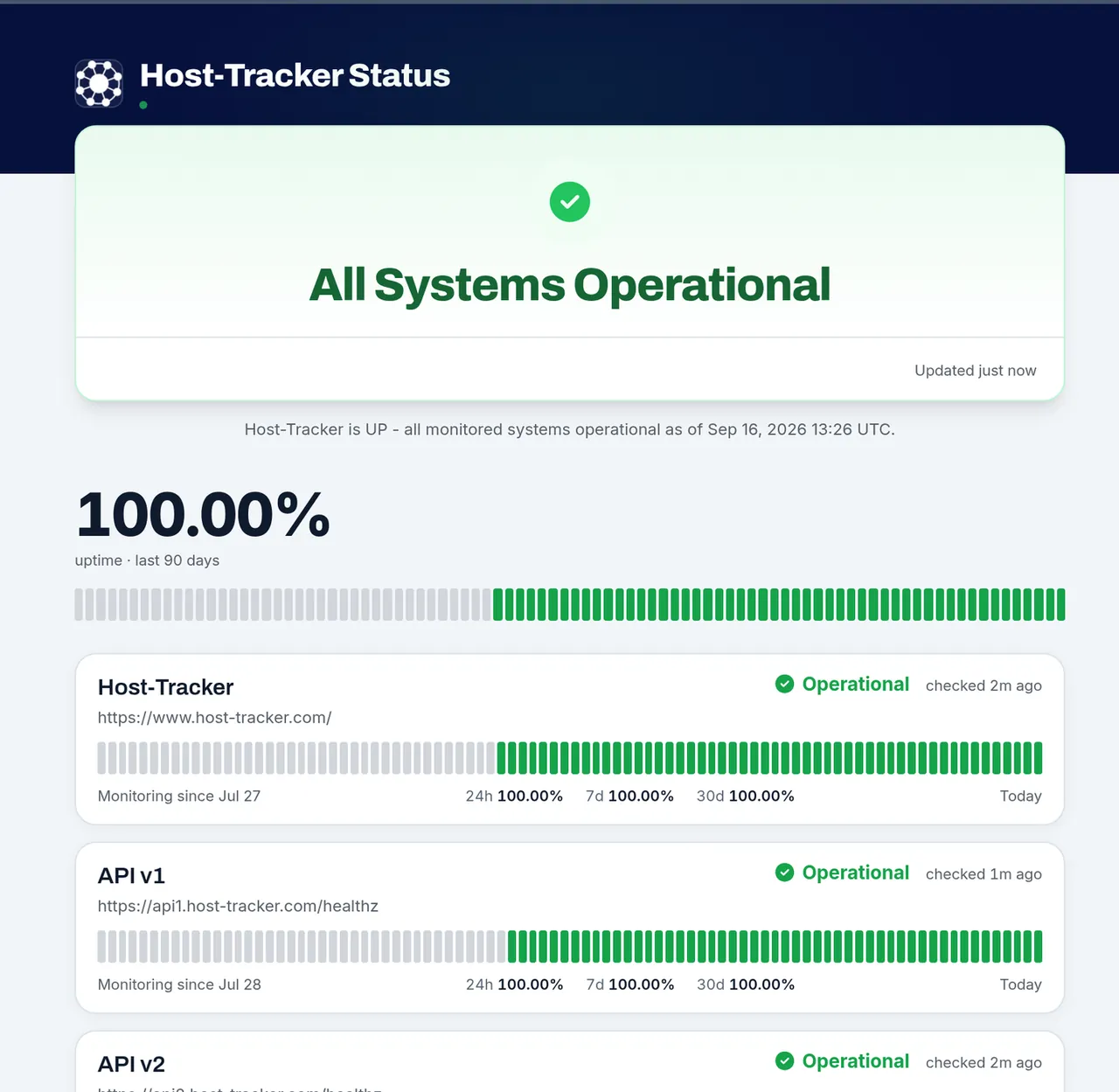
A live public status page, built from monitors
Live status per component, uptime windows and a 90-day bar for each service, on a page built from the same checks that send your alerts.
HostTracker vs Atlassian Statuspage, feature by feature
The marks go both ways: Statuspage is stronger on subscriber allowance, SMS notifications, custom HTML and CSS and the size of its Free plan. As of October 2026:
| HostTracker | Statuspage | |
|---|---|---|
| Status page | ||
| Status follows live monitoring | Each component is a monitor you already run | Monitoring checks are not among the listed core features |
| Incidents with an update timeline | Investigating, Identified, Monitoring, Resolved | Yes |
| Scheduled maintenance | Failures inside a window shown as maintenance | Yes |
| Incident templates | Saved presets for incident updates | Yes |
| Component groups | Yes | Yes |
| Uptime history on the page | 24h, 7d, 30d and 90d, plus 30/60/90-day bars | Page analytics listed; history length not published |
| Password-protected page | Optional on every page | Private pages at the same prices; audience-specific pages from $300/month |
| Domain and branding | ||
| Custom domain | Every plan, Free included; subdomains only | Public pages except on Free (support docs); all plans (marketing page) |
| SSL certificate on the custom domain | Issued for you once the DNS records resolve | Included on all plans |
| Custom HTML and CSS | Logos, colors, theme, layout and section settings | Depending on plan |
| Remove the vendor credit | 'Powered by HostTracker' stays on every plan | Not published |
| Subscribers and alerts | ||
| Email subscribers | Double opt-in, one-click unsubscribe | Yes |
| SMS to subscribers | No | Startup plan and above |
| Slack, Teams and webhook channels | Added by the page owner | Slack and Teams on Free; webhook from Startup |
| RSS and Atom feeds | Yes | Not published |
| SLA and data | ||
| SLA target and error budget on the page | Webmaster plan and above | Not published |
| 12-month SLA history with CSV export | Also served as JSON | Not published |
| REST API | API v2 includes status pages; Solo, Business, Enterprise and trial | On every plan, Free included |
| Pricing | ||
| Cheapest paid plan | $5/month (Personal: 5 components, 50 subscribers) | $29/month (Hobby: 250 subscribers) |
| Subscribers | 10 / 200 / 500 / 2,000 per page on Free / Webmaster / Business / Enterprise | 100 / 250 / 1,000 / 5,000 / 25,000 on Free / Hobby / Startup / Business / Enterprise |
| Components on the Free plan | 1 | 25 |
Statuspage facts come from Atlassian's own pricing, support and customization pages, checked on 24 October 2026. Atlassian's support documentation and marketing page disagree on custom domains for the Free plan, so both are shown. Anything those pages do not state renders as 'Not published' rather than a guess. Found something out of date? Tell us and we will fix it.
Sources, verified as of 2026-10-24:
What a status page costs on each side
- A public status page on every plan, with a custom domain on every plan
- Webmaster $14, Business $29, Enterprise $99 a month, monitors included
- 10 / 200 / 500 / 2,000 email subscribers per page on Free / Webmaster / Business / Enterprise
- No SMS to subscribers, no custom HTML or CSS
- Free: 100 subscribers, 25 components, two team members, email, Slack and Teams
- Hobby $29, Startup $99, Business $300, Enterprise $1,499 a month
- 250 / 1,000 / 5,000 / 25,000 subscribers; SMS and webhook from Startup
- Monitoring checks are not among the listed core features
HostTracker prices are from the live pricing page; Statuspage prices from Atlassian's pricing page, both checked 24 October 2026. Atlassian bills yearly plans through a manual order form.
What each HostTracker plan includes for status pages
The figures below are the status page rows of the pricing page's comparison table, plus the SLA rule from the product itself.
| Plan | Price | Monitors | Status pages | Components per page | Email subscribers per page | Custom domain | SLA target and export |
|---|---|---|---|---|---|---|---|
| Free | $0 | 2 | 1 | 1 | 10 | Yes | No |
| Personal | $5/month | 5 | 1 | 5 | 50 | Yes | No |
| Webmaster | $14/month | 10 | 2 | 10 | 200 | Yes | Yes |
| Business | $29/month | 25 | 5 | 25 | 500 | Yes | Yes |
| Enterprise | $99/month | 150 | 10 | 150 | 2,000 | Yes | Yes |
| 30-day trial | $0, no card | 100 | 10 | 100 | 2,000 | Yes | Yes |
Monthly prices as listed on the pricing page, which also shows annual prices, the Solo plan and the larger Enterprise sizes. Every plan shows a small 'Powered by HostTracker' credit in the status page footer, and no plan removes it.
What a HostTracker status page includes
- Components from your monitors
- Add any monitor as a component, group them the way your users think about the product, and the status updates from the same confirmed checks that send your alerts. Each component carries a 90-day uptime bar, with 30 and 60 days as options.
- Incidents
- Declare an incident, tag the affected components and post updates through Investigating, Identified, Monitoring and Resolved. Each incident has its own page with the full timeline, and saved templates speed up the wording.
- Maintenance
- Schedule a window with a start, an end and the components it touches. Visitors see it in advance, and failures inside the window show as maintenance instead of downtime.
- Subscribers
- Visitors subscribe by email with double opt-in and leave from the link in any message. RSS and Atom feeds are on the page, and you can add Slack, Microsoft Teams and webhook channels yourself.
- SLA record
- Set an SLA target and the page shows uptime against it, the 30-day error budget and a 12-month history that visitors can download as CSV. Available from the Webmaster plan.
- Access and reuse
- Password-protect a page, embed a status card or badge on your site, read the page as status.json, or manage everything through the REST API, the CLI and the MCP server.
Put the page on status.yourcompany.com
- Choose a subdomain. For example status.example.com. Only subdomains are supported, not a bare apex domain.
- Add two DNS records. A CNAME from the subdomain to
domains.host-tracker.com, and a TXT record that proves you own the name. The page shows you both values. - Check and go live. Once both records resolve, HostTracker issues the certificate and serves the page on your domain. The Free plan can do this too.
The DNS records stay in your own zone, so you control where the name points. The footer credit stays on the page whichever plan you choose.
Move from Statuspage without a gap
- Add a monitor for each service your page shows. HTTP, API, ping, port, transaction and the other monitor types all work as components. The 30-day trial fits 100 monitors with no credit card.
- Build the page. Create a status page, add those monitors as components in the same groups, set the name, logo and colors, and turn on the sections you want.
- Point your subdomain at it. Add the CNAME and TXT records described above, or keep the HostTracker address while you test.
- Tell your subscribers. There is no subscriber import, so send the new address and let people subscribe again. Keep the old page running while both are live, and cancel it once the new one has carried a real incident.
When Statuspage is the better choice
Choose Atlassian Statuspage if your audience is large or expects text messages. Its paid plans allow 250 to 25,000 subscribers against HostTracker's 200 to 2,000 per page, SMS notifications arrive with its Startup plan, its Free plan holds 25 components where ours holds one, and Atlassian says custom HTML and CSS are available depending on the plan. It also offers private and audience-specific pages and SSO through Atlassian Guard. If you already run Atlassian tools and only need a page, that is a strong reason to stay.
Choose HostTracker if you want one account for the monitoring and the page, a custom domain on every plan, a downloadable SLA record, and a price that starts at $0 and reaches $29 for 25 components and 500 subscribers per page.
Frequently Asked Questions
Yes, if you want the status page and the monitoring in one account. Every component on a HostTracker status page is one of the monitors you already run, so its status follows the same confirmed checks that raise your alerts, and the page is included in every plan. Atlassian's pricing page lists incidents, components, scheduled maintenance, incident templates, page analytics, component groups, a REST API and automation integrations as the core features of Statuspage, with no monitoring checks among them. Statuspage is the better fit when you need very large subscriber lists, SMS notifications to subscribers or custom HTML and CSS.
Atlassian lists a Free plan and paid plans at $29 (Hobby), $99 (Startup), $300 (Business) and $1,499 (Enterprise) a month, with 250, 1,000, 5,000 and 25,000 subscribers; audience-specific pages start at $300 a month. HostTracker status pages are included in every plan: Free at $0, Webmaster at $14 a month, Business at $29 and Enterprise at $99, with 10, 200, 500 and 2,000 email subscribers per page. The HostTracker price also covers the monitors that feed the page. Prices were checked on 24 October 2026.
Yes. A custom domain such as status.example.com is included on every HostTracker plan, the Free plan too, as the pricing page's comparison table shows. You add a CNAME record to domains.host-tracker.com and a TXT record that proves you own the name, and HostTracker issues the certificate once both resolve. Only subdomains are supported, not a bare apex domain. Atlassian's support documentation says public pages can use a custom domain except on the Free plan, while its marketing page says all plans include one, so check the current rule on their side.
Yes. The HostTracker Free plan includes one public status page with one component, a custom domain and up to 10 email subscribers; the component is one of your own monitors. Atlassian's Free plan is larger on paper: 100 subscribers, 25 components and two team members, with email, Slack and Microsoft Teams notifications. If your free page needs many components or subscribers, Statuspage's free tier gives you more room; if it needs your own domain on a free plan, HostTracker does.
No. Every public status page shows a small 'Powered by HostTracker' credit in its footer, on every plan, and it cannot be switched off. Name, logos, favicon, colors, theme, layout density, grouping and the sections visitors see are all yours to set. If you need custom HTML or CSS, Atlassian's customization page says Statuspage offers it depending on the plan.
Components built from your monitors with live status and a 90-day uptime bar per component (30 or 60 days if you prefer), uptime for 24 hours, 7, 30 and 90 days, a response-time chart, incidents with an Investigating, Identified, Monitoring and Resolved timeline, saved incident templates, scheduled maintenance windows, email subscribers with double opt-in and one-click unsubscribe, RSS and Atom feeds, Slack, Microsoft Teams and webhook channels, an embeddable card and badge, a status.json endpoint, optional password protection and a REST API. The SLA target, error budget and 12-month SLA history are included from the Webmaster plan.
No. Visitors subscribe by email, and can follow the RSS or Atom feed instead. You can add Slack, Microsoft Teams and webhook channels yourself. Atlassian's pricing page lists SMS notifications on its Startup plan and above, so a page whose audience expects text messages is a reason to choose Statuspage.
When you set an SLA target on a page, HostTracker shows uptime against it, the 30-day error budget (minutes allowed and minutes used) and a table of the last 12 months with each month's uptime and whether it met the target. A month's figure is the weakest component's figure. Anyone viewing the page can download that table as a CSV file, and the same data is served as JSON at /status/your-page/sla-export.json. It is available on the Webmaster plan and above, and a password-protected page does not publish it.
Add a monitor for each service your current page shows, create a HostTracker status page and add those monitors as components in the same groups, then point a subdomain at the page with the CNAME and TXT records. There is no subscriber import, so announce the new address to your subscribers and keep the old page running while both are live. The 30-day trial fits 100 monitors and needs no credit card, so you can build the new page before you cancel anything.
A hosted status page runs on the provider's infrastructure, so it stays reachable when your own servers fail, and there is nothing to patch or back up. A self-hosted page gives you full control of the code and the data, but you run it and must keep it apart from the product it reports on. HostTracker is a hosted service: the page lives on its infrastructure and can be served from your own subdomain.
Keep exploring HostTracker's monitoring
The status page feature in full
Live status, incidents, maintenance, subscribers and the guide to what belongs on a public status page.
Comparing monitoring tools instead?
How HostTracker stacks up against Pingdom on price, checks and alerting.
Looking at UptimeRobot?
Free plans, intervals, check depth and alerting compared honestly.
Automate it all
The REST API v2 behind every monitor and status page - 182 operations, SDKs, CLI and MCP.
A status page that runs on your monitors
Start the 30-day trial - 100 monitors, every feature, no credit card - and put the page on your own domain.