
Comment surveiller l'expiration d'un certificat SSL
Un moniteur d'expiration de certificat se connecte à un point de terminaison TLS selon un horaire fixe et relit la date d'expiration du certificat serveur, pour que vous l'appreniez des semaines avant l'échéance plutôt que lorsqu'un navigateur commence à afficher une page d'avertissement à vos visiteurs. C'est l'un des types de vérification HostTracker « configurez et oubliez » : pas de corps de requête, pas de règle de réponse, pas de sélecteur d'emplacement. Vous saisissez un hôte et c'est terminé. Choisissez ce type quand ce que vous gérez est le certificat, comme une tâche de renouvellement Let's Encrypt ou un certificat acheté auprès d'une AC, plutôt que l'enregistrement du domaine lui-même. La comparaison avec la surveillance d'expiration de domaine se trouve plus bas, puisque ce sont les deux types de vérification que les lecteurs confondent le plus souvent.
Paramètres principaux
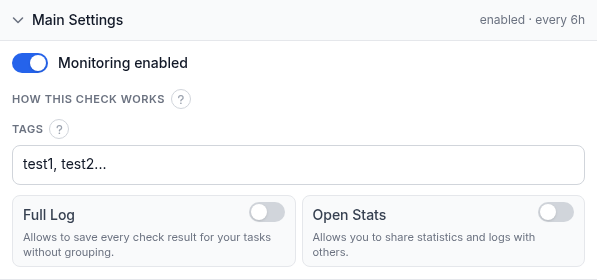
Deux champs se trouvent au-dessus de ce panneau, et le panneau lui-même en contient quatre de plus :
- Domaine / IP - l'hôte auquel se connecter via TLS. Saisissez un domaine ou une IP simple ; le
port 443 est supposé sauf si vous en ajoutez un explicitement, par exemple
example.com:8443pour un certificat servi sur un port non standard. - Nom (facultatif) - une courte étiquette pour ce moniteur dans les alertes, les rapports et votre tableau de bord. Laissez-le vide et HostTracker se rabat sur le domaine.
- Surveillance activée - suspend ou reprend la vérification sans la supprimer. Désactivez-la avant un remplacement de certificat planifié pour qu'un court écart entre l'ancien et le nouveau certificat ne déclenche pas une fausse alerte.
- Comment fonctionne cette vérification - une note d'information repliée expliquant la mécanique : la vérification se connecte via TLS et relit la date d'expiration du certificat, selon un horaire fixe de toutes les 6 heures depuis le réseau de surveillance propre de HostTracker. Il n'y a pas de curseur d'intervalle pour ce type ; voir plus bas pourquoi.
- Étiquettes - des étiquettes en texte libre pour filtrer et regrouper ce moniteur sur votre tableau de bord.
- Journal complet - enregistre chaque résultat de vérification individuel au lieu de regrouper les résultats identiques consécutifs. Activez-le pour un historique complet plutôt que seulement les changements d'état.
- Statistiques ouvertes - génère une page de statistiques publique et partageable pour ce moniteur. Laissez-le désactivé pour un hôte interne ou non public.
Pourquoi 6 heures et pas un intervalle de l'ordre de la minute : la date d'expiration d'un certificat ne bouge pas entre deux vérifications. Elle ne change que lorsque quelqu'un en émet un nouveau. Interroger toutes les quelques minutes répéterait la même réponse sans aucun bénéfice ; vérifier quatre fois par jour reste assez rapide pour détecter un renouvellement raté dans la même journée ouvrable. Vous n'avez pas non plus besoin de configurer un délai d'anticipation pour prendre de l'avance sur une expiration : HostTracker envoie automatiquement un rappel informatif à 30, 7 et 1 jour avant la date d'expiration du certificat, à chaque contact auquel vous avez donné un abonnement Up ci-dessous (tous les canaux sauf l'appel vocal, réservé aux vraies pannes). Ces rappels sont distincts d'une alerte Down. Un certificat encore valide mais dont l'expiration approche est un rappel, pas un échec ; la vérification ne passe Down qu'une fois le certificat expiré.
Abonnements aux alertes
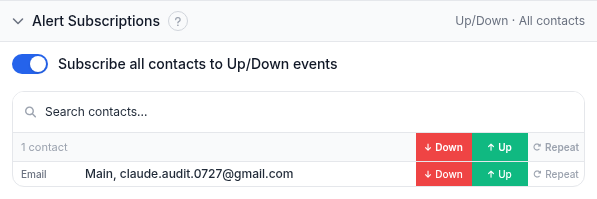
C'est le même panneau d'abonnements que chaque type de vérification utilise. Activez S'abonner tous les contacts aux événements Up/Down pour mettre tous les contacts de votre compte sur les deux événements à la fois, ou utilisez le champ de recherche et les interrupteurs par contact Down / Up / Repeat pour construire une liste précise :
- Down - notifié quand le certificat a expiré.
- Up - notifié quand une vérification se rétablit après un Down (un nouveau certificat a été installé), et, spécifiquement pour ce type de vérification, reçoit aussi les rappels automatiques d'expiration à 30/7/1 jours décrits ci-dessus.
- Repeat - continue d'envoyer l'alerte Down selon un horaire régulier tant que le certificat reste expiré, plutôt que d'alerter une fois et de se taire.
Un certificat public expiré est le genre d'échec qui coûte la confiance dès l'instant où le navigateur d'un visiteur affiche la page d'avertissement, donc laisser cette section vide va à l'encontre du but de la vérification. Elle enregistre l'expiration et ne le dit à personne.
Abonnements aux rapports
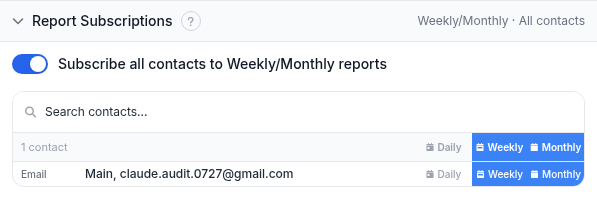
Les rapports sont des résumés périodiques plutôt que des alertes déclenchées par un événement, utiles si quelqu'un dans votre équipe veut une synthèse hebdomadaire ou mensuelle fixe de l'état des certificats plutôt que d'être averti au moment précis où quelque chose expire. Ils ne vont qu'aux contacts e-mail. Laissez-le désactivé si les Abonnements aux alertes ci-dessus couvrent déjà qui doit être prévenu.
Exemple concret
Vous gérez une page de paiement sur pay.example.com derrière un certificat qui se renouvelle
automatiquement via Let's Encrypt, mais vous vous êtes déjà fait avoir par une tâche de renouvellement qui a
échoué sans prévenir personne. Créez un moniteur d'expiration de certificat pour pay.example.com,
laissez Surveillance activée sur oui, ajoutez l'étiquette payments, et abonnez vos contacts e-mail et
Slack d'astreinte à Up et Down (Up pour qu'ils reçoivent aussi les rappels à 30/7/1 jours). Passez Journal complet
à moins de vouloir un historique complet par vérification. Pour une vérification qui change d'état peut-être deux
fois par an, la vue regroupée est plus facile à lire. Rien d'autre à configurer : la vérification s'exécute
désormais toutes les 6 heures, et vous entendrez parler d'un renouvellement qui dérape trois fois distinctes
avant que cela ne devienne une panne.
Dépannage
- Le moniteur affiche Down mais le site se charge bien dans un navigateur. Les navigateurs mettent les certificats en cache et tolèrent souvent un problème de chaîne qu'une poignée de main TLS fraîche ne tolérera pas. Confirmez avec l'outil gratuit de vérification SSL depuis une session propre, ou vérifiez si le certificat sur cet hôte:port exact a changé.
- Vous avez ajouté un port mais la vérification se connecte toujours sur le 443. Le port
doit faire partie du champ Domaine / IP lui-même, écrit sous la forme
host:port. Il n'y a pas de champ de port séparé pour ce type de vérification. - Aucun rappel n'est arrivé à 30 ou 7 jours. Les rappels ne vont qu'aux contacts ayant un abonnement Up sur ce moniteur précis. Cochez d'abord cette case, puis confirmez que le canal du contact n'est pas l'appel vocal, qui ne porte jamais ces avis.
- Vous avez renouvelé le certificat mais voyez toujours une date d'expiration obsolète. La vérification s'exécute selon son propre horaire de 6 heures et n'est pas liée à votre déploiement ; attendez la prochaine exécution programmée, ou ouvrez le moniteur et utilisez son action de vérification immédiate si votre forfait en inclut une.
- Vous vouliez surveiller l'enregistrement du domaine, pas le certificat. Mauvais type de vérification ; voir la section suivante.
Voir aussi
- Tous les guides de surveillance - le point central pour chaque type de vérification HostTracker.
- Comment vérifier la date d'expiration d'un certificat SSL - la version ponctuelle de cette vérification, par navigateur et par ligne de commande.
- Vérifications de domaine et TLS - la page produit couvrant à la fois la surveillance de certificat et d'expiration de domaine, y compris toute l'échelle de rappels à 30/7/1 jours et en quoi elle diffère d'une vraie alerte Down.
- Outil gratuit de vérification SSL - une vérification de certificat ponctuelle sans compte requis, utile pour confirmer ce qu'un moniteur rapporte.
- Guide d'expiration de domaine - la vérification pour un enregistrement expiré, un échec différent avec un responsable différent.
- Guide de la vérification HTTP - l'expiration de certificat est aussi disponible comme tuile jointe sur un moniteur Http, Port ou API, profitant de cette vérification au lieu de tourner comme son propre moniteur séparé.