
How to Monitor Domain Registration Expiration
- guide
- domain expiration monitoring
- whois monitoring
- domain and tls checks
- dns monitoring
A Domain expiration monitor runs a registration lookup against your domain on a fixed schedule and tells you when that registration is about to lapse - a completely different failure from a certificate expiring, and one that is easy to confuse with it. Losing a domain registration means the domain stops resolving at all: your site, your email, everything behind it goes dark until you re-register it, sometimes at a markup once a registrar's redemption period kicks in. Losing a TLS certificate means the site is still there but a browser refuses to trust it. Different failure, usually a different owner (whoever holds the registrar account versus whoever manages certificates), and a different fix. If it is the certificate you are worried about, see the certificate expiration guide instead - the two check types sit side by side in the monitor picker and this pairing is the single most common mix-up in setup.
Main Settings
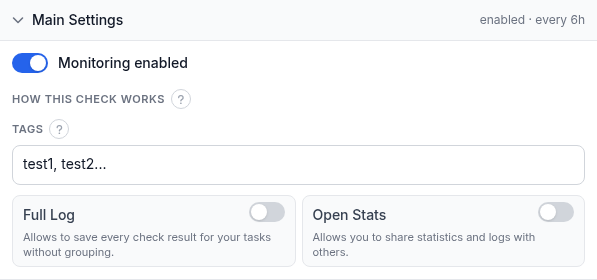
Two fields sit above this panel, and the panel itself holds four more:
- Domain - the registration to look up. This field only accepts a real domain name: a bare
IP address is rejected (an IP has no registration expiration to monitor), and so is a single top-level label
on its own - you need a full domain like
example.com, not justcom. - Name (optional) - a short label for this monitor in alerts, reports, and your dashboard. Leave it blank and HostTracker falls back to the domain.
- Monitoring enabled - pauses or resumes the check without deleting it.
- How this check works - a collapsed info note: the check runs on a fixed schedule, every 6 hours, from HostTracker's own monitoring network. There is no interval slider for this type - see below for why.
- Tags - free-text labels for filtering and grouping this monitor on your dashboard.
- Full Log - saves every individual check result instead of grouping consecutive identical ones.
- Open Stats - generates a public, shareable stats page for this monitor.
Why 6 hours and not a minute-scale interval: a domain's expiration date is set by its registrar and does not change between lookups except on the day it is renewed or lapses, so there is nothing to gain from polling more often. You also do not need to configure a lead time separately - HostTracker automatically sends an informational reminder at 30, 7, and 1 day before the registration expires, to every contact you have given an Up subscription below. Those reminders are separate from a Down alert: the check only goes Down once the registration has actually expired, not while it is merely approaching that date.
Alert Subscriptions
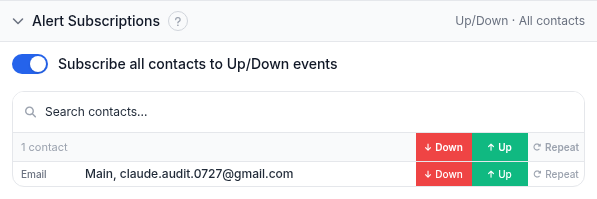
The same subscriptions panel every check type uses. Toggle Subscribe all contacts to Up/Down events to put every contact on both events at once, or use the search box and the per-contact Down / Up / Repeat switches to build a specific list:
- Down - notified when the domain registration has actually expired.
- Up - notified on recovery, and is also who receives the automatic 30/7/1-day expiry reminders described above.
- Repeat - keeps sending the Down alert on a schedule while the registration stays expired, instead of alerting once and going quiet.
Put the registrar-account holder here, not just whoever set up the monitor - domain renewals are commonly owned by a different person than the one watching the dashboard, and a reminder that reaches only the wrong inbox is a reminder that gets missed.
Report Subscriptions
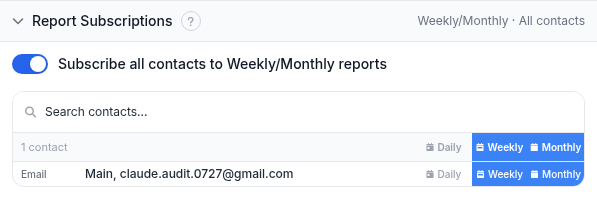
Periodic email summaries rather than event-driven alerts - useful for a standing digest, less useful as your only safety net for something as consequential as a lapsed registration. Reports go to email contacts only.
Worked example
Your company's domain example.com renews every two years through a registrar account only your
finance lead has access to, and last year a renewal invoice went to an inbox nobody checked. Create a Domain
expiration monitor for example.com, subscribe the finance lead's email and your own to Up (so both
of you get the 30/7/1-day reminders) and Down. Leave Full Log off - a registration that renews every two years
does not need a per-check history, the grouped summary is plenty. From here the monitor runs every 6 hours on
its own; the first reminder arrives a month before the renewal deadline, with two more behind it if nothing
happens.
Troubleshooting
- The domain field rejects your entry. This check only accepts a real registered domain
name - not a bare IP, and not a single label like
comon its own. Enter the full domain, for exampleexample.com. - You want to monitor a subdomain's expiration. A subdomain does not have its own registration - only the base domain does. Point the monitor at the registered domain itself.
- The check shows Down but the site is still up. A domain can resolve and serve traffic for a short window even after its registration lapses, depending on the registry's grace period. Confirm the actual registration status with the free whois lookup tool before assuming a false alarm.
- No reminder arrived at 30 or 7 days out. Reminders go only to contacts with an Up subscription on this specific monitor - check that box, and make sure the contact is not a voice-call channel, which never carries these notices.
- You meant to monitor the SSL/TLS certificate, not the domain registration. Wrong check type - domain registration and certificate expiration are unrelated failures with the same-looking name; see the certificate expiration guide.
Related
- Domain and TLS checks - the product page covering both certificate and domain expiration monitoring, including the full 30/7/1-day reminder ladder.
- Free whois check tool - a one-off registration lookup with no account needed.
- DNS lookup tool and DNS query tool - useful when a domain issue turns out to be a resolution problem rather than an expired registration.
- Certificate expiration guide - the check for an expiring TLS certificate, a different failure from a lapsed domain.
- HTTP check guide - domain expiration is also available as an attached tile on an Http, Port, or API monitor, riding along with that check instead of running as its own separate monitor.