Ping Monitoring: Watch Any Host, Around the Clock
Ping monitoring repeats an ICMP check on a schedule instead of only when you remember to run one. HostTracker pings your server, router or device from 300+ checkpoints worldwide, as often as once a minute, and alerts you the moment the replies stop.
The ping you already run, running forever
Same protocol, same four packets, same round-trip numbers you would read in a terminal - repeated from three continents, stored, graphed, and attached to a phone that rings.
Continuous, not on demand
Pick an interval from one minute to twenty-four hours, or write a cron-style schedule of your own. The check runs whether or not anybody is watching, which is the entire point: outages do not wait for office hours, and the gap between "it broke" and "we found out" is the only number that ever matters.
From 300+ checkpoints
HostTracker's fleet spans 300+ checkpoints across 158 cities, and a ping monitor runs from the regions you select. Latency is mostly a function of distance, so measuring from where your users actually are is what turns a raw millisecond figure into something you can act on.
Nine ways to be told
Email, SMS, voice call, webhook, Slack, web push, Telegram, Discord and Viber - each contact with its own delay, so an on-call engineer hears immediately and a manager only if it is still broken an hour later. A recovery notice follows when the host starts answering again.
What ping monitoring actually is
Ping is the oldest useful question on a network: I am sending you a small packet, please send it straight back. The protocol is ICMP, the packet type is an echo request, and the answer - an echo reply - tells you two things at once. That the host is reachable, and how many milliseconds the round trip took.
Ping monitoring, sometimes written ICMP monitoring, is that question asked
on a loop. A monitoring service sends the echo requests for you, from outside your network, every few
minutes, indefinitely - and does three things a person typing ping cannot. It keeps every
result, so latency becomes a graph instead of a memory. It asks from several places at once, so you can
tell a broken host from a broken route. And it tells somebody when the answers stop, which is the only
part of monitoring that actually reduces downtime.
The reason ping monitoring survives in an era of elaborate observability stacks is that it costs almost nothing and needs nothing installed. There is no agent on the device, no SDK in your code, no port to open, no credential to rotate. If the thing has an address and answers ICMP, it can be monitored - which makes ping the natural monitor for the enormous category of network equipment that will never run a monitoring agent: routers, switches, firewalls, VPN endpoints, cameras, industrial gateways and appliances.
One honest caveat, stated up front. A host that is configured to ignore ICMP cannot be monitored by ping, no matter how healthy it is. That is not a HostTracker limitation, it is what blocking ICMP means. Check with a free instant ping test before you build the monitor - if the host answers, ping monitoring is an excellent, cheap, low-noise choice; if it does not, use an HTTP availability check or a TCP port check instead. There is a whole section on this below.
A ping test tells you about right now. Ping monitoring watches the rest of the time.
Most people arrive at ping monitoring from a ping test. Something felt wrong, they ran a free online ping test, and it either confirmed the problem or - more often, and more annoyingly - came back perfectly healthy because whatever went wrong had already gone away. That second outcome is the whole argument for monitoring. A one-off test can only ever describe the seconds it ran in. What you actually wanted was a continuous ping test: the same four packets, sent again and again without you, with somebody told when they stop coming back.
| One-off ping test | Continuous ping monitoring | |
|---|---|---|
| When it runs | When you click the button | Every 1 to 1440 minutes, forever |
| Who has to be present | You | Nobody |
| Catches a 3 a.m. outage | No - unless you were awake and testing | Yes - and it wakes the right person |
| Latency history | None - the numbers vanish when you close the tab | Every check kept - average, minimum, maximum and p95 over any period |
| Guards against a false alarm | No - one result, take it or leave it | Yes - a quorum of independent checkpoints must agree |
| Tells you the uptime percentage | No | Yes - computed from every recorded state change |
| Sends alerts | No | Nine channels, per-contact delays, recovery notices |
| Cost | Free, no login | Free for 2 monitors; from $5/month beyond that |
Both are useful and neither replaces the other. Keep the instant test for triage - it is the fastest way to answer "is this thing responding at all" while you are already in the middle of something. Use monitoring for the hosts whose failure has a cost, because for those, finding out late is the expensive part. The companion guide on how to read ping results covers round-trip time, packet loss and the classic surprises in more depth.
How one HostTracker ping check runs
A check begins with a DNS resolution of your target. By default the checkpoint uses its own local resolver - which is deliberate, because it means the check exercises the same name lookup a real visitor in that region would get. You can override that with up to four resolver IPs of your own, pin the check to public-DNS-filtered locations, or declare which resolvers the answer is expected to come from.
Then it sends four ICMP echo requests to the resolved address, one after another, allowing one second for each reply. Every packet that answers contributes its round-trip time and the address that actually replied; every packet that does not contributes the reason it failed. The target can be a host name or a literal IPv4 or IPv6 address - a ping monitor is addressed at a host, so a URL is reduced to its host name and any path or port is ignored.
The verdict is deliberately not "one packet was lost, sound the alarm". The check passes when more than half the packets come back. And if most of them fail, HostTracker still does not conclude yet: it repeats the round against the next address the name resolved to, up to three candidates in total, recording each address that failed on the way. Only when no candidate answers does the check report down. One dead A record in a multi-address DNS answer therefore cannot take down a monitor for a service that is genuinely healthy - a failure mode that catches out a surprising number of simpler tools.
Notice what is not on that list: there is no packet-count or timeout dial to get wrong. Every ping monitor runs the same four-packet round, so results are comparable across your whole estate and across time, and nobody has to remember why one monitor was set to two packets in 2023.
Setting up a ping monitor
- Check the host answers ICMP at all. Run a free instant ping test against it first - it takes seconds, needs no login, and saves you from building a monitor that can only ever report down.
- Add a monitor and choose Ping check as its type. The 30-day trial covers it: 100 monitors, every check type, no credit card.
- Enter the target as a host name or an IP address. A ping monitor is addressed at the
host, not at a URL -
gateway.example.comor203.0.113.10, not a page path. - Give it a short name. That name is what appears in alerts, reports and widgets, so "edge-router-fra" beats "Monitor 7" the first time it pages you at two in the morning.
- Pick the interval - one minute for anything whose downtime is expensive, three minutes for a normal server, hours for something you only need to know has quietly died.
- Choose the monitoring locations. The defaults cover Western Europe, Eastern Europe and North America; add the regions your users are actually in, and decide what should happen if a chosen region has no available checkpoint at check time.
- Set the recheck strategy if the default does not suit. A majority verdict across several independent checkpoints is the default and is right for almost everything; stricter options exist for hosts where a false alarm is worse than a late one.
- Subscribe the contacts that should be alerted, each with its own delay. Then save, and read the first few results while everything is healthy - that baseline round-trip time is what makes the first real anomaly obvious.
Two optional extras are worth knowing about. A ping monitor can carry an attached DNSBL check, which runs every twelve hours and tells you if the host's address has turned up on a DNS blacklist - useful on a mail relay or an outbound gateway. And expected IPs turn the monitor into a light DNS-integrity check as well: declare which addresses the name should resolve to, and anything else fails the check, which is how a hijacked or misconfigured record announces itself.
What happens when the replies stop
A failed check is a signal, not a conclusion. Before anything is called down, the check is re-run across additional independent checkpoints and the state change is confirmed only when a quorum agrees. The default is a majority verdict across up to seven agents with a minimum of three, so a single flaky checkpoint or one transient hiccup on one network path cannot manufacture an alert. If your host needs different treatment you can require full agreement in both directions, require it only for a down transition, require a specific number of agents to report down, or - for hosts where speed beats certainty - skip the recheck entirely.
Once the transition is confirmed, alerting follows the delay each contact chose: immediately, or only after 3, 5, 15, 30 or 60 minutes, or 3, 6, 12 or 24 hours of continuous failure. That ladder is what lets one monitor serve a whole escalation chain - the on-call engineer at zero, the team lead at thirty minutes, the account manager at six hours - without anybody configuring three monitors.
Alerts go out over the nine channels HostTracker supports: email, SMS, voice call, webhook, Slack, web push and the messengers Telegram, Discord and Viber. A recovery notice follows when the host starts answering again, and contacts whose delayed tier never came due are deliberately not told about a recovery they were never told about the failure of. Planned work is handled by maintenance windows, so a scheduled reboot does not spend its night calling people.
Ping monitoring vs HTTP monitoring vs port monitoring
These three checks answer three different questions, and choosing the wrong one is the most common reason a monitor is either useless or permanently noisy. The short version: ping asks whether the host is there, a port check asks whether the service is listening, and an HTTP check asks whether the application is working.
| Ping monitoring | TCP port monitoring | HTTP monitoring | |
|---|---|---|---|
| Question it answers | Is the host reachable, and how fast? | Is this port accepting connections? | Does the site actually work? |
| Protocol | ICMP | TCP (optionally with TLS) | HTTP/HTTPS |
| Works on a device with no web server | Yes | Yes, if it listens on a port | No |
| Survives a host that blocks ICMP | No | Yes | Yes |
| Notices a 500 error page | No - the host still answers pings | No - the port is still open | Yes |
| Notices an expired certificate | No | Partly, when TLS is negotiated | Yes |
| Measures network latency | Yes - that is its core output | Connect time only | Full response time, network plus application |
| Load it puts on the target | Almost none - 4 tiny packets | One TCP handshake | A real request, and real log lines |
| Typical target | Routers, firewalls, VPN endpoints, servers, appliances | Mail, FTP, database and custom TCP services | Websites, APIs, anything user-facing |
In practice the strongest setups combine them. Ping the host every minute for the cheapest, fastest signal that the machine itself has gone; run an HTTP availability check on the site it serves so an application failure is caught even when the host is perfectly reachable; add a TCP port check on the specific service ports that matter. When the ping starts failing and the HTTP check fails at the same moment, you know it is the box. When only the HTTP check fails, you know the box is fine and the software is not - which is a two-second diagnosis you get for free simply from having both.
What people actually put a ping monitor on
Ping earns its place wherever the target has an address, answers ICMP, and matters enough that its silence should be somebody's problem within minutes.
Routers, switches and firewalls
Network equipment will never run a monitoring agent, but it will answer a ping. A monitor on each edge device turns "the office internet is weird" into a timestamped record of exactly which box stopped answering and when - usually before the first support ticket arrives.
Bare-metal and VPS hosts
The cheapest possible signal that a machine is alive. Pair it with an HTTP check on the site it serves: ping down plus HTTP down means the host is gone, ping up plus HTTP down means the host is fine and the application is not. That distinction is most of a diagnosis.
VPN endpoints and site links
A tunnel endpoint that stops replying is a branch office that has just gone offline, whether or not anybody there has noticed. Monitoring from several regions also shows whether the endpoint is down for everyone or only unreachable from one part of the world.
Game servers and voice relays
Real-time traffic cares about round-trip time far more than about bandwidth. A ping monitor from the regions your players or callers are in turns "it feels laggy sometimes" into a chart with a shape, and makes the case for moving a server somewhere better.
IoT gateways and cameras
Devices with no management interface worth monitoring, but a very real cost when they silently drop off the network for a week. Ping is often the only check such a device supports, and it is enough to answer the one question that matters: is it still there?
Holding a host accountable
An independent, externally recorded history of reachability and latency, from locations your provider does not control. When a support conversation turns into "we see no problem on our side", a shareable record of every failed check is a considerably shorter argument.
Limits worth knowing before you rely on it
Ping is a narrow instrument, and knowing exactly how narrow is what stops it becoming the monitor that cried wolf.
- A host that blocks ICMP cannot be ping-monitored. This is the big one. Many servers, and most firewalls in front of them, drop echo requests as routine hardening while serving web traffic normally. Against such a host the monitor reports down permanently and means nothing. Test first, and if there is no reply, monitor it over HTTP or TCP instead.
- Ping up does not mean the service works. A machine can answer every packet while the web server has crashed, the database is refusing connections, the disk is full or the certificate expired an hour ago. Ping proves the box is on the network. It proves nothing else, and treating a green ping monitor as proof that a site is fine is how outages get discovered by customers.
- Ping requires ICMP-capable checkpoints. Raw ICMP is not permitted on every hosting platform, so ping checks are routed only to checkpoints whose host allows it. The eligible fleet is large and worldwide, but it is a subset - which is another reason to select monitoring regions deliberately rather than pinning a monitor to one exotic location.
- There is no latency threshold to alert on. A ping monitor's state is reachable or not reachable; round-trip time is recorded, charted and reported, but a slow reply is still a reply. If you need an alert on a response-time policy rather than on silence, that is what an HTTP check or a page-load timing check is for.
- ICMP is deprioritised on the way. Routers under load will drop or delay echo replies before they drop real traffic, so a small amount of loss or an odd latency spike on a ping graph can be the network protecting itself rather than a problem with your host. Sustained, growing or multi-location loss is the signal; one strange data point usually is not.
- Checkpoints are external. The checks come from the public internet, so a device on a private network with no public address cannot be reached this way. Internal targets are the job of the private-network check types instead.
- It is real traffic, however small. Four packets per check per location is negligible by any standard, but a very aggressive interval across a long list of regions is still a pattern that will appear in a strict intrusion-detection log. Size the location list deliberately.
What the data looks like after a month
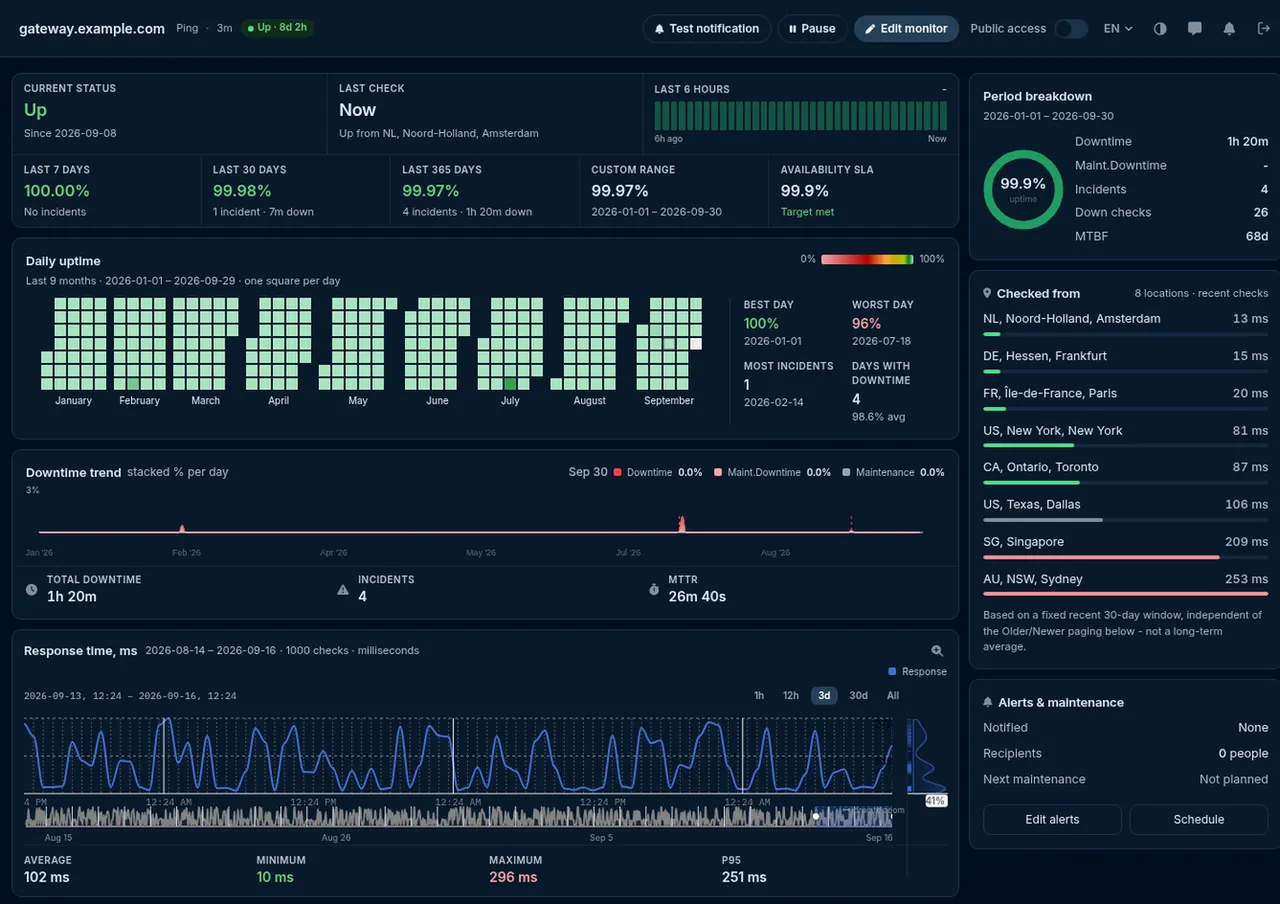
The point of monitoring a host continuously rather than testing it occasionally is that the results accumulate into something a single test can never produce: a shape. Every check a ping monitor runs is kept, and the statistics view turns them into a response-time chart with the average, minimum, maximum and 95th-percentile round-trip time for whatever period you select.
That percentile is more useful than it sounds. An average hides the tail - a host that answers in 20 ms almost always and in 900 ms twice an hour still averages beautifully, while feeling terrible to use. The 95th percentile is where that kind of intermittent misery becomes visible, and where a gradual degradation over three weeks shows up as a trend line rather than as an accident you happen to notice.
Alongside it, a per-location breakdown reports the round-trip time each checkpoint measured. This is the diagnosis that a single-location tool cannot give you: if every region degrades together, the problem is at the host; if one region degrades alone, the problem is a route, and it is affecting exactly the users who sit behind it. Every confirmed state change is timestamped too, so uptime percentages and downtime history are computed rather than reconstructed, and downtime periods are attributable to the moment they began.
All of it can be shared. A monitor's statistics can be made publicly viewable without giving anybody access to your account - which is the difference between telling a hosting provider that their box keeps disappearing and showing them. Scheduled uptime reports can go out to the same contacts that receive the alerts, so the monthly summary arrives without anybody generating it.
Where the pings come from
HostTracker's fleet spans 300+ checkpoints across 158 cities, and a ping monitor runs from the pools you select rather than from one fixed place. This matters more for ping than for almost any other check type, because ping's primary output is a distance measurement. A round-trip time only means something relative to where it was measured from: 200 ms from Tokyo to a server in Frankfurt is physics, and 200 ms from Amsterdam to the same server is a problem.
Multi-location checking is also what makes the difference between "the host is down" and "the host is unreachable from one part of the internet". A routing failure, a peering dispute or a regional filtering policy produces exactly the symptom of an outage - for some users. A monitor running from a single point reports that as a global outage or misses it entirely, depending on which side of it that point sits. A monitor running from several continents shows you the map.
Because a chosen region can occasionally have no checkpoint free at check time, each monitor also decides what should happen in that case: wait for its own region, or let the check run from elsewhere so the schedule is never silently skipped. Pair the geography with the confirmation quorum described above and the result is a monitor that is both sensitive and quiet - it sees regional problems that a single vantage point misses, and it refuses to page anybody on the strength of one checkpoint's bad minute.
What ping monitoring costs
Start with the 30-day free trial: 100 monitors, every check type, no credit card. It is the honest way to find out whether your hosts answer ICMP consistently enough for ping to be the right monitor for them, and to see a month of latency data before deciding anything.
After that, the free plan keeps 2 monitors running on a 30-minute interval - enough to watch a home server, a personal site's host or a single piece of equipment indefinitely at no cost. Paid plans start at $5 a month for Personal, $14 for Webmaster and $29 for Business, with Enterprise beyond that; the higher tiers raise the monitor count, the contact count and the minimum check interval, so a one-minute ping is available where you need one. The pricing page has the full comparison.
Because a ping monitor is one of the cheapest checks to run, it is usually not the monitor you have to ration. The common pattern is a ping monitor on every host in the estate for the fast, cheap "is it there" signal, and richer HTTP or transaction checks reserved for the handful of user-facing flows where an application failure actually costs money.
Preguntas frecuentes
Ping monitoring is the practice of sending ICMP echo requests to a host automatically, on a repeating schedule, and raising an alert when the replies stop coming back or start taking too long. It is the continuous form of the ping command every administrator already knows: instead of one person typing ping once and reading four lines of output, a monitoring service repeats that check from multiple locations every few minutes, forever, and stores the result. The value is not in any single ping - a one-off ping only describes the moment you ran it - but in never having a gap between the moment a server stops answering and the moment somebody finds out. HostTracker's ping monitoring runs the check from 300+ checkpoints worldwide and notifies you over email, SMS, voice call, webhook, Slack, web push, Telegram, Discord or Viber when a host stops replying.
A ping test is a snapshot and ping monitoring is a recording. When you run a free instant ping test you learn whether the host answered in the few seconds the test took, and nothing at all about the twenty-three hours and fifty-nine minutes you were not looking. Ping monitoring turns that same ICMP check into a scheduled job: HostTracker repeats it as often as once a minute from the locations you choose, keeps every round-trip time so you can see latency trends over weeks, confirms a failure across several independent checkpoints before it calls anything down, and sends the alert to whoever is on call. The practical difference is who notices the outage first - you, at three in the morning because your phone rang, or your customers, on Monday when they email to ask why nothing worked all weekend.
A HostTracker ping monitor runs on an interval you choose from 1, 2, 3, 5, 10, 15, 30 and 45 minutes and 1, 2, 4, 6, 12 and 24 hours, or on a cron-style schedule if you would rather define your own timing. Three minutes is the default, which suits most servers; one minute is available on plans whose minimum interval allows it and is the right choice for anything where a few minutes of unnoticed downtime is genuinely expensive. Long intervals are not a lesser option - a 24-hour ping on a backup appliance or a rarely-used branch-office router is a perfectly sensible way to notice that a device has quietly died without generating noise the rest of the year.
Each run first resolves the host name to an address - using the checkpoint's own resolver, a public-DNS tier, or up to four custom resolver IPs you specify - and then sends four ICMP echo requests to that address, allowing one second for each reply. It records the round-trip time and the replying address for every packet that answers, and the reason for failure for every packet that does not. The check passes when more than half the packets come back. If most of them fail, HostTracker does not immediately call the host down: it retries the round against the next address the name resolved to, up to three candidate addresses in total, so one dead A record in a multi-address DNS answer cannot fail a service that is actually healthy. Only when every candidate fails does the check report down.
No, and this is the single most important thing to know before choosing ping as your monitor. Plenty of servers, and most firewalls in front of them, are configured to drop ICMP echo requests while happily serving web traffic on ports 80 and 443. Against such a host a ping monitor will report down permanently and be useless. The fix is not to fight it: check whether the host answers a ping at all first - the free instant ping test answers that in seconds - and if it does not, monitor it with an HTTP check or a TCP port check instead, both of which use the protocol the service actually speaks. Ping is the right monitor for hosts that answer ICMP, which in practice means most routers, switches, firewalls, VPN endpoints, IoT gateways and self-managed servers, and fewer of the sites sitting behind a hardened CDN.
No. There are two independent layers of protection against that. Within one check, the verdict needs more than half the four packets to fail, so an isolated dropped packet does not even make the check fail. And when a check does fail, the state change is not trusted until it is re-run across additional independent checkpoints and a quorum agrees - by default a majority verdict across up to seven agents, with a minimum of three. On top of that, each contact chooses its own alert delay: immediately, or only after 3, 5, 15, 30 or 60 minutes, or 3, 6, 12 or 24 hours of continuous failure. A brief transient blip on one network path between one data centre and your host therefore cannot manufacture a page.
Yes, and it is one of the things ping monitoring is best at. A ping monitor's target is a host name or an IP address, not a URL, so anything with an address that answers ICMP can be watched: routers, managed switches, firewalls, VPN concentrators, NAS boxes, print servers, industrial gateways, IP cameras, virtual machines with no public web service. There is nothing to install on the device and no agent to keep up to date - the check runs entirely from HostTracker's own checkpoints. The one requirement is that the device be reachable from the public internet, since the checkpoints are external; a device on a private network is a job for the private-network monitoring path instead.
You get a response-time chart of every check, with the average, minimum, maximum and 95th percentile round-trip time for the period you are looking at, so a slow drift upward over three weeks is visible as a shape rather than something you have to notice by accident. Alongside it, a per-location breakdown shows the round-trip time each checkpoint measured, which is how you tell a global problem from a routing problem affecting one region. Every state change is recorded with its timestamp, so uptime percentages and downtime history are computed for you rather than reconstructed from memory. If you want to share any of that - with a client, a hosting provider you are arguing with, or the rest of your team - a monitor's statistics can be made publicly viewable without giving anyone access to your account.
Sigue explorando la monitorización de HostTracker
Run a free ping test right now
Ping any website, server or IP from 300+ worldwide locations with no login - the fastest way to check whether a host answers ICMP before you monitor it.
Monitor website availability from 300+ locations
The HTTP half of the pair: catches application failures a ping can never see, and works on hosts that block ICMP entirely.
How to read ping results
Round-trip time, packet loss and the classic surprises - including why a perfectly healthy site can show 100% packet loss.
Know the moment your host stops answering
Start a free trial and let HostTracker ping your servers, routers and devices around the clock from 300+ locations.