
How to Monitor a Website with an HTTP Check
- guide
- http monitoring
- uptime check
- website monitoring
- http check
- response validation
An HTTP check requests a URL from your monitoring locations the way a browser does, then judges the response: did the server answer, how fast, and does the status and content look right. It is HostTracker's most-used check type - use it for any website or page you want treated as up or down based on a real page fetch. Pick an API check instead to parse and validate structured JSON or XML.
Main Settings
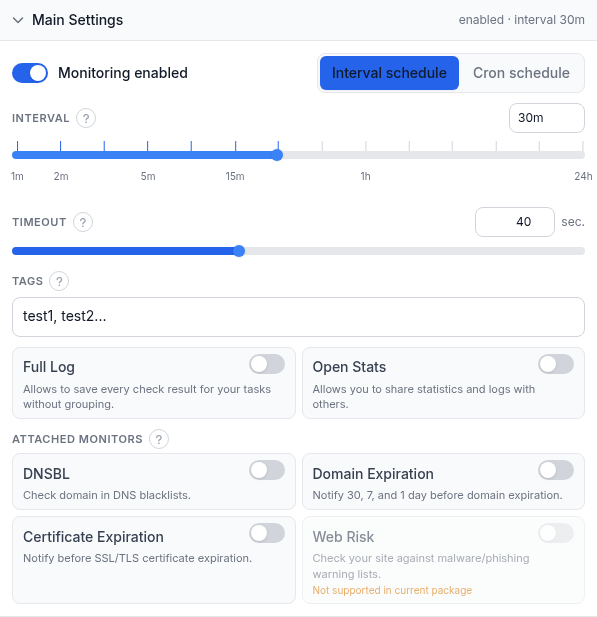
- Monitoring enabled - master on/off switch. A paused task keeps its settings but stops checking and alerting.
- Interval schedule / Cron schedule - the simple interval slider below, or a cron builder (every N minutes/hours, daily, weekly, monthly, or a custom 5-field expression) for schedules an interval can't express. Cron needs a paid plan.
- Interval - how often the check runs, from 1 minute to 24 hours; drag the slider or pick a value from the dropdown. The shortest interval available depends on your plan.
- Timeout - how long to wait for a response before failing, 1 to 100 seconds (40s is a common default). DNS resolution time isn't counted.
- Tags - comma-separated labels for grouping and filtering monitors on the dashboard.
- Full Log - saves every check result instead of grouping identical consecutive ones.
- Open Stats - publishes this task's statistics and check log on a public link.
- Attached monitors - four extra checks bolted onto this task instead of separate ones: DNSBL (domain blacklist), Domain Expiration/Certificate Expiration (30/7/1-day reminders), Web Risk (Google malware/phishing lists). All run every 12 hours; reminders follow Up subscriptions below, a bad result follows Down/Repeat. Each has its own guide - see Related.
Request Configuration
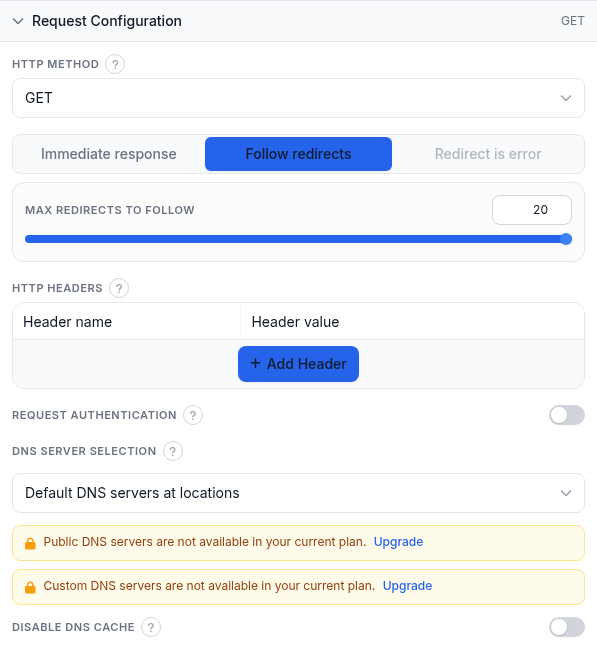
- HTTP Method - GET, HEAD, POST, PUT, DELETE, PATCH or OPTIONS. GET (default) downloads the page and is required for content-keyword checks; HEAD fetches only headers, the fastest availability check; POST/PUT/PATCH also send a body.
- Request body (POST/PUT/PATCH only) - Plain text sends exactly what you type (add your own Content-Type header); Key-value mode builds it from name/value rows as form-urlencoded or JSON and sets Content-Type automatically.
- Redirect behavior - Immediate response judges the first response as-is; Follow redirects (default) follows the chain, with a Max redirects to follow slider (1-20); Redirect is error fails on any redirect (unavailable under assertion mode).
- HTTP Headers - custom name/value pairs. Left empty, the probe sends default headers (User-Agent, Accept, Accept-Language, a Referer). Add an Authorization header here for token/API-key auth.
- Request authentication - reveals username/password for the server's own HTTP challenge auth (Basic, Digest, NTLM, Kerberos, Negotiate). Use an Authorization header instead for preemptive token auth.
- DNS Server Selection - Default DNS servers at locations; Public DNS servers of location's country; or Manually defined DNS servers (your own resolver IPs). The last two need a paid plan.
- Disable DNS cache - forces a fresh DNS lookup every check instead of reusing the agent's cache; useful right after a DNS change.
Response Validation
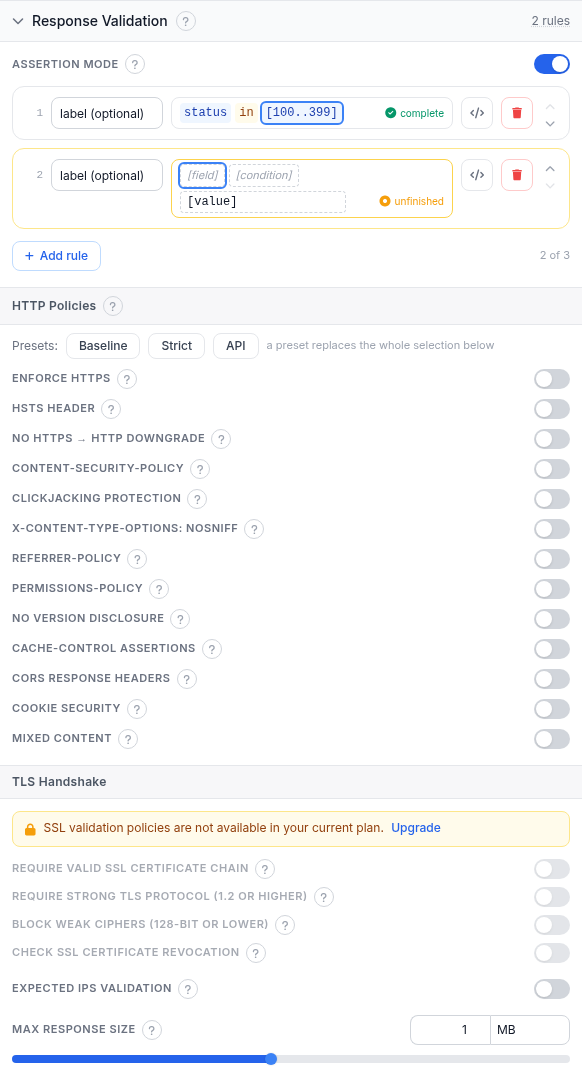
By default a check succeeds when DNS resolves, the TCP connection and TLS handshake (for https) complete, and the server returns an HTTP Ok status - any code below 400.
- Assertion mode - replaces the classic fields below with a rule editor for status codes, response time, headers or body content. The screenshot shows it on with two rules:
status in [100..399](complete) and an empty second rule marked unfinished - an incomplete rule takes no part in the verdict until filled in or deleted. HTTP and API are the only two check types with a working assertion editor; see the assertion-mode deep dive for the full rule language. - Ignore HTTP Errors (classic mode) - codes that should NOT fail the check, e.g.
401, 403, 500; empty means every code 400+ is an error. - Error on these HTTP statuses - the reverse: codes that should fail the check even if they normally wouldn't.
- Content check keywords - comma-separated keywords to search for in the page (GET required).
- Successful content check condition - how keywords decide the verdict: ANY present (default), ALL present, ANY absent, ALL absent, or ALL absent (fail shows location).
- HTTP Policies - opt-in header/cookie/content checks; a violation concludes the check as Down like any other failure. Presets Baseline, Strict and API replace the whole selection; run the policies as a separate task if you want a softer signal that never touches this task's own uptime stats.
| Toggle | What it checks |
|---|---|
| Enforce HTTPS | The URL must load over https. |
| HSTS header | Strict-Transport-Security present with a minimum max-age; sub-options add includeSubDomains and preload readiness. |
| No https to http downgrade | An https page must not redirect back to http. |
| Content-Security-Policy | A CSP header exists and avoids common unsafe script sources; Report-Only alone does not count. |
| Clickjacking protection | The page can't be framed by another site. |
| X-Content-Type-Options: nosniff | The MIME-sniffing-block header is present. |
| Referrer-Policy | Present and not unsafe-url, so full URLs aren't leaked to linked sites. |
| Permissions-Policy | Limits powerful browser features (camera, mic, geolocation). |
| No version disclosure | Response must not reveal server/framework version info. |
| Cache-Control assertions | Custom Cache-Control checks, e.g. require no-store on personal-data pages. |
| CORS response headers | Flags a static wildcard Access-Control-Allow-Origin, especially with credentials. |
| Cookie security | Own-host cookies must carry Secure/HttpOnly/SameSite as configured; specific names can be exempted. |
| Mixed content | Flags http:// subresources loaded on an https page. |
- TLS Handshake - four strictness toggles (paid plan): Require valid SSL certificate chain, Require strong TLS protocol (1.2+), Block weak ciphers (128-bit or lower), and Check SSL certificate revocation (online CRL/OCSP lookup).
- Expected IPs validation - confirms DNS resolves your host to one of the IPs you list on every check; catches hijacking, misconfiguration or an expired record even while some server still answers.
- Max response size - stops reading the body past this size; content checks, assertions and policies then judge only the downloaded part. Default 1 MB, maximum 10 MB; 0 reads no body.
Alert Subscriptions
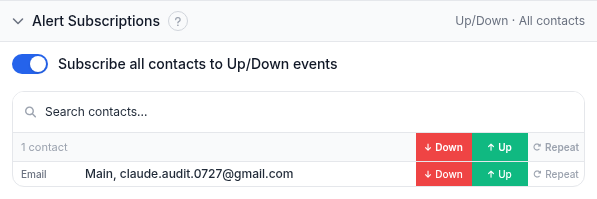
Shared by every check type. Down = the site went down, Up = it recovered, Repeat = reminders while it stays down. Subscribe all contacts to Up/Down events is a shortcut; the table gives per-contact control, individually or via reusable contact-group presets. A task with no alert subscriptions still runs and logs results - it just never notifies anyone.
Report Subscriptions
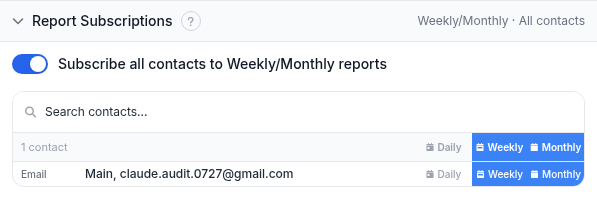
Periodic uptime reports, email only. Choose Daily, Weekly or Monthly per contact; Monthly also bundles in Quarterly and Yearly summaries. The subscribe-all switch works the same as in Alert Subscriptions.
Monitoring Locations
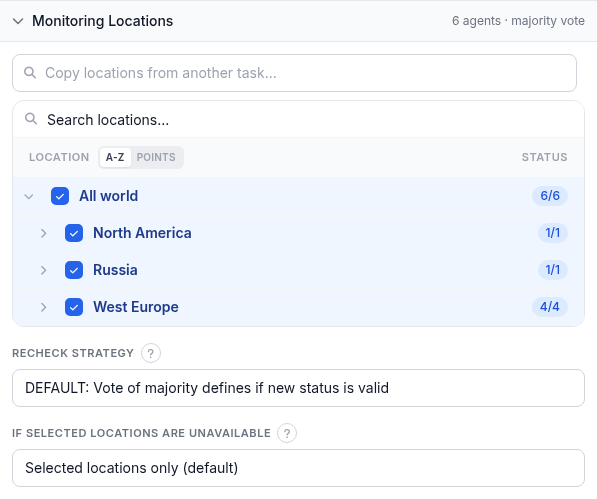
- Location picker - search or browse the region/country tree and tick locations to check from; each row shows agents available versus agents selected. "Copy locations from another task" reuses an existing set.
- Recheck strategy - on a state transition (e.g. Up to Down), several locations re-verify it before the new state is accepted, guarding against a false positive from one location. Options: default majority vote; a specified number of locations confirming Down (adds a 1-7 slider); no recheck; full agreement of every recheck location; or full agreement for Down, majority vote for Up.
- If selected locations are unavailable - Selected locations only (default) waits rather than risk a false alert; Closest locations uses the nearest available location; Any location falls back worldwide.
Worked example
Monitoring a marketing homepage: HTTP check, 5-minute interval, 40s timeout, GET, Follow redirects (max 20). Content check keyword Contact us with "ANY keyword must be present", so a broken deploy serving an error page is caught. HTTP Policies set to Baseline. Locations left at All world with the default recheck strategy. The on-call team's email subscribed to Down, Up and Repeat, and to Weekly reports.
Troubleshooting
- Reports Down but loads fine for you - a single location's network can hiccup; that's what the default majority-vote recheck strategy filters out. Still flapping? Check DNS Server Selection and confirm the timeout suits that location's normal latency.
- A content-keyword check flips Up/Down - content may vary by cache, personalization or A/B testing. Pick a keyword present on every real load, and confirm the Successful content check condition matches what you mean.
- Went Down right after enabling HTTP Policies (especially Strict) - Strict expects headers many sites haven't configured yet. Fix the headers, drop to Baseline, or run the policies as a separate task first.
- A content check or assertion stops matching on a large page - Max response size cuts the body off; content past the cutoff is invisible to it. Raise it.
- An assertion rule never seems to run - a rule with an empty field, condition or value renders "unfinished" and takes no part in the verdict. Complete or delete it.
Related
- HTTP / website uptime monitoring - the product page for this check type.
- Free instant HTTP check - run a one-off check with no account needed.
- Assertion-mode response validation rules - the full rule language behind Response Validation.
- DNSBL check guide - the attached DNS-blacklist monitor.
- Domain expiration guide - the attached domain-expiry monitor.
- Certificate expiration guide - the attached TLS certificate-expiry monitor.
- Web Risk guide - the attached malware/phishing monitor.