
Как мониторить истечение регистрации домена
Монитор истечения домена по фиксированному расписанию выполняет проверку регистрации вашего домена и сообщает, когда она вот-вот истечет. Это совершенно другой сбой, чем истечение сертификата, и его легко с ним перепутать. Потеря регистрации домена означает, что домен вообще перестает разрешаться: сайт, почта - все, что за ним стоит, гаснет, пока вы не зарегистрируете его заново, иногда с наценкой, если наступил период выкупа у регистратора. Потеря TLS-сертификата означает, что сайт по-прежнему на месте, но браузер отказывается ему доверять. Разные сбои, обычно с разными ответственными (тот, у кого доступ к аккаунту регистратора, и тот, кто управляет сертификатами), и с разным решением. Если вас беспокоит именно сертификат, смотрите руководство по истечению сертификата. Эти два типа проверок стоят рядом в списке мониторов, и именно эта пара чаще всего путается при настройке.
Основные настройки
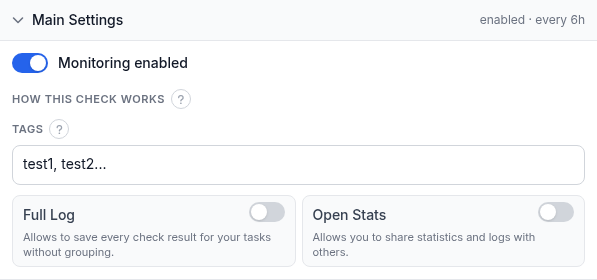
Над этой панелью расположены два поля, а сама панель содержит еще четыре:
- Домен - регистрация, которую нужно проверить. Это поле принимает только настоящее доменное имя: чистый
IP-адрес отклоняется (у IP нет регистрации, срок которой можно мониторить), как и одна-единственная метка верхнего
уровня сама по себе - нужен полный домен вроде
example.com, а не простоcom. - Имя (необязательно) - короткая метка этого монитора в оповещениях, отчетах и на панели управления. Оставьте пустым - и HostTracker будет использовать домен.
- Мониторинг включен - приостанавливает или возобновляет проверку без ее удаления.
- Как работает эта проверка - свернутая инфо-заметка: проверка выполняется по фиксированному расписанию, каждые 6 часов, из собственной сети мониторинга HostTracker. Ползунка интервала у этого типа нет; почему - см. ниже.
- Теги - произвольные текстовые метки для фильтрации и группировки этого монитора на панели управления.
- Полный лог - сохраняет каждый отдельный результат проверки вместо группировки подряд идущих одинаковых.
- Открытая статистика - создает публичную страницу статистики этого монитора, которой можно поделиться.
Почему 6 часов, а не интервал масштаба минут: дату истечения домена задает регистратор, и она не меняется между проверками, кроме дня, когда домен продлевают или срок истекает, так что от более частого опроса нет никакого выигрыша. Отдельно настраивать заблаговременность тоже не нужно. HostTracker автоматически отправляет информационное напоминание за 30, 7 и 1 день до истечения регистрации каждому контакту, у которого ниже оформлена подписка на событие Up. Эти напоминания отделены от оповещения о Down: проверка переходит в Down только после того, как регистрация действительно истекла, а не пока эта дата приближается.
Подписки на оповещения
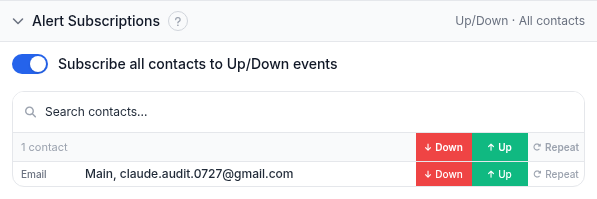
Та же панель подписок, что используется для любого типа проверки. Включите Подписать все контакты на события Up/Down, чтобы разом добавить всех контактов на оба события, либо воспользуйтесь строкой поиска и переключателями Down / Up / Repeat для каждого контакта, чтобы составить конкретный список:
- Down - оповещение приходит, когда регистрация домена истекла.
- Up - оповещение приходит при восстановлении, и именно эти контакты получают автоматические напоминания за 30/7/1 день, описанные выше.
- Repeat - продолжает по расписанию отправлять оповещение Down, пока регистрация остается просроченной, вместо того чтобы оповестить один раз и замолчать.
Добавьте сюда владельца аккаунта регистратора, а не только того, кто настраивал монитор. Продлением домена нередко занимается не тот человек, что следит за панелью управления, а напоминание, дошедшее не в тот почтовый ящик, легко пропустить.
Подписки на отчеты
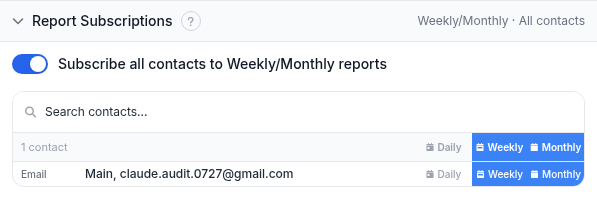
Периодические сводки по email, а не оповещения по событию. Они полезны как постоянный дайджест, но плохо подходят в роли единственной подстраховки для чего-то настолько важного, как просроченная регистрация. Отчеты уходят только email-контактам.
Разобранный пример
Домен вашей компании example.com продлевается каждые два года через аккаунт регистратора, доступ к которому
есть только у вашего финансового директора, а в прошлом году счет на продление ушел в почтовый ящик, который никто не проверял. Создайте монитор истечения домена для example.com, подпишите email финансового директора и свой собственный на Up (чтобы вы оба получали напоминания за 30/7/1 день) и Down. Полный лог оставьте выключенным: регистрации, продлеваемой раз в два года, история по каждой проверке не нужна, сгруппированной сводки вполне достаточно. С этого момента монитор сам работает каждые 6 часов; первое напоминание приходит за месяц до крайнего срока продления, и еще два - если ничего не произошло.
Диагностика
- Поле домена отклоняет ваш ввод. Эта проверка принимает только настоящее зарегистрированное доменное
имя, а не чистый IP и не одну метку вроде
comсаму по себе. Введите полный домен, напримерexample.com. - Вы хотите мониторить истечение поддомена. У поддомена нет собственной регистрации; она есть только у базового домена. Настройте монитор на сам зарегистрированный домен.
- Проверка показывает Down, но сайт по-прежнему работает. Домен может недолго разрешаться и отдавать трафик даже после истечения регистрации - в зависимости от льготного периода реестра. Прежде чем считать это ложной тревогой, сверьте статус регистрации бесплатным инструментом whois.
- Напоминание за 30 или 7 дней не пришло. Напоминания приходят только контактам с подпиской на Up на этом конкретном мониторе. Проверьте эту галочку и убедитесь, что канал контакта - не голосовой звонок: по нему такие уведомления никогда не приходят.
- Вы хотели мониторить SSL/TLS-сертификат, а не регистрацию домена. Это не тот тип проверки: регистрация домена и истечение сертификата - не связанные друг с другом сбои с похожими названиями. См. руководство по истечению сертификата.
Связанные материалы
- Все руководства по мониторингу - раздел обо всех типах проверок HostTracker.
- Как выполнить whois-запрос - чтение записи регистрации вручную, включая дату истечения, за которой следит этот монитор.
- Проверки домена и TLS - страница продукта, охватывающая мониторинг и сертификата, и истечения домена, включая полную лестницу напоминаний за 30/7/1 день.
- Бесплатный инструмент whois - разовая проверка регистрации без аккаунта.
- Инструмент DNS-поиска и инструмент DNS-запросов - полезны, когда проблема с доменом оказывается проблемой резолвинга, а не истекшей регистрацией.
- Руководство по истечению сертификата - проверка для истекающего TLS-сертификата, другой сбой, не связанный с просроченным доменом.
- Руководство по HTTP-проверке - истечение домена также доступно как прикрепленная плитка на мониторе Http, Port или API, идущая вместе с этой проверкой, а не отдельным монитором.