
Russian Blacklist (RKN) Check: Setup Guide
- guide
- russian blacklist check
- rkn monitoring
- dns black list monitoring
- block page detection
A Russian BL check is not a spam blacklist check, even though it sits near DNSBL monitoring in the type picker and readers regularly land on the wrong one. It tests whether a site is showing the block-page banner that Russian internet providers display for domains restricted under Russian regulation, checked from Russia-based vantage points over public DNS. If what you actually want is "is my domain listed on a spam DNSBL", see the DNSBL check guide instead - the two check completely different things and neither substitutes for the other.
Main Settings
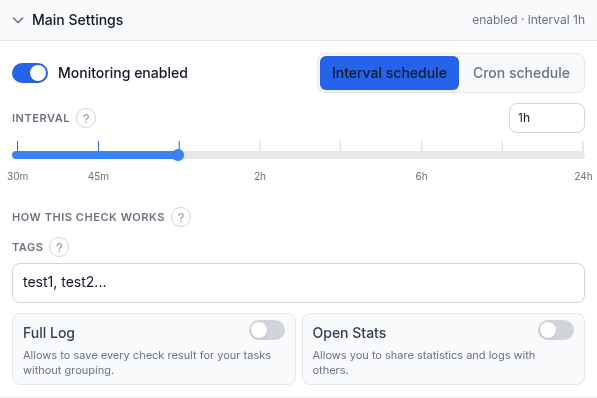
Unlike the other fixed-schedule check types in this series, a Russian BL check has a real interval control, because under the hood it runs as a preset HTTP check rather than its own standalone plugin:
- Domain / IP - the site to check.
- Name (optional) - a short label for this monitor in alerts, reports, and your dashboard.
- Monitoring enabled - pauses or resumes the check without deleting it.
- Interval schedule / Cron schedule - choose a straight recurring interval (the default) or a cron expression if you need the check to run on specific times rather than a fixed cadence.
- Interval - a slider running from 30 minutes up to 24 hours, defaulting to 1 hour. Drag it or type an exact value into the box on the right.
- How this check works - a collapsed info note explaining the policy: the check looks for the Russian regulator's block-page keywords on your page, resolved through public DNS from Russia-based monitoring locations. A match is reported as Down.
- Tags - free-text labels for filtering and grouping this monitor on your dashboard.
- Full Log - saves every individual check result instead of grouping consecutive identical ones.
- Open Stats - generates a public, shareable stats page for this monitor.
The check itself is a plain content check: it requests the page from a Russia-based agent and looks for the specific banner text Russian providers show on a restricted-domain block page. There is no separate warning tier and no "close but not quite" state - the banner is either found, which reports Down, or it is not, which reports Up. Monitoring locations are not user-selectable for this check type; it always runs from Russia-based vantage points, since that is the only place the block page would actually appear.
The Interval schedule / Cron schedule toggle is shared with the regular HTTP monitor form. Interval schedule is the simple choice for almost everyone: pick a cadence and the check runs on that fixed loop. Cron schedule exists for the less common case where you need the check to fire at specific times of day rather than on a rolling interval - for example, only during business hours if that is when a listing would actually need a response from your team. Most accounts never need it for this check type; the plain interval slider covers the normal use case of "tell me within an hour if this changes."
Alert Subscriptions
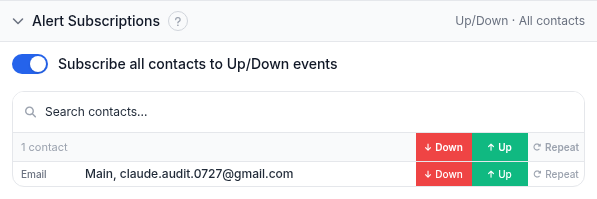
The same subscriptions panel every check type uses. Toggle Subscribe all contacts to Up/Down events to put every contact on both events at once, or use the search box and the per-contact Down / Up / Repeat switches to build a specific list.
Report Subscriptions
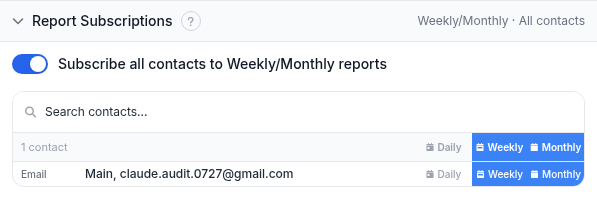
Periodic email summaries rather than event-driven alerts. Reports go to email contacts only.
Worked example
You run an e-commerce storefront at example.com and have customers in the Russian market. You
want to know quickly if the site becomes unreachable there for regulatory reasons rather than a technical one,
since the fix and the process are completely different. Create a Russian BL check for example.com,
leave the interval at its default of 1 hour (a shorter interval buys you little here - the check reflects a
regulatory decision, not something that flips back and forth minute to minute), and subscribe your regional
support contact to Down. Nothing else needs configuring; the check runs from Russia-based locations
automatically.
Troubleshooting
- The check reports Down but the site loads fine for you. That is expected if you are not testing from inside Russia - the block, if one exists, is enforced at the network/ISP level there and simply will not reproduce from elsewhere. The check is specifically built to see what a Russia-based visitor sees.
- You expected a DNSBL-style spam listing check. Wrong check type - this one has nothing to do with mail deliverability or spam blacklists. See the DNSBL check guide for that.
- You want a faster or slower check cadence. Drag the interval slider or type an exact value; it runs from 30 minutes up to 24 hours.
- You are looking for the old prefix-match or ignore-warnings options from a previous version of this form. Those settings belonged to a discontinued check type and no longer apply here - the check is a straightforward Up/Down policy with no tunable strictness.
- You need to confirm a Down result before escalating internally. Because this reflects a regulatory decision rather than a technical fault, it is worth a manual look before treating it as an incident: check from a Russia-based network yourself if you can, since the underlying cause and the fix (if any) sit outside your own infrastructure and outside anything HostTracker can change.
Related
- DNS blacklist monitoring - the product page most closely associated with this check in HostTracker's navigation, though it covers spam DNSBL rather than this check specifically.
- Free Russian blacklist check tool - a one-off lookup with no account needed.
- DNSBL check guide - the spam-blacklist check readers most often confuse this one with.
- HTTP check guide - this check is itself built on the same HTTP monitor engine, which is why it has a real interval slider instead of a fixed schedule.