
Assertion Mode: Complete Response Validation Reference
- assertion mode
- response validation
- API monitoring
- website monitoring
- SNMP monitoring
- port monitoring
- HostTracker
Most uptime monitors judge a check with a handful of fixed fields: a status code that counts as "down," a list of statuses to ignore, maybe a keyword that has to appear somewhere in the body. That works until it does not. An API that legitimately answers 404 for a missing resource. A page that returns 200 with an empty shell because the database timed out. A redirect chain that quietly starts routing through someone else's domain. None of that fits into a status-code box and a keyword field.
HostTracker's assertion mode replaces those fixed fields with a small rule language you write yourself, rule by rule, inside the monitor editor. Each rule says exactly what has to be true about the response - the status, a piece of the body, a header, how long it took, where a redirect ended up - and a check fails only when one of your rules fails. It is the same language whether you are checking a website, a REST API, a database query, a TCP port, a Ping target, an SNMP counter or a generic Counter check: one set of subjects, one set of predicates, learned once and reused everywhere the mode appears. This guide covers the whole language - every subject, operator, reducer, sugar shortcut and syntax form the engine actually implements - not just a sampler of the popular ones.
What assertion mode replaces
The classic Response Validation fields are still there when assertion mode is off: an expected status range, a list of statuses to ignore, a keyword that must (or must not) appear. Assertion mode is a switch that swaps that fixed set of fields for a list of rules you build yourself. Turning it off again before you save puts the classic fields straight back - nothing about a monitor is locked into one mode permanently.
The point of one language instead of a pile of per-type gadgets is that it composes. A "must be JSON and contain a field" check, a "must still say Add to cart" check and a "must not have gotten slower" check are not three separate form features - they are three rules in the same syntax, sitting in the same list, each passing or failing on its own.
Turning it on
Assertion mode lives inside the Response Validation section of the monitor editor, for HTTP (website) and API monitors. Flip the switch, and the classic fields are replaced by a numbered rule list with an "Add rule" button and a live counter showing how many rules you have used against your plan's limit.
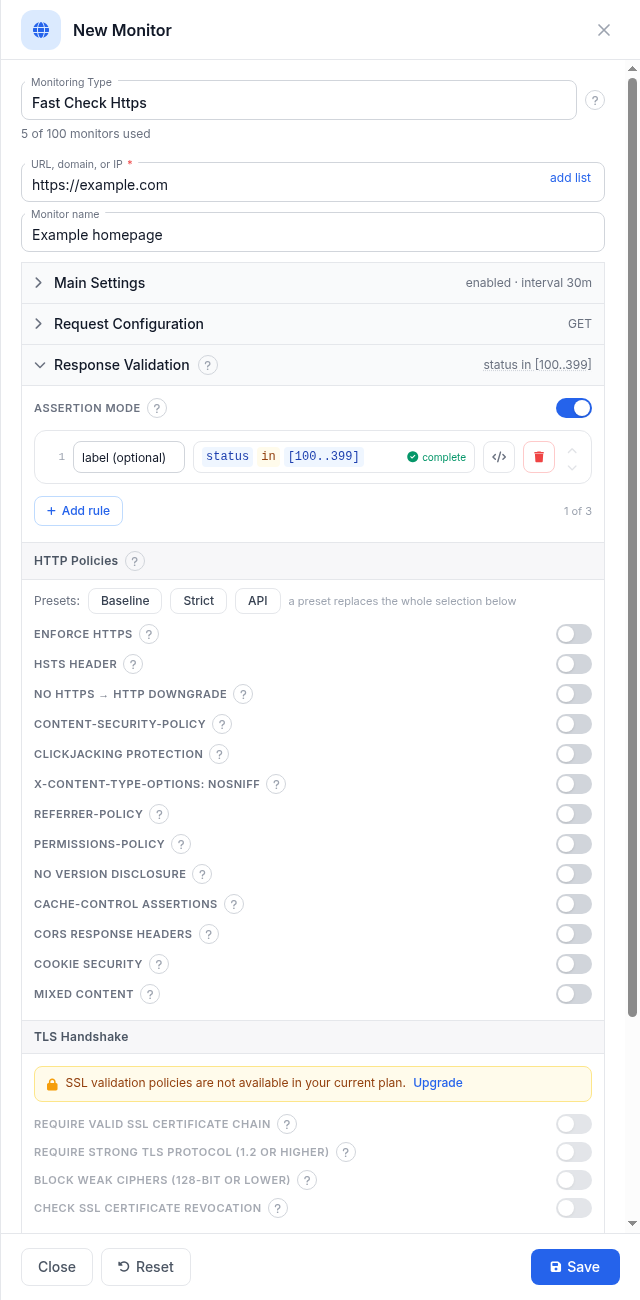
Each rule is validated as you build it - a rule that is not yet finished carries a distinct "unfinished" state; a rule the editor can actually evaluate is marked complete. Every rule also has a small </> button that opens its plain-text source form, so you can read or copy the exact expression instead of only the box-by-box view.
The mental model: subject, predicate, value
Every rule has the same shape: a subject (what you are looking at - the status code, the body, a header, the response time), a predicate (the test - equals, contains, exists, is less than) and, for most predicates, a value to compare against. status eq 200 is a subject and a predicate and a value; body.json exists is a subject and a predicate with no value at all, because "exists" needs nothing else.
Building a rule in the editor starts with picking what to check, then the condition, then the value:
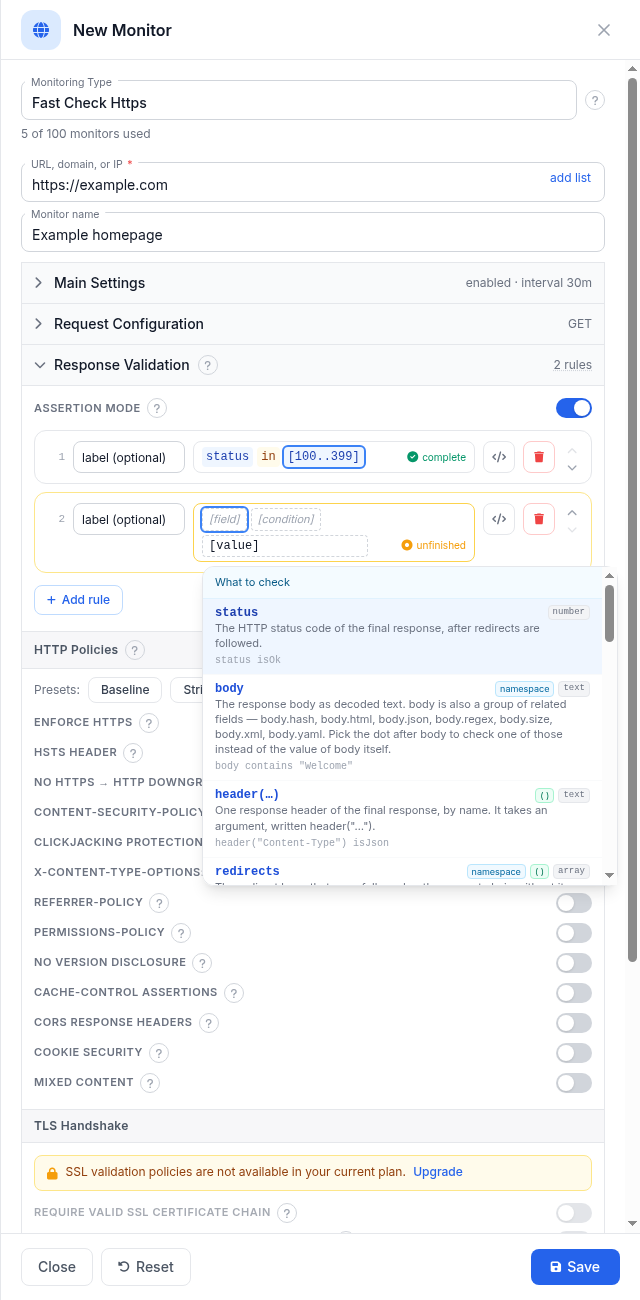
Rules in the list are combined with AND - a check fails when any single rule fails, and passes only when every rule passes. There is no OR yet; if you want to accept one of several statuses or one of several strings, express that inside a single rule instead of writing alternatives (status in [200, 301, 302], body containsAny ["In stock", "Pre-order"]). A rule that fails names itself in the alert, so give each one a short label if you can - the alert then says which specific expectation broke, not just that something did.
What you can check
The picker groups subjects into the response's own document (the body, the headers) and its transport (status, timing, redirects, TLS). A few of the subjects that matter most day to day - the full list, organized the same way the engine organizes it internally, is the reference that follows this section:
| Subject | What it is | Example |
|---|---|---|
status | The HTTP status code of the final response, after redirects are followed | status isOk |
body | The response body as plain text | body contains "Add to cart" |
body.json / body.xml / body.html / body.yaml | The body, but only when it genuinely parses as that format - otherwise the subject is simply not present | body.json exists |
body.json.path("$.a") | A JSONPath query into a JSON body (the same query language also works over YAML, since YAML parses into the same object model) | body.json.path("$.status") eq "ok" |
body.size / body.hash | The response size in bytes, and a fingerprint of the body's content | body.size gt 1kb |
header("Name") | One response header, looked up by name | header("Content-Type") isJson |
time and time.connect / time.tls / time.dns / time.head | Total response time, and its network, TLS-handshake, DNS and server think-time phases | time lt 2s |
redirects / requests | The hops a check followed, and the full chain (including the final response) | redirects.count eq 0 |
url and its parts (.host, .scheme, .path...) | The final URL the check landed on | url.scheme eq "https" |
cert.days.left | Days remaining before the TLS certificate expires | cert.days.left gt 14 |
Numbers accept unit suffixes so you never have to convert by hand: 2s means 2000 milliseconds, 1kb means 1024 bytes. Text comparisons are case-sensitive unless you add nocase to the rule.
The complete reference
What follows is every subject, operator, reducer, sugar shortcut, filter and syntax form the assertion engine registers for HTTP and API checks, taken straight from the engine's own registry (the same data that feeds the rule editor's pickers and its docs). Entries that are not yet generally available carry an explicit note in parentheses - reserved fields the engine has not started populating, candidates still rolling out to agents, and the stateful family that needs a specific plan. Anything without such a note is live today, on every plan that has assertion mode at all.
The reference is organized the way the engine itself groups things: response fields first, then the ways to reach into a body, then timing, network and TLS, then the operators and reducers and shortcuts that work on all of them, then the handful of check kinds beyond HTTP that speak the identical language.
Response
The subjects that describe the response itself: its status, its raw body, its headers, the URL it actually answered from, and the chain of requests that got it there.
| Name | What it is | Type/values | Example |
|---|---|---|---|
body | The response body as decoded text. | string | body contains "Welcome" |
header | One response header of the final response, by name. | string | header("Content-Type") isJson |
redirects | The redirect hops that were followed - the request chain without its final element. | collection | redirects.count eq 0 |
status | The HTTP status code of the final response, after redirects are followed. | number | status isOk |
body.size | The size of the downloaded body, in bytes. | number | body.size lt 500000 |
url | The URL that actually answered, after all redirects. A url: compare it as text, or read its parts (url.host, .port, .path, .query, .scheme). | url | url.host eq "www.example.com" |
requests | Every request this check made, in order - the redirect hops and then the final request. | collection | requests.count le 2 |
url.host | The host part of the URL. | string | url.host eq "example.com" |
url.path | The path part of the URL. | string | url.path startsWith "/api" |
url.port | The port part of the URL. | number | url.port eq 443 |
url.query | The query string of the URL. | string | url.query contains "token" |
url.scheme | The scheme of the URL (http or https). | string | url.scheme eq "https" |
body.hash | A digest of the response body - compare it with previous.body.hash to detect content changes. | string | body.hash eq previous.body.hash |
httpVersion (reserved - not yet populated) | The negotiated HTTP version. | string | httpVersion eq "HTTP/2" |
setCookie | The Set-Cookie values of the final response, one item per cookie - match one with contains or matches, count them with .count. | collection | setCookie exists |
steps (not available yet) | The steps of a multi-step check. Not available yet. | collection | steps.count le 1 |
url.original | The URL the check was configured with, before any redirect. A url like url itself: it has the same parts (url.original.host, .port, .path, .query, .scheme). | url | url.original.scheme eq "http" |
url.original.host | The host part of the URL. | string | url.original.host eq "example.com" |
url.original.path | The path part of the URL. | string | url.original.path startsWith "/start" |
url.original.port | The port part of the URL. | number | url.original.port eq 80 |
url.original.query | The query string of the URL. | string | url.original.query contains "utm_" |
url.original.scheme | The scheme of the URL (http or https). | string | url.original.scheme eq "http" |
Two aliases worth knowing: redirectCount is shorthand for redirects.count - redirectCount eq 0 reads slightly more naturally than the equivalent long form when you mean "the check answered directly, no redirects." And setCookie at the top level is the final response's cookie list; the same name reappears per-hop inside requests/redirects (see Hop subjects below), holding just that one request's cookies.
Extracting values from the body
These subjects only resolve when the body genuinely is the format they name - a JSON namespace on an HTML page is simply not present, not a typed error. That makes exists the standard way to probe format: body.json exists asks "did this really parse as JSON?" The four format namespaces each carry a matching .path(...) query function (JSONPath for json/yaml, XPath for xml, CSS selectors for html) and a matching .regex(...), plus a format-agnostic body.regex(...) that reads the raw text regardless of format. body.html.a, body.html.script and body.html.link are ready-made collections of every link, script and <link> element on the page - see Element scopes below for the fields available on each one.
| Name | What it is | Type/values | Example |
|---|---|---|---|
body.json | The response body, but only when it really is JSON. | string | body.json exists |
body.json.path | Query the JSON body with a JSONPath expression. | json | body.json.path("$.status") eq "ok" |
body.html | The response body, but only when it really is HTML. | string | body.html exists |
body.html.path | Select page elements with a CSS selector. | collection | body.html.path("h1").first contains "Welcome" |
body.regex | Match the text with a regular expression and take what it captured. | string | body.regex("order-(?<id>\\d+)") exists |
body.xml | The response body, but only when it really is XML. | string | body.xml exists |
body.xml.path | Query the XML body with an XPath expression. | string | body.xml.path("//item/@id") exists |
body.html.a | Every link in the page. | collection | body.html.a.count gt 0 |
body.html.link | Every <link> the page declares. A bare mention means the link targets. | collection | body.html.link.count gt 0 |
body.html.script | Every script the page loads. A bare mention means the script sources. | collection | body.html.script.count gt 0 |
body.yaml | The response body, but only when it really is YAML. | string | body.yaml exists |
body.yaml.path | Query the YAML body with a JSONPath expression. | json | body.yaml.path("$.services.web.image") contains ":1." |
body.html.regex | Match the text with a regular expression and take what it captured. | string | body.regex("order-(?<id>\\d+)") exists |
body.json.regex | Match the text with a regular expression and take what it captured. | string | body.regex("order-(?<id>\\d+)") exists |
body.xml.regex | Match the text with a regular expression and take what it captured. | string | body.regex("order-(?<id>\\d+)") exists |
body.yaml.regex | Match the text with a regular expression and take what it captured. | string | body.regex("order-(?<id>\\d+)") exists |
A regex family detail worth calling out: named capture groups ((?<id>...)) inside a .regex(...) rule write into a check-scoped binding namespace that a later rule can read back with bind("id") or bind[0] by position - see Captured values below.
Captured values
One subject lives in its own registry group because it does not read the response directly - it reads what an earlier rule captured from it.
| Name | What it is | Type/values | Example |
|---|---|---|---|
bind | A value captured by an earlier regex rule, by capture name or by position. | string | bind("id") gt 1000 |
Pair it with a regex rule earlier in the list: a rule like body.regex("order-(?<id>\d+)") exists captures the order id into the name id, and a later rule can test it with bind("id") gt 1000 or, for a positional (unnamed) capture, bind[0].
Timing
One total plus a breakdown by phase, so a "got slower" alert can also say which part got slower.
| Name | What it is | Type/values | Example |
|---|---|---|---|
time | Total response time: connect + TLS + waiting + download. DNS resolution is not included. | number | time lt 2000 |
ttfb (reserved - not yet populated) | Time to first byte. | number | ttfb lt 200 |
time.connect | Time taken to establish the TCP connection. | number | time.connect lt 500 |
time.data | Time taken to download the response body. | number | time.data lt 1000 |
time.dns | Time taken to resolve the domain name. Not included in the bare time subject. | number | time.dns lt 200 |
time.head | Time waited for the response headers. | number | time.head lt 500 |
time.tls | Time taken for the TLS handshake. | number | time.tls lt 300 |
The bare time subject is connect + TLS + waiting-for-headers + downloading the body; DNS resolution is deliberately excluded from it and lives only in the sibling time.dns, because DNS is frequently cached and would otherwise make the same endpoint look inconsistently fast or slow between checks.
Network: DNS and connection
dns and conn are pure namespaces in the registry - a group with no value of its own, so a rule can never stop on the bare name (the editor and the engine both refuse a chain that finishes on dns or conn alone, pointing you at the real fields below).
| Name | What it is | Type/values | Example |
|---|---|---|---|
conn | The network connection the check made - the address that served the response and any connect failures. | string | - |
conn.failed | How many of the resolved addresses failed to connect. | number | conn.failed eq 0 |
conn.failedIps (candidate - rolling out to agents) | The resolved addresses that failed to connect. | collection | conn.failedIps.count eq 0 |
conn.ip | The IP address that actually served the response. | string | conn.ip eq "203.0.113.10" |
conn.ip.family (candidate - rolling out to agents) | Whether the response was served over IPv4 or IPv6. | string | conn.ip.family eq "IPv4" |
dns | DNS resolution of the monitored name - which addresses it resolved to and which server answered. | string | - |
dns.ips | All IP addresses the domain name resolved to during this check. | collection | dns.ips contains "1.2.3.4" |
dns.server | The DNS server that answered the resolution. | string | dns.server eq "8.8.8.8" |
TLS and certificate
Like dns and conn, tls and cert are pure namespaces - the certificate/handshake facts live one level down.
| Name | What it is | Type/values | Example |
|---|---|---|---|
cert.days.left | Days remaining until the site certificate expires. | number | cert.days.left gt 14 |
cert | The certificate the server presented - days to expiry, issuer and identity fields. | string | - |
cert.days | Days since the certificate was issued. | number | cert.days gt 0 |
cert.issuer | The certificate authority that issued the site certificate. | string | cert.issuer contains "Let's Encrypt" |
cert.san | The domain names the certificate is valid for. | collection | cert.san contains "www.example.com" |
cert.serial | The certificate's serial number. | string | cert.serial exists |
cert.subject (reserved - not yet populated) | The certificate's subject. Not captured yet - coming with a future agent version. | string | cert.subject contains "example.com" |
tls | The TLS handshake of the secured connection - negotiated protocol version and cipher. | string | - |
tls.cipher | The negotiated cipher suite. | string | tls.cipher contains "AES" |
tls.protocol | The negotiated TLS version. | string | tls.protocol eq "Tls13" |
cert.subject is listed here for completeness but is not populated yet - see the Honesty section below for what "reserved" means in practice. The everyday certificate rule is cert.days.left gt 14, covered in the worked-rules section.
Hop subjects: fields inside requests and redirects
requests and redirects are collections, and each item in them is a full request/response record with its own reduced field set - not every top-level subject makes sense per-hop (a hop has no certificate of its own, for instance), and one field exists ONLY per-hop: hstsHeader, the Strict-Transport-Security header of that specific request in the chain.
| Name | What it is | Type/values | Example |
|---|---|---|---|
status | The status code of this request in the chain. | number | status eq 200 |
url | The URL this request was made to. | url | url startsWith "https://" |
header | A response header of this request. A hop keeps a reduced, single-value header record - list predicates (containsAny, containsAll, unique) apply only on the final response's header. | string | header("Content-Type") contains "json" |
hstsHeader | The Strict-Transport-Security header of this request. | string | requests[0].hstsHeader exists |
setCookie | The Set-Cookie header values of this request. | collection | setCookie exists |
url.original | The URL the check was configured with, before any redirect. A url like url itself: it has the same parts (url.original.host, .port, .path, .query, .scheme). | url | url.original.scheme eq "http" |
url.host | The host part of the URL. | string | url.host eq "example.com" |
url.port | The port part of the URL. | number | url.port eq 443 |
url.path | The path part of the URL. | string | url.path startsWith "/api" |
url.query | The query string of the URL. | string | url.query contains "token" |
url.scheme | The scheme of the URL (http or https). | string | url.scheme eq "https" |
url.original.host | The host part of the URL. | string | url.original.host eq "example.com" |
url.original.port | The port part of the URL. | number | url.original.port eq 80 |
url.original.path | The path part of the URL. | string | url.original.path startsWith "/start" |
url.original.query | The query string of the URL. | string | url.original.query contains "utm_" |
url.original.scheme | The scheme of the URL (http or https). | string | url.original.scheme eq "http" |
The per-hop header(...) deliberately keeps a reduced, single-value record - list-shaped predicates like containsAny or unique only make sense on the final response's full header map, so they apply there and not per-hop. Remember the two collections mean different things: requests is the whole chain including the final response that actually answered (so it is never empty, even for a direct 200), while redirects is only the hops that got followed on the way there (empty when nothing redirected).
Element scopes: fields inside one collection item
An element scope is the field set available on ONE item of a collection - after indexing into it (requests[0]) or while filtering it with where(current. ...) (see the next section). Six collections carry their own element scope: the four HTML element collections share one shape, and requests/redirects share the hop-subject shape documented just above.
| Element scope | What one item looks like |
|---|---|
body.html.path | One element matched by a body.html.path("selector") CSS query. |
body.html.a | One <a> link element from body.html.a. |
body.html.script | One <script> element from body.html.script. |
body.html.link | One <link> element from body.html.link. |
requests | One request in the full chain (see the hop-subjects table above). |
redirects | One followed redirect hop (the same fields as requests, see above). |
The shared shape for body.html.path(...), body.html.a, body.html.script and body.html.link - one row per link, script tag or <link> element:
| Name | What it is | Type/values | Example |
|---|---|---|---|
url | The link target exactly as the markup writes it. | string | body.html.a.url contains "/checkout" |
text | The visible text of the element. | string | body.html.a.text contains "Sign in" |
absolute | The link target resolved against the page URL into an absolute address - a list of urls, with the url parts available per element (.host, .path, .port, .query, .scheme). | url | body.html.a.absolute.scheme in ["https"] |
rel | The element's rel attribute. | string | body.html.a.where(current.rel eq "nofollow").count eq 0 |
absolute.host | The host part of the URL. | string | body.html.a.absolute.host.unique.count le 3 |
absolute.port | The port part of the URL. | number | body.html.a.absolute.port in [443] |
absolute.path | The path part of the URL. | string | body.html.a.absolute.path startsWith "/" |
absolute.query | The query string of the URL. | string | body.html.a.absolute.query not contains "session" |
absolute.scheme | The scheme of the URL (http or https). | string | body.html.a.absolute.scheme in ["https"] |
Two defaults worth knowing before you write a rule against these collections: a bare mention of body.html.a (or .script/.link) means its .url projection - so body.html.a.count gt 0 is really counting hrefs, and if you reopen a saved rule it will read back with .url spelled out explicitly, because a stored rule always says exactly what it evaluates rather than leaning on an implicit default. And .url is the raw href attribute exactly as the markup wrote it - a relative link stays relative; .absolute is the same link resolved against the page's own URL, which is what you want when checking the scheme or host of outbound links (body.html.a.absolute.scheme in ["https"]).
Operators
The predicate half of every rule - what test to run against the subject. All 15 are shared across every check kind; which ones make sense for a given subject depends on its type (a status code takes lt/gt, a body takes contains, a collection takes exists/unique/in).
| Name | What it is | Applies to | Example |
|---|---|---|---|
eq | Equal to. Against a json("…") / xml("…") / yaml("…") literal it is an EXACT structural match: same keys (any order), arrays in order, same values. | any type | body.json eq json("{\"ok\": true}") |
lt | Less than. | numbers | time lt 2000 |
le | Less than or equal to. | numbers | cert.days.left le 30 |
gt | Greater than. | numbers | body.size gt 0 |
ge | Greater than or equal to. | numbers | status ge 500 |
contains | Contains the text - over a list, passes when the value IS one of the items (exact match; use matches to search inside items). Against a json("…") / xml("…") / yaml("…") literal it is STRUCTURAL containment: everything the literal states must be present and match; the response may have more. | text or list | body.json contains json("{\"status\": \"ok\"}") |
startsWith | Starts with the text - over a list, when ANY item does. | text | url.path startsWith "/api" |
endsWith | Ends with the text - over a list, when ANY item does. | text | url.path endsWith ".json" |
matches | Matches the regular expression anywhere in the text - over a list, when ANY item does. | text | body matches "order-\\d+" |
containsAny | Contains at least one of the listed values (over a list: some item EQUALS one of them). | list | body containsAny ["In stock", "Pre-order"] |
containsAll | Contains every one of the listed values (over a list: each value equals some item - witnesses may differ). | list | body.html.a.text containsAll ["Home", "Contact"] |
in | Is one of the listed values or ranges - over a list, every item is. | value(s) or range | status in [200, 301, 302] |
exists | The subject is present. | any subject | header("ETag") exists |
isNumber | The value reads as a number. | text or any | bind("id") isNumber |
unique | The list has no duplicates. | list | dns.ips unique |
Two operators deserve a second look because they are easy to reach for by habit and mean something narrower than they sound: contains over a list is EXACT membership (the value must equal one whole item, not appear as a substring inside one) - reach for matches when you want substring behavior across a collection's elements. And eq against a json(...)/xml(...)/yaml(...) literal is a full structural match (same keys, arrays in the same order, same values), while contains against the same kind of literal is structural containment - everything the literal states must be present, but the real response may carry more.
Reducers
A reducer collapses a collection to one value, and can only appear at the very end of a chain. The examples below use requests.status - the one naturally numeric collection HTTP subjects form - purely as an illustration; the same eight reducers work identically over any numeric collection in any check kind (a Ping check's round-trip times, a filtered set of database rows, and so on).
| Name | What it collapses | Applies to | Example |
|---|---|---|---|
count | How many items the list has. | any collection | requests.count le 2 |
min | The smallest number in the list. | numeric collection | requests.status.min ge 200 |
max | The largest number in the list. | numeric collection | requests.status.max lt 500 |
sum | The sum of the numbers in the list. | numeric collection | requests.status.sum gt 0 |
avg | The average of the numbers in the list. | numeric collection | requests.status.avg lt 300 |
first | The first item of the list. | any collection | redirects.status.first eq 301 |
last | The last item of the list. | any collection | requests.status.last eq status |
unique | The list with duplicates removed. | any collection | dns.ips.unique.count le 3 |
unique is deliberately overloaded and the spelling is what tells the two meanings apart: written as an operator with no dot (x unique) it is a PREDICATE - "this collection has no duplicates," and it fails by naming the repeat. Written as a reducer with a dot (x.unique) it is a TRANSFORM - the deduplicated collection itself, which still needs something after it (x.unique.count eq 1). A dangling x.unique with nothing following it is a syntax error precisely because the engine cannot guess which of the two you meant.
Sugar
Sugar predicates are shorthand that the engine expands into ordinary core predicates before the rule is ever sent to an agent - a sugar predicate costs nothing extra to add (no agent bundle, no version floor) because by the time it reaches the wire it already looks like a ordinary rule. Prefer sugar whenever it exists: it reads better, and it is exactly equivalent to writing the long form out by hand.
| Name | What it means | Applies to | Example |
|---|---|---|---|
isOk | The status is a success code (200-299). | status | - |
isRedirect | The status is a redirect code (300-399). | status | status isRedirect |
isClientError | The status is a client error (400-499). | status | status isClientError |
isServerError | The status is a server error (500-599). | status | status isServerError |
isJson | The content really is JSON. | document or media-type text | header("Content-Type") isJson |
isXml | The content really is XML - the body parses as XML, or a header names an XML media type. | document or media-type text | body isXml |
isHtml | The content really is HTML - the body parses as HTML, or a header names an HTML media type. | document or media-type text | body isHtml |
isForm | A media type names a form encoding: application/x-www-form-urlencoded or multipart/form-data. Unlike isJson/isXml/isHtml there is no matching body namespace, so this only applies to a media-type value such as a Content-Type header. | media-type text only | header("Content-Type") isForm |
isEmpty | Nothing there: an empty text, a zero size or an empty list. | text, size or list | body isEmpty |
isNull | The value is null. | any value | body.json.path("$.deletedAt") isNull |
absent | The subject is not present at all. | any subject | header("X-Debug") absent |
between | A number within an inclusive range. | numbers (2-operand) | body.size between 50 and 500kb |
isJson/isXml/isHtml are context-sensitive on purpose, and which meaning applies is decided by what you write them on, not by guessing from the name: written on the document itself (body isJson) they mean "does this parse as that format," the same thing as body.json exists. Written on a text value that names a media type, such as a header (header("Content-Type") isJson), they mean "does this name that format's MIME family" - see MIME families below for exactly which media types qualify. isForm only has the second meaning, since there is no body.form namespace to parse into - writing body isForm is a static error rather than a rule that could never be true.
The where(...) filter
Keep only the elements that match, then carry on from there. It is the one filtering construct in the language, and it has exactly one shape: where(current.<field> <condition> <value>).
Filtering is different from projecting: requests.url contains "cart" asks whether such a hop exists anywhere in the chain, while requests.where(current.url contains "cart").status asks what that specific hop returned. Filtering does not collapse the list, so finish with .first, an in [...] check, or .count. It goes one level only in this version of the language, and takes exactly one condition inside.
| Part | What it names | Notes |
|---|---|---|
current.<field> | A field of each element being filtered, written after current. | This is the half people get wrong: current.url is the individual hop's URL, not the final response's. Only the element's own fields can follow current.. |
| the condition | Any ordinary predicate, including not and nocase | Any condition that works at the top level of a rule works here too. |
| the value | What each element's field is compared against | Usually a plain value. A subject written here is read from the OUTER response, not the element - where(current.url eq url.original) compares each hop against the URL the check was configured with, which is why the element side has to say current. out loud. |
Example: requests.where(current.url contains "cart").status.first eq 301 - keep only the hops whose URL contains "cart", then look at the status of the first one that matched.
Two more limits, both enforced by the parser with their own message: where cannot be nested inside another where, and its argument is exactly one condition - no and/or inside it. It only applies to a collection whose elements carry named fields (requests, body.html.a), not to a plain projected list like dns.ips, where there is nothing for current. to name.
Syntax reference
Everything else the grammar defines: how to name a rule, how to write ranges and lists, what a bare subject means, and the small punctuation forms that show up across many rules.
| Form | What it does | Kind | Example |
|---|---|---|---|
where | Keep only the elements that match, then carry on from there. | collection filter | requests.where(current.url contains "cart").status.first eq 301 |
not | Inverts the condition that follows. | flag | body not contains "error" |
nocase | Compare text without regard to upper and lower case. | flag | body contains "welcome" nocase |
current | Inside where(…), names the one element being filtered. | element reference (inside where) | requests.where(current.status eq 301) |
range | A range of numbers, both ends INCLUDED. | number range | status in [200..299] |
list | A list of values to compare against. | value list | status in [200, 301, 302] |
docLiteral | A typed document value for structural comparison: the quoted text is parsed as JSON, XML or YAML when the rule is saved. | json/xml/yaml text | body.json contains json("{\"user\": {\"active\": true}}") |
implicitExists | A rule that names only a subject checks that it is present: writing just body.json saves as body.json exists. | bare subject line | body.json |
index | Picks ONE item of a list by position, counting from 0. | 0-based integer | requests[0].status |
label | An optional name for the rule, written before a colon. | name before a colon | "json ok": body.json exists |
comment | Everything after # is a note to yourself; it does not affect the check. | trailing # text | status isOk # the happy path |
A few worth a plain-English pass: label gives a rule a name that shows up in the alert instead of the rendered expression - write it before a colon, as in "json ok": body.json exists. implicitExists means a line that names only a subject and no predicate at all is shorthand for exists - writing just body.json saves as body.json exists, and reopening the rule shows the spelled-out form. range and list are the two shapes a value can take after in: a range ([200..299], both ends included) or an explicit list ([200, 301, 302]) - a value can also be open-ended on either side ([400..]). docLiteral is the json(...)/xml(...)/yaml(...) wrapper used for structural comparison against the body (covered under Operators above, and again in the worked rules below). index picks exactly one item out of a collection by position, 0-based, the same way bind[0] reads a positional capture. current only has meaning inside a where(...) filter, covered in its own section above.
Wrappers: previous, delta and delta2
Three forms that look backward instead of only at the current response - each one is gated to plans with stateful assertions, and each is explained in full in "Comparing against the previous check" below.
| Name | What it is | Type/values | Example |
|---|---|---|---|
delta (requires a plan with stateful assertions) | How much a numeric value changed since the previous check - optionally as a rate per ms/s/m/h. | number | delta(body.size, h) lt 1mb |
delta2 (requires a plan with stateful assertions) | The change of the change - is a value accelerating? | number | delta2(time) gt 0 |
previous (requires a plan with stateful assertions) | The value this subject had on the previous check. | any | status eq previous.status |
Flags: not and nocase
Two modifiers that attach to a rule rather than standing as subjects or predicates of their own.
| Flag | What it does | Kind | Example |
|---|---|---|---|
not | Inverts the condition that follows. | flag (attaches to a rule) | body not contains "error" |
nocase | Compare text without regard to upper and lower case. | flag (attaches to a rule) | body contains "welcome" nocase |
not composes with the predicate that follows rather than negating the whole rule as a unit - x not != y reads as x eq y, not as a double negative. When a subject might be entirely absent, prefer the sugar absent over not exists: the two mean exactly the same thing, but absent says so directly. nocase only changes anything on a genuinely textual comparison; the editor (and this reference) still let you write it anywhere, but it is silently meaningless on a numeric test like status eq 200 nocase.
MIME families
The lookup tables behind isJson, isXml, isHtml and isForm when they are applied to a media-type value such as a header. Each family matches the obvious top-level media type plus, for JSON and XML, any type ending in the matching structured-syntax suffix - which is what makes header("Content-Type") isJson correctly pass on application/problem+json or application/vnd.api+json and not just the plain application/json.
| Family | Matches | Paired sugar | Example |
|---|---|---|---|
json | application/json, text/json, or any media type ending in +json (application/problem+json, application/vnd.api+json, application/ld+json, ...). | sugar: isJson | header("Content-Type") isJson |
xml | application/xml, text/xml, or any media type ending in +xml (image/svg+xml, application/atom+xml, ...). | sugar: isXml | header("Content-Type") isXml |
html | text/html or application/xhtml+xml. | sugar: isHtml | header("Content-Type") isHtml |
form | application/x-www-form-urlencoded or multipart/form-data. | sugar: isForm | header("Content-Type") isForm |
Matching ignores everything from the first ; onward (so application/json; charset=utf-8 still matches) and is case-insensitive.
Subjects for database, counter, SNMP, port and ping checks
Every operator, reducer, sugar shortcut and syntax form documented above is identical for these five check kinds - the engine registers the same 15 operators, 8 reducers, 12 sugar predicates and 11 syntax forms for all six kinds, without exception. What differs per kind is the subject list: each kind exposes a small set of subjects unique to what it actually measures, plus a subset of the network/timing/TLS subjects already documented above (the meaning adapts slightly to the kind - a Database check's time is connect-plus-query rather than connect-plus-TLS-plus-download, for instance, since there is no HTTP response to download).
Database checks
Shares time, time.connect and time.dns with the subjects documented above (re-scoped to a database connection: connect-plus-query, DNS resolution of the database host). Unique to database checks:
| Name | What it is | Type/values | Example |
|---|---|---|---|
scalar | The single value the query returned (Scalar mode). | any | - |
rows | The rows the query affected or returned (NonQuery mode). | collection | - |
time.query | Time the query itself took. | number | - |
A worked example is in the next section: use rows.count to assert on how many rows a query affected or returned, and scalar to check a single returned value directly.
Counter checks
Shares time with the subjects documented above - as a candidate-status field for Counter checks specifically (round-trip time of the counter request; see the Honesty section for what "candidate" means). Unique to counter checks:
| Name | What it is | Type/values | Example |
|---|---|---|---|
value | The measured counter value. | number | - |
SNMP checks
Shares time and time.dns with the subjects documented above (host-name resolution plus the SNMP request itself). Unique to SNMP checks:
| Name | What it is | Type/values | Example |
|---|---|---|---|
time.request | Time the SNMP request took. | number | - |
value | The value the OID returned. | any | - |
value.type (candidate - rolling out to agents) | The SNMP data type name of the returned value. | string | - |
value.type is candidate-status - see the Honesty section. Note on availability: the assertion-mode Response Validation switch itself has not reached the SNMP monitor editor yet - it shows a "Coming soon" panel with these two subjects named as a preview of what is coming, rather than a working rule list. The subjects and the evaluator underneath are real and already registered; only the SNMP-specific editor UI is still pending.
Port checks
The largest shared list of any non-HTTP kind - a TCP port check carries essentially the same connection, DNS, TLS and certificate subjects an HTTP check does, since a port check can optionally negotiate TLS too: bind, cert and its six sub-fields, conn and its four sub-fields, dns and its two sub-fields, time/time.connect/time.dns/time.tls, and tls/tls.cipher/tls.protocol - all documented in the sections above, with the same meanings. Unique to port checks:
| Name | What it is | Type/values | Example |
|---|---|---|---|
banner | The data read from the socket after connect. | string | - |
banner.hash (candidate - rolling out to agents) | A digest of the banner - compare with previous.banner.hash to detect service changes. | string | - |
banner.regex | Match the text with a regular expression and take what it captured. | string | body.regex("order-(?<id>\\d+)") exists |
banner.size (candidate - rolling out to agents) | The size of the banner, in bytes. | number | - |
banner.hash and banner.size are candidate-status - see the Honesty section. banner.regex is live today and works exactly like body.regex(...) on an HTTP check: named captures feed the same bind(...) namespace.
Ping checks
Shares the connection and DNS subjects with the sections above: conn, conn.failed, conn.failedIps, conn.ip, conn.ip.family, dns, dns.ips, dns.server, time (here, the average round-trip time of the successful replies) and time.dns. Unique to ping checks:
| Name | What it is | Type/values | Example |
|---|---|---|---|
loss | The percentage of echo requests that got no reply. | number | loss eq 0 |
reply | The successful echo replies. | collection | - |
sentCount (candidate - rolling out to agents) | How many echo requests were sent. | number | - |
time.max | The slowest reply's round-trip time. | number | - |
time.min | The fastest reply's round-trip time. | number | - |
ttl | The TTL of the first successful reply - compare with previous.ttl to spot route changes. | number | - |
sentCount is candidate-status - see the Honesty section. ttl is a good one to know about even outside a strict pass/fail rule: pairing it with previous.ttl (see Wrappers above) flags a route change between checks, since a packet's time-to-live at arrival reflects how many hops it crossed.
Rules people actually want to write
The page is up and actually says the right thing
A status code alone cannot tell you a page rendered correctly - a 200-with-empty-shell response is the classic silent failure a status-only check misses.
status isOk
body contains "Add to cart"
An API answers with JSON and the field you expect
Check that the endpoint is still speaking JSON, then reach into it. The first line catches an HTML error page served where JSON should be, a common outage shape behind a proxy; the second checks the API's own reported health, not just its transport status.
body isJson
body.json.path("$.status") eq "ok"
The response got slower than it should
Break it down when you need to know what to fix rather than just that something is slow - time.connect, time.tls, time.dns and time.head separate network, handshake, resolver and application time.
time lt 2sA redirect sent visitors off your own domain
Compares where the check ended up against the URL you configured - it fails the moment a redirect chain, hijacked, misconfigured, or just changed by a deploy, lands somewhere you did not intend.
url.host eq url.original.hostThe page changed since the last check
Useful on content that should be stable between checks - pricing, terms, a published policy - and doubles as a basic defacement signal.
previous.body.hash eq body.hashA number within a range, written the short way
Catches both a stripped-down page and a runaway one in a single rule, without writing out an explicit range.
body.size between 50 and 500kbA certificate that is about to expire
The single most common TLS check, and one that a plain up/down monitor cannot express at all - a certificate that still validates today but lapses next week gives no other warning sign. Pair it with cert.issuer if you also want to catch a certificate quietly issued by the wrong authority.
cert.days.left gt 14A database query returning the wrong number of rows
On a Database check, rows is the collection a query affected or returned - counting it catches a query that should return exactly one account record silently starting to return zero (deleted, or a broken join) or more than one (a duplicate that should not exist).
rows.count eq 1An SNMP value drifting out of range
An SNMP device that answers at all is not the same as one that is healthy - a monitored OID (disk usage, queue depth, temperature) can climb well past a safe threshold while the device itself stays perfectly reachable. Comparing the polled value against a range catches that a simple reachability check cannot.
value lt 90A TCP service answering with the wrong banner
A port that accepts connections is not the same as the right service listening on it - a hung process, a misconfigured proxy, or a downgraded/substituted service can all still complete a TCP handshake. Reading the greeting text a service sends right after connect (an SMTP, FTP or similar banner) catches what a bare port-open check cannot.
banner contains "220"Comparing against the previous check
A handful of subjects look backward instead of only at the current response: put previous. in front of a subject to read what it was on the last check, or wrap it in delta(...) to get the difference between then and now, or in delta2(...) to get the change of that change - useful for spotting a value that is not just drifting but accelerating (a response time that is not only rising but rising faster each check). previous.body.hash eq body.hash above is exactly this - "does the body's fingerprint match what it was last time." delta(body.size, h) reads the change as a rate per hour instead of a raw difference, for values you expect to grow steadily rather than jump.
The first time a rule like this runs, there is nothing to compare against yet, so it simply skips rather than failing - the check is marked as "warming up," not as broken, and nobody gets a false alert just for adding the rule. Warming applies only when the CURRENT read is sound and it is the baseline that is missing; if the current read itself fails (say, the body is not valid JSON this time), the rule fails exactly as the plain, non-previous. version of it would - a missing baseline and a broken current read are treated as the different situations they are, never folded into the same "still warming up" excuse. This kind of rule also needs the value to genuinely change between checks, which makes it meaningless on a check method that never advances state (a HEAD request, for instance).
Comparing against the previous check is a feature of higher-tier plans; on a plan without it, those subjects show up grayed out in the editor with an explanation rather than silently doing nothing.
Limits, and what is deliberately missing
How many rules you can add depends on your plan, shown as a live counter next to "Add rule." However many you are allowed, the engine also enforces an absolute ceiling on every check regardless of plan, so a rule list can never grow without bound - a safeguard against abuse rather than a number meant to constrain ordinary use, since a check with anywhere near that many rules would already be unusually large.
There is no way to write custom JavaScript for a rule, and there never will be - a deliberate choice, not a gap waiting to be filled. Every rule is built from a fixed, named vocabulary of subjects and predicates rather than an open scripting sandbox, which is what keeps a rule readable at a glance and safe to run on every monitoring agent worldwide.
Not every rule works everywhere the moment it is written: some newer conditions in the language need a recent version of the monitoring agent that runs your check, so a brand-new capability can take a little time to reach every check on your account as agents update in the background. Rules built on the stable core of the language are unaffected either way.
A handful of entries in this reference are not fully live yet, and each one is labelled in its table above rather than presented as if it worked today:
- Reserved (declared, not yet populated by any agent):
ttfb,httpVersion,cert.subject. - Candidate (already rolling out, not yet on every agent):
conn.ip.familyandconn.failedIpson HTTP, Port and Ping checks,value.typeon SNMP checks,banner.hashandbanner.sizeon Port checks,sentCounton Ping checks, and the Counter check's owntime. - Not available yet:
steps, reserved for a future multi-step check type. - Requires a plan with stateful assertions: the whole
previous/delta/delta2wrapper family, on every check kind.
Everything else in this reference - the overwhelming majority of it - is live today on every plan that has assertion mode at all.
Where assertion mode works today
Right now, the Response Validation switch for assertion mode appears on HTTP (website) and API monitors, sharing the same rule editor and syntax. The same rule language and evaluator already run underneath Database, Counter, Port, Ping and SNMP checks at the protocol level - the registry documented above genuinely serves all six check kinds, and a rule saved for one reads the same way if the mode reaches another type's editor later.
SNMP is the clearest preview of that: its monitor editor already shows an Assertion rules panel naming value and value.type as the subjects that will be available, but it is explicitly labelled "Coming soon" and does not yet mount a working rule list - the subjects and the evaluator are real, the editor for them is not finished. Database, Counter and Ping checks do not show any assertion-mode panel in the editor yet at all, even though their subjects are equally live in the engine underneath.
Setting up a real check
If you are validating a REST API rather than a plain webpage, start from API response validation, which covers monitoring your own API's uptime, response time and body together. For a page or site that just needs to stay up and answer correctly from everywhere your users are, global uptime monitoring from 300+ locations is the broader picture assertion mode plugs into. If you would rather set rules through code than through the panel, HostTracker's own API v2 lets you create and update a monitor's assertion rules the same way the editor does. For the certificate-expiry rule above and everything else TLS, domain and TLS certificate monitoring covers the check type that cert.days.left and the rest of the TLS/certificate subjects live on. And if you just want to see one rule evaluate against a real URL right now, with no account required, the free HTTP check tool is the fastest way to try it.
Frequently asked questions
What happens to my old status-code and keyword settings if I turn assertion mode on?
They are replaced by the rule list while the mode is on. Turning the mode back off before you save restores the classic fields exactly as they were - nothing is deleted, the two modes just cannot be active at the same time.
Can I combine multiple conditions in one monitor?
Yes - every rule in the list has to pass. There is no "OR" between separate rules yet; to accept one of several acceptable values, use a single rule with in [...] or containsAny [...] instead of writing rules meant as alternatives.
Will assertion mode ever let me write my own script?
No. Every rule is composed from the language's fixed set of subjects and predicates - there is no custom JavaScript, and that is by design rather than a missing feature.
What happens the first time I add a rule that compares to the previous check?
It has nothing to compare against yet, so it is marked as warming up and skipped rather than failed. You will not get a false alert just from adding a "did this change" style rule.
Do I need a specific plan to use assertion mode?
The mode itself and the everyday rules (status, body, headers, timing, redirects) are broadly available; how many rules you can add at once depends on your plan and is shown live in the editor. Rules that compare against a previous check (previous, delta, delta2) need a higher-tier plan and are grayed out with an explanation if your plan does not include them.
Does assertion mode work on API monitors the same way it works on website monitors?
Yes - HTTP and API monitors share the exact same rule editor, the same subjects and the same predicates. A rule you write for one reads identically on the other.
What does where(...) actually do, and when do I need it?
It filters a collection down to the elements matching a condition, before you look at a field of the result - reach for it when a plain projection like requests.status is not specific enough and you need to ask about one particular hop, link or element rather than the collection as a whole (see the dedicated section above).
Can I write a rule against a database query, an SNMP value, a port banner or a ping result today?
The language and the evaluator already support all of these - the subject tables above cover each one. The rule EDITOR for them is not live everywhere yet: only HTTP and API monitors currently show the Response Validation switch. SNMP shows a "Coming soon" preview of its two subjects; Database, Counter and Ping do not show an assertion-mode panel in the editor at all yet.
Why do some subjects in this reference say "reserved" or "candidate" instead of just listing them normally?
Because they are not equally available yet, and presenting them as ordinary live subjects would be misleading. "Reserved" means the field is declared in the registry but no agent populates it yet; "candidate" means it is already rolling out to agents but has not reached all of them; both are called out explicitly wherever they appear in this reference, and in the summary list in the Limits section above.