
Web Risk Monitoring: Detect Malware and Phishing Flags
- guide
- web risk monitoring
- malware detection
- phishing detection
- google safe browsing
A Web Risk check tests your URL against Google's continuously updated lists of unsafe web resources - sites flagged for phishing and other social-engineering deception, and sites known to host malware or unwanted software. It matters because the consequence of a flag is not a slow site or a missing page, it is Chrome and other browsers actively stepping in front of your visitors with a red warning screen before they can proceed, and Google demoting or removing the flagged pages from search results while the flag stands. Most site owners find out about a Web Risk flag from a support ticket or a sudden traffic drop; this check exists so you find out first.
Main Settings
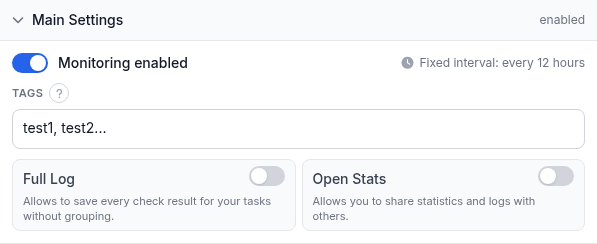
This is the whole settings surface for a Web Risk monitor - there is no request configuration and no response-validation rule to write, because there is genuinely nothing to configure beyond the URL itself:
- Url / Domain / IP - the address to check against Google's Web Risk lists.
- Name (optional) - a short label for this monitor in alerts, reports, and your dashboard. Leave it blank and HostTracker falls back to the URL.
- Monitoring enabled - pauses or resumes the check without deleting it.
- Fixed interval: every 12 hours - there is no interval control for this check type. This check does not connect to your site the way an uptime check does; it asks Google's Web Risk service for your URL's current reputation. There is no local resource to poll faster, and the interval you would actually want is however often Google's own lists change, not a number HostTracker could offer a slider for - so it is fixed rather than pretending to be tunable.
- Tags - free-text labels for filtering and grouping this monitor on your dashboard.
- Full Log - saves every individual check result instead of grouping consecutive identical ones.
- Open Stats - generates a public, shareable stats page for this monitor.
There is also no Monitoring Locations section for this check type: a reputation lookup is not something that differs by vantage point the way a network connection does, so there is nothing for a location picker to control.
Worth keeping straight: a Web Risk "Down" is not the same thing as your site being unreachable. Your server can answer every request correctly and the check can still report Down, because the verdict is entirely about whether Google's lists currently flag the URL, not about whether the URL loads. That is exactly why it is worth running alongside an uptime check on the same domain rather than instead of one - an HTTP or Ping monitor tells you the site is up, and this one tells you whether it is safe to send visitors to, which are genuinely independent questions. A compromised site is frequently still fully "up" by every uptime measure while quietly serving malware to a fraction of its visitors.
Alert Subscriptions
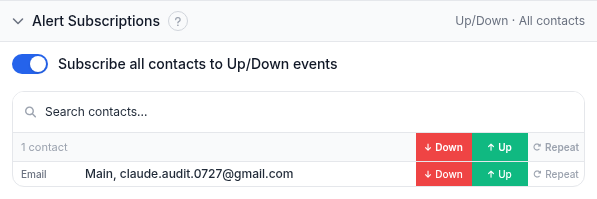
The same subscriptions panel every check type uses. Toggle Subscribe all contacts to Up/Down events to put every contact on both events at once, or use the search box and the per-contact Down / Up / Repeat switches to build a specific list. A Web Risk flag is exactly the kind of event where Repeat earns its keep - the underlying malicious content usually takes real investigation to find and remove, and it is easy to lose track of an alert that fired once and went quiet while the site is still flagged.
Report Subscriptions
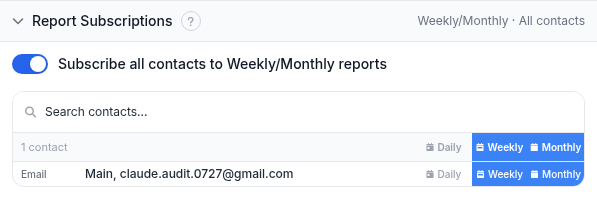
Periodic email summaries rather than event-driven alerts. Reports go to email contacts only.
Worked example
You run a WordPress site at example.com with a handful of plugins you do not personally audit,
and a compromised plugin is a realistic way for someone to inject malware or a phishing redirect without your
noticing in the admin panel. Create a Web Risk monitor for example.com, subscribe your own email
and a shared team channel to Down and Repeat, and leave everything else at its defaults - there is nothing
else to set. If the site is ever flagged, act on the alert immediately: the longer the flag stands, the longer
Chrome keeps showing visitors the warning page and the longer Google keeps the pages demoted in search.
Troubleshooting
- The monitor reports Down. This means Google's Web Risk lists currently flag your URL. Look for the actual malicious content first - an injected script, a compromised plugin, a hacked upload directory - rather than assuming it will clear on its own. Once you have removed it, the standard path back is to request a review through Google Search Console; the flag typically does not clear until that review confirms the site is clean.
- You cleaned the site but the monitor still shows Down. The flag can remain visible for a period even after the underlying issue is fixed, until Google's own review process confirms it. This check reflects Google's current published verdict, not your own assessment of whether the fix worked.
- You expected a faster or slower check interval. There is no interval control for this type - it runs on a fixed 12-hour cadence because the useful checking frequency is set by how often Google's lists update, not by anything tunable on HostTracker's side.
- You want to know why a specific page was flagged. This check reports the flag itself but is not a content scanner - Google Search Console's Security Issues report is the source for the specific reason and affected pages.
Related
- Web Risk monitoring - the product page for this check type, with more detail on what a flag costs and how detection speed limits the damage.
- Free Web Risk check tool - a one-off lookup with no account needed.
- DNSBL check guide and certificate expiration guide - two other "set it and forget it" check types worth pairing with an uptime monitor on the same site.
- HTTP check guide - Web Risk is also available as an attached tile on an Http, Port, or API monitor, riding along with that check instead of running as its own separate monitor.